SSL Connection to AWS IoT from ESP8266(Micropython)
-
Re: Q: ussl usage for https - problem
Hello @daniel,
I have checked following project regarding to make SSL connection to AWS_IOT https://github.com/juwul/umqtt_aws_iot
Unfortunately, I am also receiving following error ::
|Error in mqtt connect: [Exception] TypeError: extra keyword arguments given.|Problem is caused by ussl.wrap_socket(...) function in ussl;
    addr = socket.getaddrinfo(self.server, self.port)[0][-1]
    self.sock.connect(addr)

    if self.ssl:
        import ussl
        self.sock = ussl.wrap_socket(self.sock, **self.ssl_params)

    /*i have also moved lines here and tried but it did not help*/
    //addr = socket.getaddrinfo(self.server, self.port)[0][-1]
    //self.sock.connect(addr)
My settings in main.py as follows.
MQTT_CLIENT_ID = "23876283476233"
MQTT_HOST = "yourSpecificEndPointHere.iot.eu-west-1.amazonaws.com"
MQTT_PORT = 8883

client = MQTTClient(client_id=MQTT_CLIENT_ID, server=MQTT_HOST, port=MQTT_PORT, keepalive=10000, ssl=True, ssl_params={"certfile":"/flash/cert/deviceCertAndCACert.pem", "keyfile":"/flash/cert/deviceCert.key", "ca_certs":"/flash/cert/root.pem"})
(With these 2 certs and key, i am successfully connecting to AWS IoT from MQTT.fx)
if it is possible to make secure SSL connection to AWS IoT from micropython on ESP8266, I will be glad if you can let me know your guidance regarding to this issue.
-
Could you show us the contents of
self.ssl_paramsby addingprint(self.ssl_params)on the line before the call towrap_socket. That error message implies that there are extra fields that don't match the function as documented here:
https://docs.pycom.io/chapter/firmwareapi/micropython/ussl.html -
@sunrise17
why are you talking aboutESP8266notESP32? -
Hi @seb, i have added print(self.ssl_params) and you can see following debug; I did not stop running program in that point, it continued and go on giving same error.
{'keyfile': '/flash/cert/deviceCert.key', 'certfile': '/flash/cert/deviceCertAndCACert.pem', 'ca_certs': '/flash/cert/root.pem'}
Error in mqtt connect: [Exception] TypeError: extra keyword arguments given
-
Dear @livius, i have some switches based on ESP8266 in my hand, that's why i wanted to apply on them. As i see that some guys could handle it, that's why i wanted to try. If MicroPython (ESP8266) library consists ussl, it should work without an issue.
Only this warning made me anxious in according to Ussl module.
https://docs.micropython.org/en/latest/esp8266/library/ussl.html
"Some implementations of ussl module do NOT validate server certificates, which makes an SSL connection established prone to man-in-the-middle attacks." -
@livius Today, i have received ESP32 but still i am getting same error as "Error in mqtt connect: [Exception] TypeError: extra keyword arguments given". print(self.ssl_params) in mqtt.py is printing as i expected. I have not understood the issue??
Code in main.py;
KEY_PATH = "/flash/cert/deviceCert.key"
CERT_PATH = "/flash/cert/deviceCertAndCACert.pem"
CACERT_PATH = "/flash/cert/root.pem"
MQTT_HOST = "yourSpecificEndPointHere.iot.eu-west-1.amazonaws.com"
MQTT_CLIENT_ID = "23876283476233"

client = MQTTClient(client_id=MQTT_CLIENT_ID, server=MQTT_HOST, port=MQTT_PORT, keepalive=10000, ssl=True, ssl_params={"keyfile":KEY_PATH, "certfile":CERT_PATH, "ca_certs":CACERT_PATH})
Code in mqtt.py;
def connect(self, clean_session=True): self.sock = socket.socket() addr = socket.getaddrinfo(self.server, self.port)[0][-1] self.sock.connect(addr) # print(self.ssl_params) // it prints: {'keyfile': '/flash/cert/deviceCert.key', 'certfile': '/flash/cert/deviceCertAndCACert.pem', 'ca_certs': '/flash/cert/root.pem'} if self.ssl: import ussl self.sock = ussl.wrap_socket(self.sock, **self.ssl_params) premsg = bytearray(b"\x10\0\0\0\0\0") msg = bytearray(b"\x04MQTT\x04\x02\0\0") ... -
@sunrise17
I do not suppose that this is releated because you get error onwrap_socket
but from where do you getMQTTClient.py?
I ask because it is now in frozen modules - try removing MQT releated files from flash and try again -
@livius Thanks for your quick response, you can find complete code of mqtt.py where i get the MQTTClient.py.0_1518175187007_mqtt.py
-
@sunrise17
It looks really different
try to remove all MQT files from card and use internal one.internal files are already on your device as frozen modules.
-
Dear @livius i have downloaded simple.py from following link below and added file into my board.
https://github.com/micropython/micropython-lib/tree/master/umqtt.simple/umqtt
I have imported library as follows;from simple import MQTTClientError as follows;
(2378) wifi: connected with ASUS_5G_2.4G_EXT, channel 4
(2378) network: event 4
(3268) event: sta ip: 192.168.1.169, mask: 255.255.255.0, gw: 192.168.1.1
(3268) network: GOT_IP
(5098) wifi: pm start, type:0

Error in mqtt connect: [Exception] TypeError: extra keyword arguments given
Mqtt Broker connected
Error in mqtt connect: [Exception] TypeError: extra keyword arguments given
Mqtt Broker connected
Error in mqtt connect: [Exception] TypeError: extra keyword arguments given
Mqtt Broker connected
Error in mqtt connect: [Exception] TypeError: extra keyword arguments given
Mqtt Broker connected
Error in mqtt connect: [Exception] TypeError: extra keyword arguments given
Mqtt Broker connected
Error in mqtt connect: [Exception] TypeError: extra keyword arguments given
Mqtt Broker connected
Error in mqtt connect: [Exception] TypeError: extra keyword arguments given
Mqtt Broker connected
Error in mqtt connect: [Exception] TypeError: extra keyword arguments given
Mqtt Broker connected
Error in mqtt connect: [Exception] OSError: 23
Mqtt Broker connected
Error in mqtt connect: [Exception] OSError: 23
Mqtt Broker connected
Do you have any idea about this error, why it could be happened?
-
@sunrise17
I do not know and becouse of that try first internal one.
Remove all mqt files from your flash and do simplefrom MQTTClient import MQTTClientand use it then
-
@livius Yes i have tried it also but after i got this error i have left it. "ImportError: no module named 'MQTTClient''. Because mqtt lib is not coming with Esp32 Firmware in default.
-
@sunrise17 said in SSL Connection to AWS IoT from ESP8266(Micropython):
Esp32
it come with pycom firmware
what firmware version do you have?import os os.uname() -
OS Info as follows;
(sysname='esp32', nodename='esp32', release='1.9.3', version='v1.9.3-286-gbbb08431 on 2018-02-09', machine='ESP32 module with ESP32') -
@sunrise17
You must update the firmware first.
https://pycom.io/downloads/You have
1.9but current is1.15and frozen mqt go with1.10 -
@livius, i am using oem esp32, is it possible to update it with pycom firmware update?
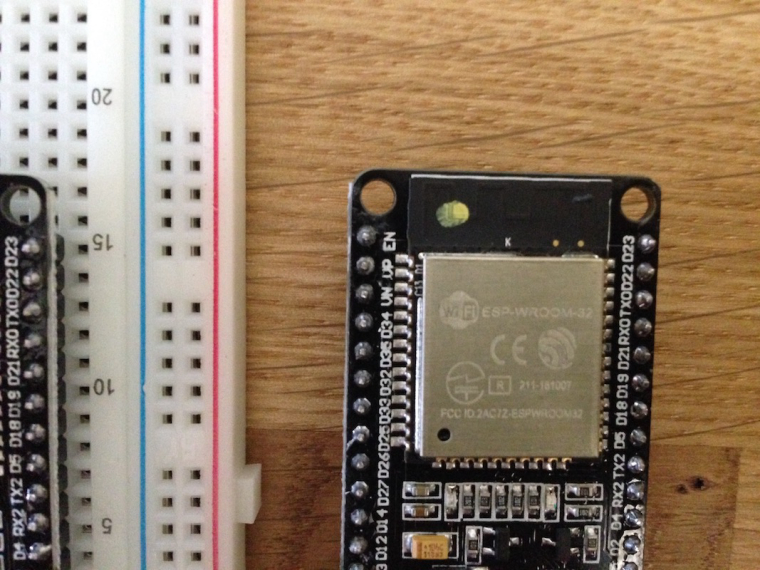 ,
,I have tried but it has not been updated
-
sysname='esp32', nodename='esp32',
then you are on the wrong forum, for this device better go to micropython forum
is it possible to update it with pycom firmware
it is possible to flash it with custom pycom firmware
i say custom because you must modify firmware first, especially about chip revision. -
Dear @livius , is there some guide to upload custom pycom firmware to ESP-WRoom-32 board? Because you have mentioned that it is necessary to adjust chip revision. I will be glad if you let me know about some guide to flash my board with pycom firmware. Thanks...
-
@sunrise17
you must modifyesp_get_revision- i do not have guide but on the forum you can find such posted by
@robert-hh
https://forum.pycom.io/post/13828

Hello! It looks like you're interested in this conversation, but you don't have an account yet.
Getting fed up of having to scroll through the same posts each visit? When you register for an account, you'll always come back to exactly where you were before, and choose to be notified of new replies (either via email, or push notification). You'll also be able to save bookmarks and upvote posts to show your appreciation to other community members.
With your input, this post could be even better 💗
Register Login