Welcome to the Pycom forum Forum
    • \[\[global:header.categories\]\]
    • \[\[global:header.recent\]\]
    • \[\[global:header.tags\]\]
    • \[\[global:header.popular\]\]
    • Login

    Explore Pybytes | Official Documentation | Report a Firmware Bug/Issue | GitHub

    Building my own firmware?

    Scheduled Pinned Locked Moved Firmware
    fipylopy
    20 Posts 8 Posters 5.4k Views 10 Watching
    Loading More Posts
    • Oldest to Newest
    • Newest to Oldest
    • Most Votes
    Reply
    • Reply as topic
    Log in to reply
    This topic has been deleted. Only users with topic management privileges can see it.
    • J Offline
      jmarcelino @misterlisty
      last edited by

      @misterlisty
      Yes, that’s right

      1 Reply Last reply Reply Quote 0
      • M Offline
        misterlisty
        last edited by

        Looking at the readme for the code...what do i use to build firmware for the fopy? Its just mentions wipy,lopy,sipy

        robert-hhR 1 Reply Last reply Reply Quote 0
        • robert-hhR Offline
          robert-hh @misterlisty
          last edited by robert-hh

          @misterlisty The procedure is the same for all boards. In the make command, you mention

          make BOARD=xxxx .....

          with xxx being WIPY, LOPY, GPY, SIPY, LOPY4 or FIPY or whatever the next board is being called. For the OEM modules, use the name of the matching development board.

          For the Lora frequency, tell either:

          LORA_BAND=USE_BAND_868
          or
          LORA_BAND=USE_BAND_915

          1 Reply Last reply Reply Quote 0
          • M Offline
            misterlisty
            last edited by

            When i try

            $ cd esp32
            $ make clean
            $ make TARGET=boot
            $ make TARGET=app
            $ make flash

            i get bash: python: commandnot found ...any idea..running on windows

            1 Reply Last reply Reply Quote 0
            • sebS Offline
              seb
              last edited by

              You will need to install python from: https://www.python.org/

              M 1 Reply Last reply Reply Quote 0
              • M Offline
                misterlisty @seb
                last edited by

                @seb Already have python, do i have to do something with the path?

                L 1 Reply Last reply Reply Quote 0
                • L Offline
                  livius @misterlisty
                  last edited by

                  @misterlisty
                  edit msys2_shell.cmd
                  and uncomment line (remove rem)

                  rem set MSYS2_PATH_TYPE=inherit
                  

                  think about people first, then computers

                  M 1 Reply Last reply Reply Quote 0
                  • M Offline
                    misterlisty @livius
                    last edited by

                    @livius still no luck..what should the path be anyway? When installing python should the path have been addded?

                    robert-hhR L 3 Replies Last reply Reply Quote 0
                    • robert-hhR Offline
                      robert-hh @misterlisty
                      last edited by

                      @misterlisty In windows you have to add the path to python to the PATH environment variable, which is normally done by the installation process. So if you open a cmd window and type the command "python"(enter), python should start. If not, PATH is not set. You can do that in System Control->system>enhanced setting>environment variables.
                      I'm guessing the names because I have no english system here.

                      1 Reply Last reply Reply Quote 0
                      • L Offline
                        livius @misterlisty
                        last edited by livius

                        @misterlisty
                        what if you right click and "Run as administrator"?

                        think about people first, then computers

                        1 Reply Last reply Reply Quote 0
                        • robert-hhR Offline
                          robert-hh @misterlisty
                          last edited by

                          @misterlisty Besides everything else, the best method of creating your own firmware on a windows machine is to install Linux in a virtual machine and do it there. Then the only problem left is getting the compiled firmware onto your board, because the USB support of virtual machines is poor. That can be done with ftp too.
                          If you have an older computer at hand, install linux there. Unless it's older than 10 years, it should still be fast enough for the task.

                          M 1 Reply Last reply Reply Quote 0
                          • M Offline
                            misterlisty @robert-hh
                            last edited by

                            @robert-hh Just curios, why is running this on linux advantageous?

                            robert-hhR 1 Reply Last reply Reply Quote 0
                            • robert-hhR Offline
                              robert-hh @misterlisty
                              last edited by

                              @misterlisty because it matches the development environment for both micropython and esp-idf. All teh toosl used are generic Linux/Unix tools.

                              1 Reply Last reply Reply Quote 0
                              • G Offline
                                gnm
                                last edited by

                                Hi guys.
                                I am trying to build the firmware for mi FIPY but I am having trouble when executing
                                make BOARD=FIPY TARGET=app

                                I have followed the steps indicated in this thread, more precisely:

                                @jmarcelino said in Building my own firmware?:

                                @misterlisty

                                You don't need any IDE. Just setup your compiler and pycom-esp-idf first using the instructions provided in its README: https://github.com/pycom/pycom-esp-idf

                                Once that's done clone the main repository: https://github.com/pycom/pycom-micropython-sigfox

                                and follow build the instructions from esp32/README.md there

                                However the compilation throws the following error (for brevity, I show only the first part when the error messages begin):
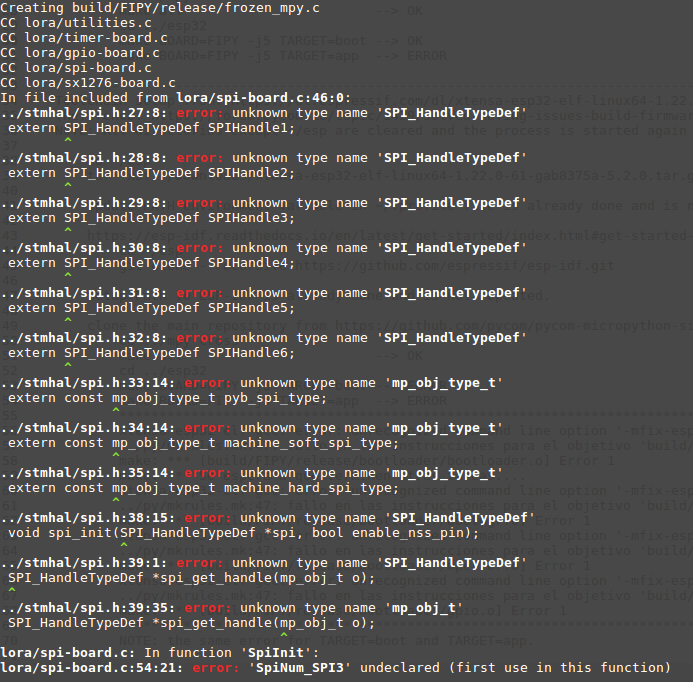
                                0_1521483504619_make_BOARD=FIPY_TARGET=app_ERROR.png

                                For the compilation of mpy-cross and for TARGET=boot I have no problem. I have the problem with TARGET=app.

                                I am using the Toolchain from: https://dl.espressif.com/dl/xtensa-esp32-elf-linux64-1.22.0-80-g6c4433a-5.2.0.tar.gz

                                I have also tryed with the toolchain sugested here by @jmarcelino 9 months ago, which is https://dl.espressif.com/dl/xtensa-esp32-elf-linux64-1.22.0-61-gab8375a-5.2.0.tar.gz, but in that case the compilation fails even for TARGET=boot with the following error (I obtain the same error with TARGET=app):
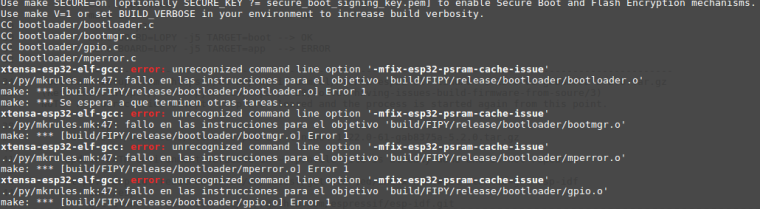
                                0_1521483897027_make_BOARD=FIPY_TARGET=boot_ERROR.png

                                Can you please help me to build and flash my own firmware? I need to then make some changes/corrections to the official firmware...but I can't even build the official one in https://github.com/pycom/pycom-micropython-sigfox

                                X J 2 Replies Last reply Reply Quote 0
                                • X Offline
                                  Xykon administrators @gnm
                                  last edited by

                                  @gnm I suggest you check out this page as well: https://esp-idf.readthedocs.io/en/latest/get-started/linux-setup.html

                                  Christian Ehlers

                                  1 Reply Last reply Reply Quote 0
                                  • J Offline
                                    jcaron @gnm
                                    last edited by

                                    @gnm Have you correctly updated the ESP-IDF as well, and cleaned previous output?

                                    1 Reply Last reply Reply Quote 0
                                    • G Offline
                                      gnm
                                      last edited by

                                      Yes @jcaron , I cleaned up everything and made the process all over again a couple of times. Same result every time.
                                      I haven't checked out the suggestion of @Xykon yet.
                                      For the moment I have given up with pycom (my final objective is to implement a nanogateway able to operate with downlink messages), and I am using a multitech gateway and microchip nodes for my project because I need to move on, and the process with pycom as gateway is way too complicated and time consuming. However, I will return to this subject as soon as possible.


                                      1 Reply Last reply Reply Quote 0

                                      Hello! It looks like you're interested in this conversation, but you don't have an account yet.

                                      Getting fed up of having to scroll through the same posts each visit? When you register for an account, you'll always come back to exactly where you were before, and choose to be notified of new replies (either via email, or push notification). You'll also be able to save bookmarks and upvote posts to show your appreciation to other community members.

                                      With your input, this post could be even better 💗

                                      Register Login
                                      • 1 / 1
                                      • First post
                                        Last post

                                      Pycom on Twitter

                                      Pycom