LoPy and custom PCB with L76-L GPS module
-
We're trying to implement custom PCB with the same module as used in PyTrack - Quectel L76-L.
This question might be a bit off topic but is it necessary to use level shifter to talk to this GPS module through I2C bus ?
We perform i2c.scan() and getting no response from connected and powered module while UART interface works perfectly.Are LoPy I2C bus levels compatible with L76-L ?
-
Is the device a 5v or 3.3v device? If it is 5v you will need to use a level shifter. Do you have pull up resistors for the SDA and SCL lines?
-
This post is deleted! -
@seb We use LoPy4 so "device" is 3.3V I believe. Quectel says:
...- I2C_SDA/I2C_SCL is pulled up to 2.8V inside L76-L module. There is no need to add a pull-up resistor externally.
- The voltage threshold of I2C is 2.8V. If the system voltage is not consistent with it, a level shifter circuit must be used.
Quectel I2C voltage characteristics:
VILmin=-0.3V
VILmax=0.7V
VIHmin=2.1V
VIHmax= 3.1V
VOLmax=0.42V
VOHmin=2.4V
VOHnom=2.8V -
Out modules output 3.3v which is above the maximum 3.1V specified there, to be safe I would include level shifters. Simple bi-directional level shifters can be made like so:
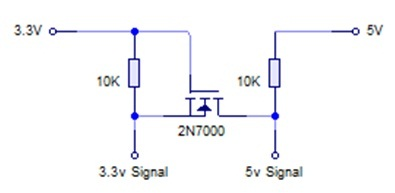 http://husstechlabs.com/wp-content/uploads/2010/09/Level-shifter.jpg
 -
@seb OK, will try to use level shifter. Do Pycom use level shifter on its PyTrack module ?
-
I just checked the Pytrack schematic and we use the i2c interface to the module and actually don't have level shifters, that must mean it works ok.
-
@seb We connected our Quectel L76-L pins:
L76-L .................. LoPy
GND------------------------ GND
VccInput ----------------- 3.3V VccOut
SDA ------------------------ P9
SCL ------------------------ P10Then we initiated:
i2c = I2C(0, I2C.MASTER)
i2c.init(I2C.MASTER)
i2c.scan()On our L76-L i2c.scan() produces empty array and multiple execution produces sometimes random adresses.
When we connected PyTrack PCB using only those 4 pins the L76-L from PyTrack gives proper response to i2c.scan()
What I did wrong ;-( ?
-
@bobie It still looks like wrong signals. If you can do so, hook up an oscilloscope and check the signal quality.
-
Do you have pullup resistors on the SDA and SCL lines? You will need to connect a 10k resistor between those lines and 3.3V. It's also worth noting that on the Pytrack the I2C is sda='P22', scl='P21'.
-
@seb No luck with pull up resistors. There is also garbage when connected on P22/P21.
PyTrack connected to the same pins with the same settings goes smooth.
While connecting our L76-L there is no response on I2C ;-( only garbage response for i2c.scan().Maybe you reconfigure L76-L chip through UART after mounting ?
Will try to connect oscilloscope and/or logic analyzer


Hello! It looks like you're interested in this conversation, but you don't have an account yet.
Getting fed up of having to scroll through the same posts each visit? When you register for an account, you'll always come back to exactly where you were before, and choose to be notified of new replies (either via email, or push notification). You'll also be able to save bookmarks and upvote posts to show your appreciation to other community members.
With your input, this post could be even better 💗
Register Login