Welcome to the Pycom forum Forum
    • \[\[global:header.categories\]\]
    • \[\[global:header.recent\]\]
    • \[\[global:header.tags\]\]
    • \[\[global:header.popular\]\]
    • Login

    Explore Pybytes | Official Documentation | Report a Firmware Bug/Issue | GitHub

    GPy LTE-M Connection

    Scheduled Pinned Locked Moved GPy
    gpylte-msend datainternet connec
    15 Posts 2 Posters 3.4k Views 2 Watching
    Loading More Posts
    • Oldest to Newest
    • Newest to Oldest
    • Most Votes
    Reply
    • Reply as topic
    Log in to reply
    This topic has been deleted. Only users with topic management privileges can see it.
    • L Offline
      livius @francesco.gallo
      last edited by

      @francesco-gallo
      You ask about LTE-M or generic problem with send to io.adafruit.com?
      I suppose that about sending at all. Because there is not difference between wifi and LTE socket use

      think about people first, then computers

      F 1 Reply Last reply Reply Quote 0
      • F Offline
        francesco.gallo @livius
        last edited by

        @livius Hi @livius , thank you for your interest.
        My idea is to use the LTE-M module with my SIM to send data (e.g. Temperature Value) to a service like io.adafruit.com.
        I don't want to use Wi-fi...How can modify the example from this link? https://docs.pycom.io/chapter/firmwareapi/pycom/network/lte/cat-m1.html

        BR

        L 1 Reply Last reply Reply Quote 0
        • L Offline
          livius @francesco.gallo
          last edited by livius

          @francesco-gallo said in GPy LTE-M Connection:

          How can modify the example from this link?

          Back to my first question. You do not know how to send something to io.adafruit.com
          not how to send something throught LTE-M1?
          Because sample you provided is exacly for LTE-CAT M1 (and there is no diiference between wifi and socket usage)

          use api provided
          https://io.adafruit.com/api/docs/#operation/lastData

          and send http request by e.g. urequest
          https://github.com/micropython/micropython-lib/blob/master/urequests/urequests.py

          think about people first, then computers

          F 2 Replies Last reply Reply Quote 0
          • F Offline
            francesco.gallo @livius
            last edited by

            @livius Thanks a lot

            1 Reply Last reply Reply Quote 0
            • F Offline
              francesco.gallo @livius
              last edited by

              @livius Hi,
              sorry, but I have the error message as in figure...
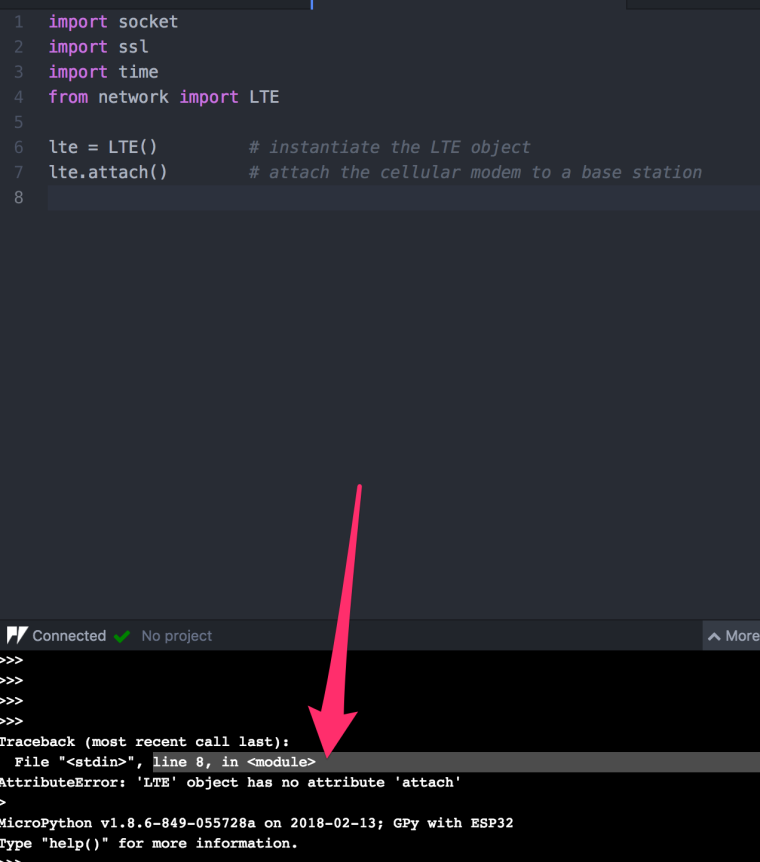
              0_1520015756626_img.png

              F 1 Reply Last reply Reply Quote 0
              • F Offline
                francesco.gallo @francesco.gallo
                last edited by

                @francesco-gallo And please, I am a newbie :(.. And I would like learn as send data (e.g. Temperature) using LTE...

                Is there an example code?

                BR

                L 1 Reply Last reply Reply Quote 0
                • L Offline
                  livius @francesco.gallo
                  last edited by livius

                  @francesco-gallo
                  What is your firmware version?

                  import os
                  os.uname()
                  

                  you should have 1.17.0.b1

                  think about people first, then computers

                  F 2 Replies Last reply Reply Quote 0
                  • F Offline
                    francesco.gallo @livius
                    last edited by

                    @livius 0_1520017800043_img1.png

                    Ops...no...

                    L 1 Reply Last reply Reply Quote 0
                    • L Offline
                      livius @francesco.gallo
                      last edited by

                      @francesco-gallo
                      update device because docs fallow firmware and in 1.17 there was big change in LTE
                      https://forum.pycom.io/topic/2734/new-firmware-release-v1-17-0-b1-completely-new-lte-class

                      think about people first, then computers

                      1 Reply Last reply Reply Quote 0
                      • F Offline
                        francesco.gallo @livius
                        last edited by

                        @livius And please, I am a newbie :(.. And I would like learn as send data (e.g. Temperature) using LTE...

                        Is there an example code?

                        L 1 Reply Last reply Reply Quote 0
                        • L Offline
                          livius @francesco.gallo
                          last edited by livius

                          @francesco-gallo said in GPy LTE-M Connection:

                          Is there an example code?

                          example of what? Updating firmware?
                          after this step we can go next :)

                          think about people first, then computers

                          F 1 Reply Last reply Reply Quote 0
                          • F Offline
                            francesco.gallo @livius
                            last edited by

                            @livius Thanks...
                            The update is done...and now is ok..

                            My question is about an example code regards the use of LTE to send temperature value to online service, or send the temperature value to smartphone...

                            BR

                            L 1 Reply Last reply Reply Quote 0
                            • L Offline
                              livius @francesco.gallo
                              last edited by

                              @francesco-gallo
                              First question is - do you have succesfully connected to LTE CAT M1?
                              If yes, which provider do you use and in which location (country)

                              For sensors you can use any code sample existed for e.g. wifi
                              only difference is start point (connection to the network)
                              next steps are the same create socket and send data
                              you can use e.g. urequest
                              https://github.com/micropython/micropython-lib/blob/master/urequests/urequests.py

                              e.g.

                              import urequests
                              res = urequests.post('your_service_url', json={'MyTemerarureSensorName': str(temp)})
                              res.close()
                              if (res.status_code - 200) < 100:
                                  print("post ok:" + str(temp) + " C")
                              else:
                                  print('some error')
                              

                              think about people first, then computers

                              F 1 Reply Last reply Reply Quote 0
                              • F Offline
                                francesco.gallo @livius
                                last edited by

                                @livius Regards first question: i used the code here: https://docs.pycom.io/chapter/firmwareapi/pycom/network/lte/cat-m1.html...

                                But I did not have any results...The country is Italy and I have the tim sim..

                                BR

                                1 Reply Last reply Reply Quote 0

                                Hello! It looks like you're interested in this conversation, but you don't have an account yet.

                                Getting fed up of having to scroll through the same posts each visit? When you register for an account, you'll always come back to exactly where you were before, and choose to be notified of new replies (either via email, or push notification). You'll also be able to save bookmarks and upvote posts to show your appreciation to other community members.

                                With your input, this post could be even better 💗

                                Register Login
                                • 1 / 1
                                • First post
                                  Last post

                                Pycom on Twitter

                                Pycom