Welcome to the Pycom forum Forum
    • \[\[global:header.categories\]\]
    • \[\[global:header.recent\]\]
    • \[\[global:header.tags\]\]
    • \[\[global:header.popular\]\]
    • Login

    Explore Pybytes | Official Documentation | Report a Firmware Bug/Issue | GitHub

    Simple MQTT Tutorial

    Scheduled Pinned Locked Moved WiPy 2&3
    34 Posts 13 Posters 30.0k Views 16 Watching
    Loading More Posts
    • Oldest to Newest
    • Newest to Oldest
    • Most Votes
    Reply
    • Reply as topic
    Log in to reply
    This topic has been deleted. Only users with topic management privileges can see it.
    • T Offline
      thibault
      last edited by thibault

      My try was successful with this on debian:
      https://pallavichaurasia94.wordpress.com/2014/10/14/mosquitto-in-debian/
      for install MQTT brockers.

      On the lopy i use this initialisation:

      from umqtt import MQTTClient
      def settimeout(duration): pass
      
      client = MQTTClient("joe", "192.168.4.2", port=1883)
      client.settimeout = settimeout
      client.connect()
      

      that give me the possibility to publish fine on my brockers with the command:

      client.publish("hello/world", "My publication")
      

      I have make some try to basic read brocker's data from lopy, We need to define a function who have been called if message are find:

      import pycom
      def t3_publication(topic, msg):
          print (topic, ':', msg)
          pycom.rgbled(0xff00)


      and assign it:

      client.set_callback(t3_publication)
      

      now we can subscribe to the desired channel:

      client.subscribe("hello/world", qos=1)
      

      I put data to the MQTT brockers from another terminal (localhost from brocker's server) mosquitto_pub -d -t hello/world -m "Hello, MQTT. This is my first message.", and i launch the check of the brocker's message from lopy by:

      client.check_msg()
      

      That's print message in channel, and set led to green (who's been reset by the heartbeat).

      I hope that will help you.

      1 Reply Last reply Reply Quote 0
      • M Offline
        MrPy
        last edited by

        Hmmm, do you have your Mosquito broker details to hand to i can test?

        I usually have a node-red instance running that connects to my broker so i can quickly test if the broker is up or down. A few of these public test brokers are not that stable so 9/10 it's the broker being down that causes my issues.

        1 Reply Last reply Reply Quote 0
        • T Offline
          thibault
          last edited by

          Sorry i don't speak very well english, so i hav'nt really understand what you says exactly. But i mean you want data about the different version
          I have use the pycom_update_0.9.3.b2 on the lopy. And for the mosquitto the version is 1.3.4-2. I'm begin in the IoT world, and maybe i have too few knowledge in it for understand you. If i have not answer that you wait, feel good about explain another way.

          M 1 Reply Last reply Reply Quote 0
          • M Offline
            MrPy @thibault
            last edited by

            @thibault My apologies, I was replying to vruizil below.

            1 Reply Last reply Reply Quote 0
            • V Offline
              vruizvil
              last edited by sakis

              Well, thanks a lot for the comments.
              After uppgrade recent firmware, the code works fine connecting mosquitto broker.
              But, I can't connect two differents sockets with two differentes brokers at same time.
              It needs run .disconnect() function to be abel to use the other one broker.
              I don't know the reason....., well, I'am not a python expert.

              # Initialize MQTT Client
              def settimeout(duration): pass
              
              
              def t3_publication(topic, msg):
              	print (topic, ';', msg)
              	pycom.rgbled(0xff00)
              
              
              UNIQUE_ID = machine.unique_id()
              MQTT_BROKER = "192.168.2.220"
              MQTT_PORT = 1883
              mqtt_client = MQTTClient(UNIQUE_ID, MQTT_BROKER, port=MQTT_PORT)
              mqtt_client.settimeout = settimeout
              mqtt_client.set_callback(t3_publication)
              mqtt_client.connect()
              
              MQTT_BROKER_2 = "test.mosquitto.org"
              #MQTT_PORT = 1883
              mqtt_client2 = MQTTClient(UNIQUE_ID, MQTT_BROKER_2, port=MQTT_PORT)
              mqtt_client2.settimeout = settimeout
              mqtt_client2.set_callback(t3_publication)
              mqtt_client2.connect()
              
              1 Reply Last reply Reply Quote 0
              • M Offline
                MainSheet
                last edited by

                Dummy question,

                I have the code on my LoPy working :

                from simple import MQTTClient
                import  time
                def settimeout(duration): pass
                client = MQTTClient("MainSheet", "broker.hivemq.com", port=8000)
                client.settimeout = settimeout
                client.connect()
                while True:
                    print("Sending ON")
                    client.publish("/lights", "ON")
                    time.sleep(1)
                    print("Sending OFF")
                    client.publish("/lights", "OFF")
                    time.sleep(1)
                

                output is this

                connected with goofy, channel 1
                Sending ON
                Sending OFF
                Sending ON
                Sending OFF
                Sending ON
                Sending OFF
                Sending ON
                Sending OFF
                Sending ON
                Sending OFF
                

                Connecting to http://www.hivemq.com/demos/websocket-client/? with Chrome
                Host = broker.hivemq.com
                ClientID = MainSheet
                Port = 8000. ( I tried setting the port to 1883 but then I can't connect to hivemq. I also tried to set the code above to connect to port 8000, however, got an out of range error)
                subscribed to /lights

                however, the messages never get through to HiveMQ

                Steve

                V G 2 Replies Last reply Reply Quote 0
                • V Offline
                  vruizvil @MainSheet
                  last edited by

                  @MainSheet said in Simple MQTT Tutorial:

                  broker.hivemq.com

                  Try client.disconnect(), then client.connect(). Try on firefox, it works fine in my tests, and try another topic (without slash), ie.: "mylopytopic"

                  V 1 Reply Last reply Reply Quote 0
                  • V Offline
                    vruizvil @vruizvil
                    last edited by

                    @vruizvil
                    For Windows, I use MQTTFX Client. Here the link
                    http://www.jensd.de/apps/mqttfx/

                    1 Reply Last reply Reply Quote 0
                    • G Offline
                      gertjanvanhethof Pybytes Beta @MainSheet
                      last edited by

                      @MainSheet I'am not able to connect.
                      What do I wrong?

                      In my main.py I setup the wifi connection successfully.
                      I checked that by doing an http get call and I was able to get HTML data from a website. So internet connection is working.

                      I went to: http://www.hivemq.com/demos/websocket-client/

                      And created a connection with the following details:

                      Host: broker.hivemq.com
                      Port: 8000
                      ClientID: MyLoPy

                      I created a subscription and tested some messages. All works.

                      Then I typed the following commands on my LoPy:

                      MicroPython v1.8.6-40-gd10463e on 2016-11-25; LoPy with ESP32
                      Type "help()" for more information.

                      from umqtt import MQTTClient
                      def settimeout(duration): pass
                      ...
                      client = MQTTClient("MyLoPy", "broker.hivemq.com", port=8000)
                      client.settimeout = settimeout
                      client.connect()
                      0xc b'10:12:00:04:4d:51:54:54:04:02:00:00'
                      Traceback (most recent call last):
                      File "<stdin>", line 1, in <module>
                      File "umqtt.py", line 86, in connect
                      IndexError: bytes index out of range

                      V 1 Reply Last reply Reply Quote 0
                      • V Offline
                        vruizvil @gertjanvanhethof
                        last edited by

                        @gertjanvanhethof Hi!, try with machine.reset(), then try your code one more time, you need only one client socket, when you try few times the code, I think the socket doesn't work fine. That is the way to solve the same problem in my tests, but I don't know the reason.

                        G 1 Reply Last reply Reply Quote 0
                        • G Offline
                          gertjanvanhethof Pybytes Beta @vruizvil
                          last edited by

                          @vruizvil

                          My code is as following:

                          import time
                          import machine
                          from umqtt import MQTTClient

                          def settimeout(duration): pass

                          def connect():
                          if machine.reset_cause() != machine.SOFT_RESET:
                          client = MQTTClient("MyLoPy", "broker.mqttdashboard.com", port=8000)
                          client.settimeout = settimeout
                          client.connect()
                          print('Connected MQTT Broker.')
                          return client

                          def send(client):
                          while True:
                          print("Sending ON")
                          client.publish("/lopy", "ON")
                          time.sleep(1)
                          print("Sending OFF")
                          client.publish("/lopy", "OFF")
                          time.sleep(1)

                          I do a connect() and the result is as following:

                          client.connect()
                          0xc b'10:12:00:04:4d:51:54:54:04:02:00:00'
                          Traceback (most recent call last):
                          File "<stdin>", line 1, in <module>
                          File "umqtt.py", line 86, in connect
                          IndexError: bytes index out of range

                          Still going wrong. What could be the solution?

                          G 1 Reply Last reply Reply Quote 0
                          • G Offline
                            gertjanvanhethof Pybytes Beta @MrPy
                            last edited by

                            @MrPy Are you sure those are you messages? I checked and somebody else was publishing these messages.

                            1 Reply Last reply Reply Quote 0
                            • G Offline
                              gertjanvanhethof Pybytes Beta @gertjanvanhethof
                              last edited by

                              I found the error. The port is wrong.
                              It should be: 1883.
                              Then connect is working.

                              1 Reply Last reply Reply Quote 0
                              • G Offline
                                gas @vruizvil
                                last edited by

                                @vruizvil Hi
                                I started a mosquitto on my laptop (vm debian) and it is working with the code as it is i updated it a little to make it configurable via config param file (wifi and mqtt)
                                what error you are getting ?

                                G 1 Reply Last reply Reply Quote 0
                                • G Offline
                                  gertjanvanhethof Pybytes Beta @gas
                                  last edited by

                                  @gas It's working now. The used port was wrong. Thxs for your help.

                                  1 Reply Last reply Reply Quote 0
                                  • R Offline
                                    RSK
                                    last edited by

                                    MQTTClient is missing in the latest firmware, using the image release on 02/Dec/2016.

                                    Could someone confirm this.
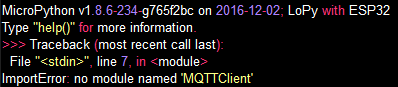
                                    0_1481092220727_upload-95d4b814-1a49-47db-b229-f9092eb4c7e0

                                    S 1 Reply Last reply Reply Quote 0
                                    • S Offline
                                      sakis @RSK
                                      last edited by

                                      @RSK umqtt is not part of Pycom's firmware or standard micropython. It is an external Python library, so to be able to use it you need to upload it to your device.

                                      The easiest way to do that is using Pymakr. Another way is using plain FTP (https://docs.pycom.io/pycom_esp32/pycom_esp32/general.html#local-file-system-and-ftp-access).

                                      Please read step 2 again and try to follow the instructions. If you have any problems let us know.

                                      1 Reply Last reply Reply Quote 0
                                      • R Offline
                                        RSK
                                        last edited by

                                        @sakis Thanks!

                                        I have downloaded umqtt.simple.py from https://github.com/micropython/micropython-lib and placed it in /flash/simple.py of the LoPy using FTP.

                                        And trying to connect from my LoPy application:
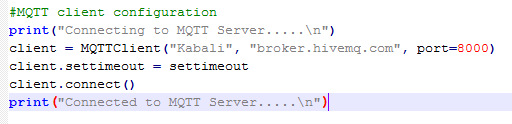
                                        0_1481109485470_upload-f0cd9d87-92ef-4d6a-8a64-b3240df41eb4

                                        With Hive settings:
                                        0_1481109531558_upload-397a9e59-4d48-495d-9538-b57cf969c284

                                        But connect fails with error "bytes index out of range":
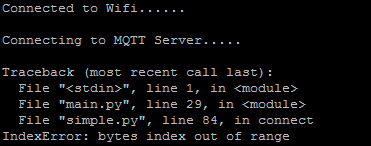
                                        0_1481109598988_upload-974ac761-263f-4c25-8604-d9a97e83b289

                                        Please help to resolve.

                                        Thanks & Regards,
                                        Satish Kumar. R.

                                        1 Reply Last reply Reply Quote 0
                                        • R Offline
                                          RSK
                                          last edited by

                                          Sorry the link i provided is incorrect, downloaded from the below link:
                                          https://pypi.python.org/pypi/micropython-umqtt.simple

                                          And the changes done to line number 57 "self.sock.settimeout(self.timeout)"

                                          Thanks & Regards,
                                          Satish Kumar. R.

                                          S 1 Reply Last reply Reply Quote 0
                                          • S Offline
                                            sakis @RSK
                                            last edited by

                                            @RSK Have you tried using port 1883 instead of 8000?

                                            1 Reply Last reply Reply Quote 0

                                            Hello! It looks like you're interested in this conversation, but you don't have an account yet.

                                            Getting fed up of having to scroll through the same posts each visit? When you register for an account, you'll always come back to exactly where you were before, and choose to be notified of new replies (either via email, or push notification). You'll also be able to save bookmarks and upvote posts to show your appreciation to other community members.

                                            With your input, this post could be even better 💗

                                            Register Login
                                            • 1
                                            • 2
                                            • 1 / 2
                                            • First post
                                              Last post

                                            Pycom on Twitter

                                            Pycom