FiPy current consumption analysis
-
I currently develop a battery based project on fipy with some sensors and these are my 2 cents on current draw. I presently use Lora but I plan on switching between ALL networks if I can.
-
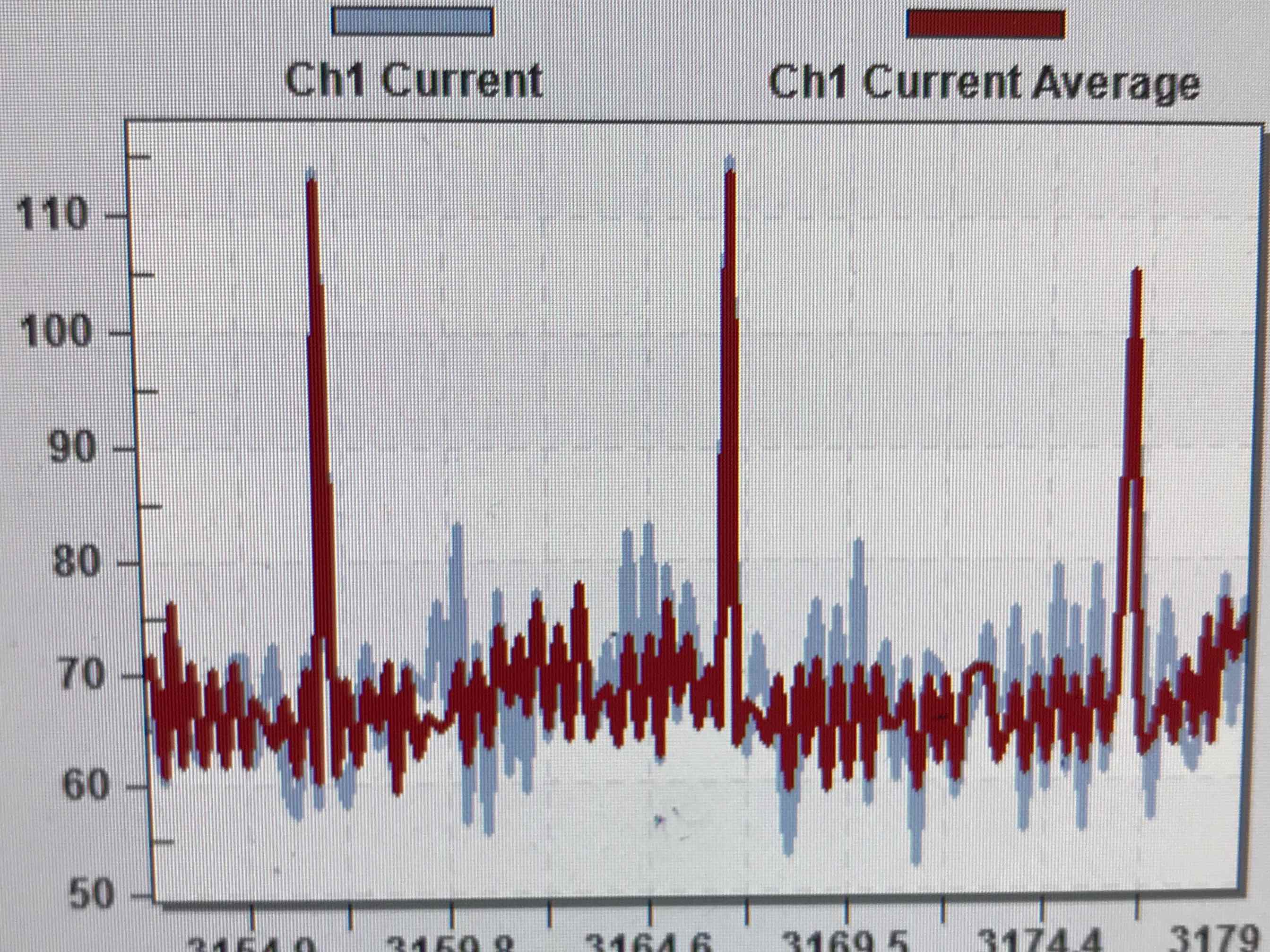
I tried with machine.deepsleep() without switching off anything, without SIM CARD. Sometimes the device would sleep with a 20uA current draw, but it would draw 200mA or 30mA current for 1-30 seconds after the supposed end of program before really sleeping . Sometimes it wouldn't sleep and the current dissipation would be either 30mA or 200mA steady. It was random as far as I could say
-
I tried with machine.deepsleep() with switching off with @MartinN 's code and I have same behaviour with him but current doesn't always decrease.
-
With SIM card installed and @MartinN 's code machine.deepsleep() works as expected. 20uA current draw always on sleep, LTE offs without delay
-
-
@nalexopo Have you looked at what happens right before deep sleep? In my case the device draws about 200 mA of current for 1-2 seconds and then goes into deep sleep. I've discussed it with Pycom here: https://forum.pycom.io/topic/3165/all-radios-on-by-default/2, which believes it might be the LTE modem getting ready for deep sleep (a potential bug), but it would be interesting to know if you experience the same behavior.
-
@thomand1000 I forgot to mention that in the first case the current draw remained at about 200mA for as long as half a minute or less before going down to 20uA. I edit that too on original post
-
@nalexopo I am also having problems getting the 20uA deepsleep current draw, would you be able to share any working code you had that achieved 20uA?
So far I have gotten it down to 30mA (also tested it with MartinNs code and got the same).
This is with a SIM card, I found that without a SIM I couldn't lte.deinit() at all.Cheers
-
-
-
@nalexopo Is there an easy way of checking if your SIM supports Cat-M1 or NB-IoT? I am following up with Telstra at the moment however it could be a few days until someone who knows gets back to me.
-
I have had success connecting to LTE which has led to a deepsleep current of around 20mA. However still have not been able to drop to the 20uA.
I am using bits and pieces of the code found in this discussion and I've tried it on different firmware versions as well. Does anyone see anything wrong with this code?
import machine import network import os import time import pycom from network import LTE from network import WLAN from network import Bluetooth from network import LoRa # setup as a station lte = LTE() print("Line 15") lte.send_at_cmd('AT+CFUN=0') lte.send_at_cmd('AT!="clearscanconfig"') lte.send_at_cmd('AT!="addscanfreq band=28 dl-earfcn=9410"') lte.send_at_cmd('AT+CGDCONT=1, "IP", "telstra.internet"') lte.send_at_cmd('AT+CFUN=1') while not lte.isattached(): print("Attaching...") time.sleep(0.1) print("Attached") lte.connect() while not lte.isconnected(): print("Connecting...") time.sleep(0.1) print("Connected!") time.sleep(2) quit = False while quit == False: try: lte.deinit() except OSError: print(' Exception occured, retrying...') pass else: quit = True print("Disconnected") print('Switching off WLAN') wlan = network.WLAN() wlan.deinit() print('Switching off Heartbeat') pycom.heartbeat(False) pycom.rgbled(0x000000) print('Switching off Server') server = network.Server() server.deinit() print('Switching off Bluetooth') bt = Bluetooth() bt.deinit() print('Switching off LoRa') lora = LoRa(mode=LoRa.LORAWAN, region=LoRa.AU915, power_mode=LoRa.SLEEP) print("Going to sleep") machine.deepsleep(300000) -
The LTE doco at
https://docs.pycom.io/chapter/tutorials/lte/cat_m1.html states the following:
"IMPORTANT: Once the LTE radio is initialized, it must be de-initialized before going to deepsleep in order to ensure minimum power consumption. This is required due to the LTE radio being powered independently and allowing use cases which require the system to be taken out from deepsleep by an event from the LTE network (data or SMS received for instance).+
When using the expansion board and the FiPy together, the RTS/CTS jumpers MUST be removed as those pins are being used by the LTE radio. Keeping those jumpers in place will lead to erratic operation and higher current consumption specially while in deepsleep."
https://docs.pycom.io/chapter/firmwareapi/pycom/network/lte.html states the following
"lte.deinit()
Disables LTE modem completely. This reduces the power consumption to the minimum. Call this before entering deepsleep."
-
@adrianbro I am using the Pytrack board, I must have made the assumption that the it was talking about the main expansion board, but that does seem possible. As for removing the RTS/CTS jumpers, would that be literally cutting the LTE_RTS and LTE_CTS pins from the FiPy :S.
-
The LTE doco at
https://docs.pycom.io/chapter/tutorials/lte/cat_m1.html states the following:
"IMPORTANT: Once the LTE radio is initialized, it must be de-initialized before going to deepsleep in order to ensure minimum power consumption. This is required due to the LTE radio being powered independently and allowing use cases which require the system to be taken out from deepsleep by an event from the LTE network (data or SMS received for instance).+
When using the expansion board and the FiPy together, the RTS/CTS jumpers MUST be removed as those pins are being used by the LTE radio. Keeping those jumpers in place will lead to erratic operation and higher current consumption specially while in deepsleep."
https://docs.pycom.io/chapter/firmwareapi/pycom/network/lte.html states the following
"lte.deinit()
Disables LTE modem completely. This reduces the power consumption to the minimum. Call this before entering deepsleep."
-
@dylan
No problems Dylan let me know how you go - I work for the Metro Fire Brigade In Melbourne - We are about to start evaluating the FiPy board on Telstra so very keen to get feed back on how you went.I am just waiting on our sim pack to arrive from Telstra and the boards.
-
Have been looking at power consumption and have similar issues to what is reported here have 200mA in main program then 190 to 150 mA for 30 sec before dropping to deep sleep. In first cycle deep sleep current is 200 micro amps. In subsequent cycles the deep sleep current is 30 mA. Have tried turning everything off without change. Have same issue with LTE but don't have a SIM. Agree that things should not be instantiated by default but as required.
Hello! It looks like you're interested in this conversation, but you don't have an account yet.
Getting fed up of having to scroll through the same posts each visit? When you register for an account, you'll always come back to exactly where you were before, and choose to be notified of new replies (either via email, or push notification). You'll also be able to save bookmarks and upvote posts to show your appreciation to other community members.
With your input, this post could be even better 💗
Register Login