AWS IoT Device Support for LoPy
-
Hi,
Will LoPy supports AWS IoT integration using MQTT.
https://github.com/aws/aws-iot-device-sdk-python/blob/master/README.rst
AWS IoT SDK contains Paho MQTT Python client library.
currently umqtt does not support this, Then what is equivalent for Paho MQTT to achieve AWS integration.
https://github.com/micropython/micropython-lib/tree/master/umqtt.simpleThanks & Regards,
Satish Kumar. R. -
You might want to have a look at this thread. When Daniel follows up we might have a solution :-)
-
I have tested fine integration with IoT Bluemix Platform from Lopy, using mqtt library.
https://internetofthings.ibmcloud.com -
Re: AWS IoT Device Support for LoPy
Good to hear, we are trying to build and integrate with all possible cloud solution like Hive MQ, Bluemix, Azure, AWS etc...
My requirement to migrate the existing system which uses AWS, have the data pushed to AWS from LoPy.
@daniel Could you help in getting the experiment code tested for AWS from Micropython umqtt.
Thanks & Regards,
Satish Kumar. R. -
Dear Satish, sorry for the delay. Please check this example here:
https://github.com/danicampora/aws_demo
You need to get the certificate files and the key from Amazon. Place them somewhere inside /flash (via the ftp server) and pass the full paths when wrapping the socket.
simple.py is the MQTT library with TLS support. You don't need to touch anything there. Just look at main.py to connect to WiFi, and then at demo.py where you need to change the certificate file paths and the AWS connection details.
Cheers,
Daniel -
Thanks Daniel !
Will integrate and check if this works for me.
-
@daniel Facing issue in connecting LoPy with AWS IoT.
Was thinking that problem might be with the cert files generated from AWS IoT.
Ensured that they are perfectly fine and working fine with MQTT.fx tool, running the tool in windows 7 32-bit machine. Downloaded from http://mqttfx.jfx4ee.org/index.php/download
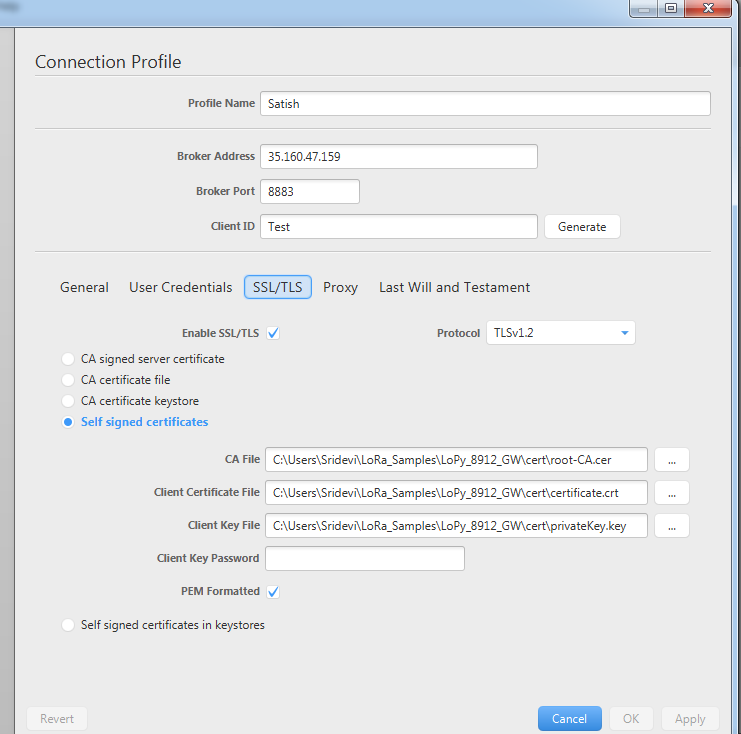
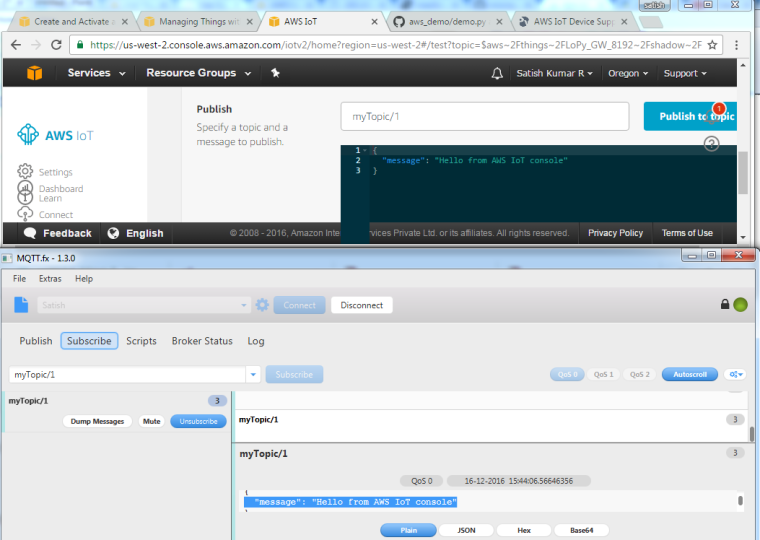
Published myTopic/1 from AWS and Subscribed the same in MQTT.fx tool, and they works fine. This helps me to ensure that cert files are fine.
The same cert files are moved to /flash/cert/*, and this time it passes through ssl.wrap_socket() successfully.

After passing ssl.wrap_socket() the exception occurs in next statement self.sock.connect(self.addr). To confirm this added the connect function in try exception block to get the error type. and it gives OSError.
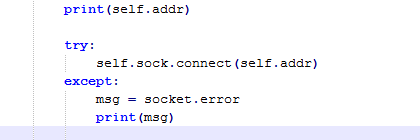
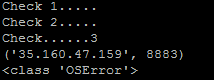
So this shows that error is with socket.connect().
Again to cross check used the IP 35.160.47.159 in MQTT.fx tool to connect and it worked fine with the tool.
Please help to resolve the issue.
Thanks & Regards,
Satish Kumar. R. -
-
@RSK, I would need to know the OSError number that you are getting.
What you could also do, is to email me all your source files, the certificates, and give me temporal access to your AWS account so I can test it fully on my end.
BTW, are you using static IP configuration on the LoPy/WiPy 2.0? There are known issues around this that we are still trying to resolve with Espressif. If you are, please give your code another try using DHCP instead... Thanks.
Cheers,
Daniel -
Hi @daniel, I am also having issues with your aws demo.
When I break out of the loop and test the connection manually I get OSError -32512
DEVICE_ID = "lopy-gateway"
HOST = "[redacted].iot.us-east-2.amazonaws.com"
TOPIC_DOWNLOAD = "Download"
TOPIC_UPLOAD = "Upload"
from simple import MQTTClient
connection = MQTTClient(DEVICE_ID, server=HOST, port=8883)
connection.connect(ssl=True, certfile='/flash/cert/lopy-gateway.cert.pem', keyfile='/flash/cert/lopy-gateway.private.key', ca_certs='/flash/cert/root-CA.crt')
Traceback (most recent call last):
File "<stdin>", line 1, in <module>
File "simple.py", line 77, in connect
OSError: -32512I have tested from my desktop using the Python AWSIoTPythonSDK module from AWS with the same credentials successfully.
I could send my code if that would help.
Thanks for any insight.
-
@daniel Could you please confirm your AWS IoT demo still works for you?
I am using the latest firmware and when trying to connect to the MQTT broker using the REPL, I get OSError 0->>> connection.connect(ssl=True, certfile='/flash/cert/lopy-gateway.cert.pem', keyfile='/flash/cert/lopy-gateway.private.key', ca_certs='/flash/cert/root-CA.crt') Traceback (most recent call last): File "<stdin>", line 1, in <module> File "simple.py", line 79, in connect OSError: 0 >>> >>> >>> import os >>> os.uname() (sysname='LoPy', nodename='LoPy', release='1.0.1.b1', version='v1.8.6-265-g5722083 on 2016-12-22', machine='LoPy with ESP32') -
@jomifo I'll be performing some tests this morning and get I'll get back with an update shortly.
Cheers,
Daniel -
@jomifo I can confirm that the issue is there, we also get the exception with OSError 0. We'll investigate it and provide and solution on tomorrow's release.
-
@daniel - I tried this in the latest release (1.1.0.b1) and am now getting a different OSError. Just wondering if you were able to address this in the latest release and verify your AWS IoT demo works so I know if it is something on my end. Thanks.
>>> from simple import MQTTClient >>> DEVICE_ID = "lopy-gateway" >>> HOST = "[redacted]" >>> TOPIC_DOWNLOAD = "Download" >>> TOPIC_UPLOAD = "Upload" >>> connection = MQTTClient(DEVICE_ID, server=HOST, port=8883) >>> connection.connect(ssl=True, certfile='/flash/cert/lopy-gateway.cert.pem', keyfile='/flash/cert/lopy-gateway.private.key', ca_certs='/flash/cert/root-CA.crt') Traceback (most recent call last): File "<stdin>", line 1, in <module> File "simple.py", line 77, in connect OSError: -32512 >>> import os >>> os.uname() (sysname='LoPy', nodename='LoPy', release='1.1.0.b1', version='v1.8.6-274-g9a2018f on 2016-12-29', machine='LoPy with ESP32') >>> -
@jomifo we are also experiencing that error and it is caused by the changes made to integrate the Bluetooth stack. We are still investigating the exact root cause. Apologies for the the delay.
-
@daniel No problem. Thanks for the quick confirmation reply.
-
This post is deleted! -
@gertjanvanhethof no, we are still busy trying to solve it. It's going to have to wait for the next release.
-
Hello Daniel, dear all,
I used your code and could do interaction with a custom mosquitto MQTT broker + Let's encrypt certificate (so using TLS on port 8883 and server authentication) from my WiPy. Still using the older firmware from Dec 16th which works fine with TLS + certificates.
https://twitter.com/_rac01/status/814894297208287237Many thanks for the great work!
Ralf -
@daniel Just checking... this is still an open issue, correct? Thanks.
Hello! It looks like you're interested in this conversation, but you don't have an account yet.
Getting fed up of having to scroll through the same posts each visit? When you register for an account, you'll always come back to exactly where you were before, and choose to be notified of new replies (either via email, or push notification). You'll also be able to save bookmarks and upvote posts to show your appreciation to other community members.
With your input, this post could be even better 💗
Register Login