umqtt robust stalls out on FiPy

-
Hi everyone,
I have a FiPy with the 2.0 expansion board. Firmware version is 1.18.0.r1. I'm using the Atom IDE, which is running on Windows 7.0. I followed the Pycom Documentation to update the firmware, which is now at version 1.18.0.r1. I also downloaded the pycom libraries from github and uploaded those to the FiPy using Atom IDE.
My current goal is to just connect to my WiFi, and then send short messages via MQTT protocol to the Adafruit IO. Here is a screen shot of the MQTTtest.py script I was running:
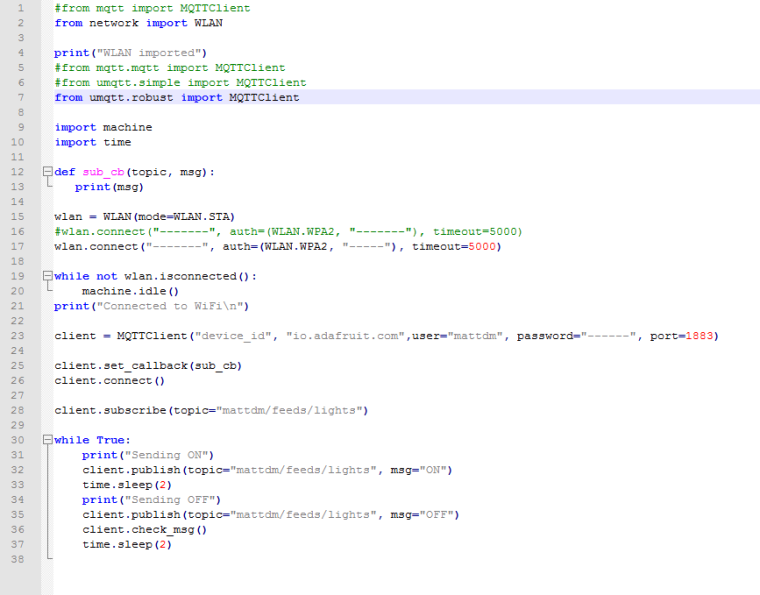
I've had a little bit of success but using mqtt.py, only about 6 messages would get through before the following error comes up:
Trackback (most recent call last):
File "<stdin>", line 33 in <module>
File "/flash/lib/mqtt/mqtt.py", line 110, in publish
OS Error: [Errno 104] ECONNRESETI then downloaded umqtt simple.py, and tried that, and would generally get the same error:
Trackback (most recent call last):
File "<stdin>", line 36 in <module>
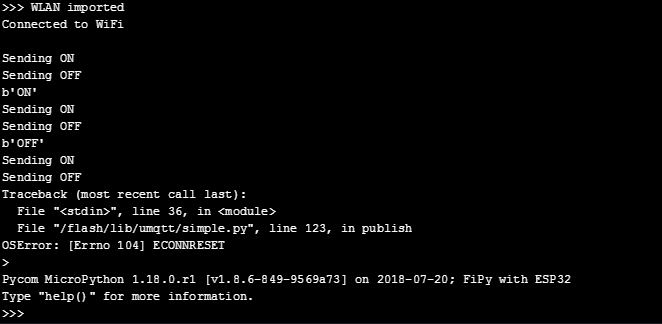
File "/flash/lib/umqtt/simple.py", line 123, in publish
OS Error: [Errno 104] ECONNRESETHere is a screen shot showing the output and error when I try using uqmtt simple:
I've been scouring help forums looking for answers and found this: https://forum.pycom.io/topic/2311/mqtt-oserror-issue/4
which suggested using uqmtt robust, so I downloaded that and tried that out. It works a little longer (gets a few extra messages out), but then just stalls out and doesn't seem respond until I disconnect and reset the Py board. Here is a screen shot showing what happens when I use umqtt robust with my script: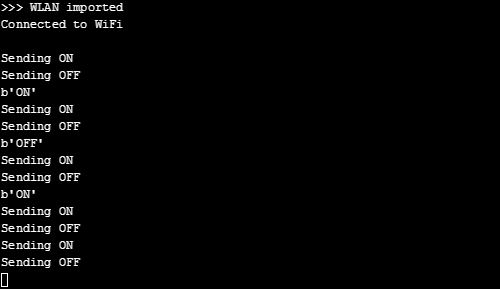
I also tried switching from my home wifi to my phone hotspot to see if the wifi connection was the error.
-
@matt @administrators any solution to this?
-
@matt You should consider checking the connection state. ( Various brokers may time the connection out at the other end.) and then possibly explicitly closing the connection and re-connecting.
I am using the core of the AWS MQTT package to talk to Losant and had to deal with the connection status and reconnections. That package maintains the connection in a seperate thread and the library doesn't clean up well so it needed some hacking.
I have found the robust and simple implementations also needs some tweaking to be reliable on ESP8266 so it doesn't surprise me.
You may even find it makes sense to disconnect after sending a message and then reconnecting later.
Have a look at what the default timouts and the inactivity timeouts are set for the MQTT service you are talking to,
Hello! It looks like you're interested in this conversation, but you don't have an account yet.
Getting fed up of having to scroll through the same posts each visit? When you register for an account, you'll always come back to exactly where you were before, and choose to be notified of new replies (either via email, or push notification). You'll also be able to save bookmarks and upvote posts to show your appreciation to other community members.
With your input, this post could be even better 💗
Register Login