Welcome to the Pycom forum Forum
    • \[\[global:header.categories\]\]
    • \[\[global:header.recent\]\]
    • \[\[global:header.tags\]\]
    • \[\[global:header.popular\]\]
    • Login

    Explore Pybytes | Official Documentation | Report a Firmware Bug/Issue | GitHub

    Fipy Unable to Import LTE Library

    Scheduled Pinned Locked Moved FiPy
    13 Posts 5 Posters 635 Views 5 Watching
    Loading More Posts
    • Oldest to Newest
    • Newest to Oldest
    • Most Votes
    Reply
    • Reply as topic
    Log in to reply
    This topic has been deleted. Only users with topic management privileges can see it.
    • stephen.ugwuanyiS Offline
      stephen.ugwuanyi
      last edited by

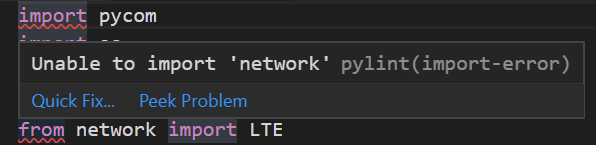
      Any idea on fixing this issue?
      The firmware upgrade was successful.
      071cff94-f84e-46c3-8b87-7562fa8ed716-image.png

      robert-hhR 1 Reply Last reply Reply Quote 0
      • robert-hhR Offline
        robert-hh @stephen.ugwuanyi
        last edited by

        @stephen-ugwuanyi Seeing pylint I assume that this error is shown in the Atom or VSCODE editor. You may ignore that. These Libraries are embedded into the Fipy module and are not accessible on the PC.

        M B 2 Replies Last reply Reply Quote 0
        • M Offline
          Martinnn @robert-hh
          last edited by

          @robert-hh I added
          "python.linting.pylintArgs": ["--disable=C0111,E0401,C0413,C0103,C0301,R0914,C1801,C0330,E1101"]
          in VScode. I would have liked to have some dummy libraries on the PC in order to retain the import checking, but found no easy way to do so.

          1 Reply Last reply Reply Quote 0
          • B Offline
            Bismarck501 @robert-hh
            last edited by Bismarck501

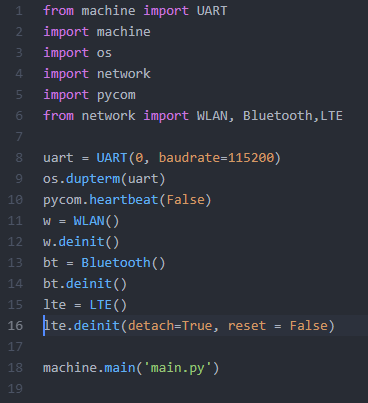
            @robert-hh Hi, I had the same issue with FiPy+pysense in OTAA mode, and I found this problem when using Atom to try the code:

            This in boot.py
            ce904d43-e0c4-4601-a108-589a3aa06993-image.png

            The error apears like this:
            line 16:
            TypeError: function does not take keyword arguments

            I don't know how to do? Could you give me any idea?

            robert-hhR 1 Reply Last reply Reply Quote 0
            • robert-hhR Offline
              robert-hh @Bismarck501
              last edited by

              @Bismarck501 I have no problem with that line:
              lte.deinit(detach=True, reset=False)
              Firmware 1.20.0.rc8

              The source code for 1.18.x is the tśame with respect to the keyword arguments.

              B 2 Replies Last reply Reply Quote 0
              • B Offline
                Bismarck501 @robert-hh
                last edited by

                @robert-hh Thanks for responsing! I will update my firmware to try again.

                1 Reply Last reply Reply Quote 0
                • B Offline
                  Bismarck501 @robert-hh
                  last edited by

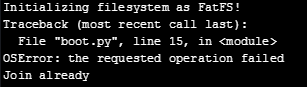
                  @robert-hh emmmm, after I updated the firmware of FiPy to latest virsion 1.20.0.rc9(development), it still didn't work.

                  from machine import UART
                  import machine
                  import os
                  import network
                  from network import WLAN, Bluetooth,LTE
                  
                  uart = UART(0, baudrate=115200)
                  os.dupterm(uart)
                  
                  wlan = WLAN()
                  wlan.deinit()
                  bt = Bluetooth()
                  bt.deinit()
                  lte=LTE()
                  lte.deinit(detach=True, reset=False)
                  machine.main('main.py')


                  c6c5c9d6-bba5-4d58-8e29-96e213350af1-image.png
                  Although this issue would be ignored by the device and main code could work, these code:

                  lte.deinit(detach=True, reset=False)
                  

                  didn't work at all after I measured the current.

                  1 Reply Last reply Reply Quote 0
                  • T Offline
                    tuftec
                    last edited by

                    @Bismarck501 Hi. what version of FiPy do you have. Have a look at the version number under the module.

                    I have seen very different performance between V1.0 and V1.2. My V1.0 device runs warm to touch even when in deepsleep (and after LTE.deinit).
                    My V1.2 device appears to do what it is instructed and remains cool to touch.

                    Peter.

                    B 1 Reply Last reply Reply Quote 0
                    • B Offline
                      Bismarck501 @tuftec
                      last edited by

                      @tuftec my version is FiPy V1.0r. But the problem is that my FiPy cannot execute the code

                      lte.deinit(detach=True, reset=False)
                      

                      This code is ignored and passed.
                      Other similar code such as:

                      wlan = WLAN()
                      wlan.deinit()
                      bt = Bluetooth()
                      bt.deinit()
                      

                      They worked well and can reduce the current consumption. Do you have the same problem?

                      1 Reply Last reply Reply Quote 0
                      • T Offline
                        tuftec
                        last edited by

                        @Bismarck501 I use commands very similar.
                        There might be a Pycom documentation error that has tripped you up.

                        I use lte.deinit(dettach=False)
                        I also use lte.deinit()

                        This does not throw any errors and appears to work on my later FiPy unit.
                        Although, I do not have any way of confirming whether the device is still left attached/registered on the network after the deinit command.

                        I am running the same main firmware and sequans firmware on both units.

                        There appears to be some inconsistency with the detach or dettach commands in the documentation.

                        I am not sure whether this has any bearing on what you are seeing.

                        Peter.

                        B 1 Reply Last reply Reply Quote 0
                        • B Offline
                          Bismarck501 @tuftec
                          last edited by Bismarck501

                          @tuftec Thanks for responsing soon! I just tested FiPy V1.0r and V1.2 respectively and found that only V1.2 can execute the code:

                          lte.deinit()
                          

                          But V1.0r cannot execute this code.
                          I used FiPy with pysense, will the firmware of pysense influence the FiPy and cause this issue?

                          1 Reply Last reply Reply Quote 0
                          • T Offline
                            tuftec
                            last edited by

                            @Bismarck501 I have no experience with Pysense so can not help here.
                            The deinit command not working on V1.0 would explain why I observe that the unit runs warmer. More power due to LTE not turning off correctly?

                            B 1 Reply Last reply Reply Quote 0
                            • B Offline
                              Bismarck501 @tuftec
                              last edited by

                              @tuftec Exactly! I cannot reduce the current consumption because LTE modems run all the time. Next Monday, I will go to the lab and check the current consumption of FiPy V1.2 to check whether lte.deinit() works.


                              1 Reply Last reply Reply Quote 0

                              Hello! It looks like you're interested in this conversation, but you don't have an account yet.

                              Getting fed up of having to scroll through the same posts each visit? When you register for an account, you'll always come back to exactly where you were before, and choose to be notified of new replies (either via email, or push notification). You'll also be able to save bookmarks and upvote posts to show your appreciation to other community members.

                              With your input, this post could be even better 💗

                              Register Login
                              • 1 / 1
                              • First post
                                Last post

                              Pycom on Twitter

                              Pycom