Flashing v1.20.r1 bricks my LoPy4
-
Hi guys
I was hoping you could help me out here. I'm having trouble flashing the 1.20.r1 firmware to my LoPy4. The LoPy4 is mounted on an Expansion Board 3.1 with the latest firmware DFU'ed.
So lets say that I start off by using the LoPy in this state:
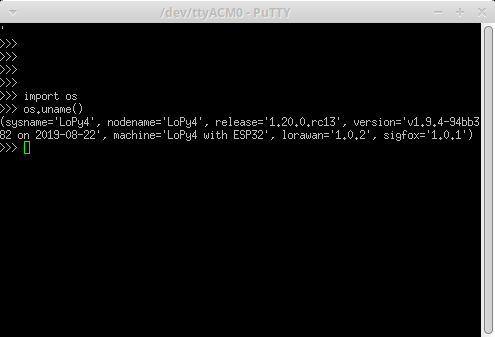
Now, then I attempt to upgrade the firmware with these settings:
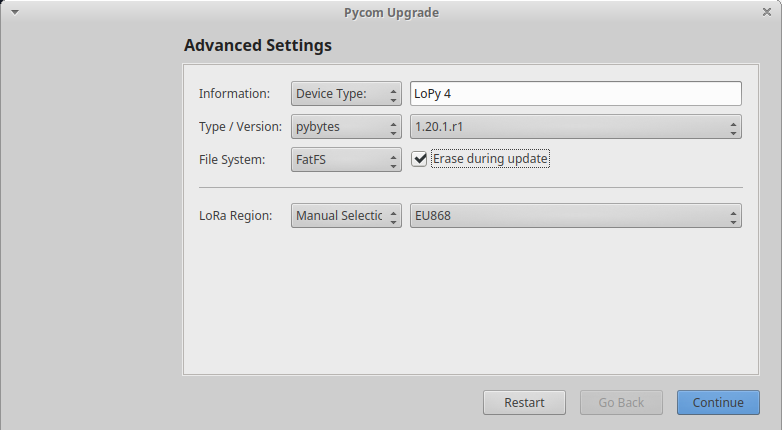
The flash-process goes as expected, but then when I power cycle the LoPy and attempt to connect to it using the USB-serial interface, there is no response, no matter what I attempt to throw at it on the serial port...
I can re-flash and downgrade the LoPy4 to an earlier firmware, and the LoPy4 will start responding on the serialport again. But once I attempt to flash using the 1.20r1 firmware, it will always be "bricked".
This is (in my setup) a very repeatable issue.Am I missing something, or is this a firmware bug?
-
@kodarn I have no problem with my LoPy4' and 1.20.1, but I recall I had to do a full flash erase. So could you try to follow the procedures outlined here: https://forum.pycom.io/topic/5309/no-access-point-ssid-detected/2 fopr a full flahs erase
and then use the updater again to load the firmware. Ticking the erase flag in the firmware updater only performs a partial erase.Instead of pycom-fwtool-cli. you can also use esptool.py, which for instance you can find here: https://github.com/pycom/pycom-micropython-sigfox/tree/Dev/esp32/tools/fw_updater
-
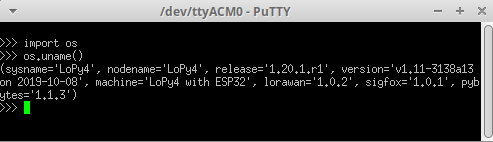
Wohoo! That worked! :-)
#1 Erase all

#2 ReFlash
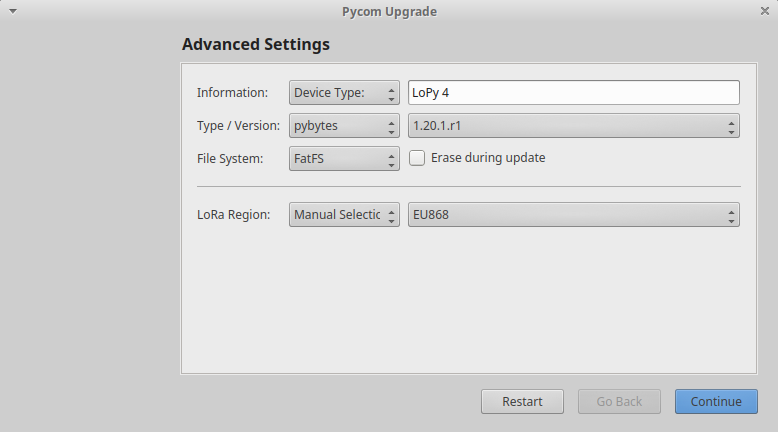
#3 Connect
@iwahdan Feature request: Add the ERASE_ALL as a checkbox in the pycom-fwtool GUI.
-
@kodarn said in Flashing v1.20.r1 bricks my LoPy4:
Feature request: Add the ERASE_ALL as a checkbox in the pycom-fwtool GUI.
@Clemens and me second that! Is there any way to contribute to this program?
-
@robert-hh said in Flashing v1.20.r1 bricks my LoPy4:
Instead of pycom-fwtool-cli. you can also use esptool.py, which for instance you can find here: https://github.com/pycom/pycom-micropython-sigfox/tree/Dev/esp32/tools/fw_updater
Thanks for pointing out the
updater.py[1] based onesptoolto us. We are assuming this is the very same code which is actually underpinning the Pycom Firmware Update tool?[1] https://github.com/pycom/pycom-micropython-sigfox/blob/Dev/esp32/tools/fw_updater/updater.py
-
@andreas I'm not sure, as the pycom update tool is now a single executable, which may have packaged esptool in it. The strings command finds esptool and indications of Python modules. Earlier versions had esptools.py visible.
-
I have also a problem with update and erase the LOPY4 device, I did the update succefull with erase ticked: >>> import os >>> os.uname() (sysname='LoPy4', nodename='LoPy4', release='1.20.1.r2', version='v1.11-06dfad0 on 2019-11-30', machine='LoPy4 with ESP32', lorawan='1.0.2', sigfox='1.0.1', pybytes=‘1.3.0') But if I tried to erase the flash memory I got: >>> import os >>> os.mkfs('/flash') Traceback (most recent call last): File "<stdin>", line 1, in <module> AttributeError: 'module' object has no attribute 'mkfs' >>> And sychronize the project with ATOM: Uploading project (main folder)... Not safe booting, disabled in settings Reading file status Failed to read project status, uploading all files Creating dir lib Creating dir lib/bme680 [1/32] Writing file Config.py (4kb) [2/32] Writing file I2C_test.py (4kb) [3/32] Writing file TTL_test.py (5kb) [4/32] Writing file boot.py (0kb) [5/32] Writing file dust_test.py (5kb) [6/32] Writing file gps_test.py (5kb) [7/32] Writing file lib/Adafruit_SHT31.py (7kb) Failed to write file, trying again... Failed to write file, trying again... timeout [8/32] Writing file lib/BME280.py (9kb) Failed to write file, trying again... Failed to write file, trying again... timeout [9/32] Writing file lib/BME680.py (16kb) Failed to write file, trying again... Failed to write file, trying again... timeout [10/32] Writing file lib/BME_I2C.py (6kb) Failed to write file, trying again... Failed to write file, trying again... timeout [11/32] Writing file lib/ConfigJson.py (4kb) Failed to write file, trying again... Failed to write file, trying again... timeout [12/32] Writing file lib/Device.py (3kb) Failed to write file, trying again... Failed to write file, trying again... Upload failed: timeout. Please reboot your device manually. I retried everything without succes, and also searching to wifi networks, the network station lopy-wan-9ca5 does not coming up. How can I get my pycom lopy4 back to factory settings and erase the flash memory? -
since 19.0.1 you shall use fsformat() instead of mkfs()
-
@crumble where did you find this? I'm surprised this isn't in the documentation anywhere..
-
@goldfishalpha said in Flashing v1.20.r1 bricks my LoPy4:
@crumble where did you find this? I'm surprised this isn't in the documentation anywhere..
just follow the link.
You have to read the firmware update posts for two reasons:
- pycom updates the documentation rarely
- pycom has no concept how to deal with version differences.
So they do not document the API changes of the development branches until they move them into release. - if the remember the changes.
MicroPython documentation is a little better. You can choose between the versions. But I prefer to see the supported versions in the doc. This is much more handy, if you have to program against multiple API versions.


Hello! It looks like you're interested in this conversation, but you don't have an account yet.
Getting fed up of having to scroll through the same posts each visit? When you register for an account, you'll always come back to exactly where you were before, and choose to be notified of new replies (either via email, or push notification). You'll also be able to save bookmarks and upvote posts to show your appreciation to other community members.
With your input, this post could be even better 💗
Register Login