Ultra Low Power (ULP) processor - Part 1
-
Introduction
In deep sleep most of the peripherals are turned off, however, the ULP processor, the RTC slow and fast memories and the RTC controller can still be powered on. In deep sleep the ULP can perform measurements using the ADC, read sensor data using the I2C interface, pulse counting, etc. In this short tutorial we will show how to compile the ULP processor.
Compiling the ULP library
To compile the ULP you need to set up the xtensia gcc toolchain, export the bin path and clone the pycom-esp-idf repository. Please follow the instructions here
Before compiling the ulp library you need select this feature from the menuconfig. Go to "examples" -> "wifi" -> "scan" and in Terminal / command prompt type:
make menuconfigThe following screen will pop up:
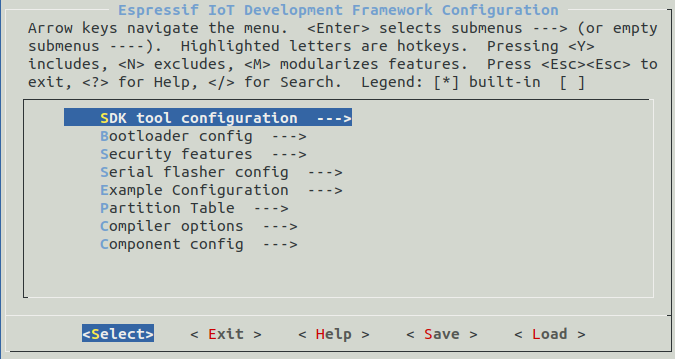
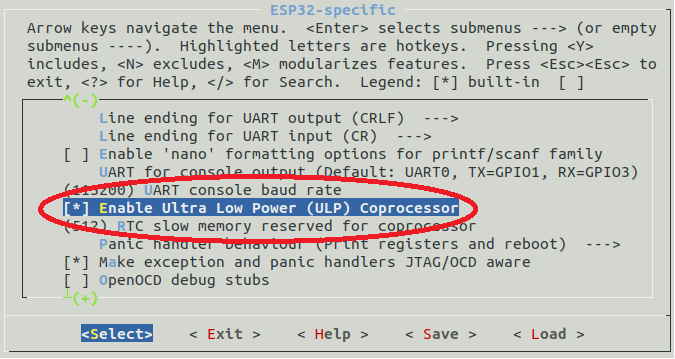
Go to "Component config" -> ESP32-sepific and then choose the "Enable Ultra Low Power (ULP) Coprocessor as shown below:
Now exit from menuconfig and in the terminal type:
make -j4to compile the libraries. The ULP library can now be found in "examples" -> "wifi" -> "scan" -> "build" -> "ulp"
-
Nice, will we be seeing a part 2? :-)
-
I would like to see an example of an I2C sensor, read it value, check if below or above a threshold and then wake up the main CPU.
To make it work: (missing assumptions)
I had to $ export IDF_PATH=~/pycom-esp-idf
and install much more dev packages like sudo apt-get install build-essential (Windows ubuntu 18.04) -
@oligauc What are the developments regarding the ULP processor? It already works on a regular ESP32 with MicroPython firmware... I can't get it to work with the Pycom firmware.

Hello! It looks like you're interested in this conversation, but you don't have an account yet.
Getting fed up of having to scroll through the same posts each visit? When you register for an account, you'll always come back to exactly where you were before, and choose to be notified of new replies (either via email, or push notification). You'll also be able to save bookmarks and upvote posts to show your appreciation to other community members.
With your input, this post could be even better 💗
Register Login