• How to use FFT Algorithm in lopy4?

    2
    0 Votes
    2 Posts
    94 Views
    J
    @Yorick-Blom See https://forum.pycom.io/topic/7505/fast-fft-for-iot-application/2
  • Pysense read when shock

    1
    0 Votes
    1 Posts
    49 Views
    No one has replied
  • Pycom Documentation Bible

    1
    0 Votes
    1 Posts
    45 Views
    No one has replied
  • PyGo2 btick - reflash needed

    2
    0 Votes
    2 Posts
    89 Views
    L
    If RS is reset, it does not work (at boot to pullup to 3v3) [image: 1657796495986-pygo2.jpg] Any idea?
  • How do I train my AirQ sensor with Bosch AI software to work with fipy?

    1
    0 Votes
    1 Posts
    50 Views
    No one has replied
  • Using PyCom boards with Arduino IDE

    arduino fipy
    19
    2
    6 Votes
    19 Posts
    6k Views
    J
    I'm getting this error whenever I try to compile anything for the GPy: [15975] Error loading Python lib '/var/folders/57/hyd6ntr1233_x_brscxdp8480000gn/T/_MEI7xbrkg/libpython3.8.dylib': dlopen: dlopen(/var/folders/57/hyd6ntr1233_x_brscxdp8480000gn/T/_MEI7xbrkg/libpython3.8.dylib, 10): Symbol not found: ____chkstk_darwin Referenced from: /var/folders/57/hyd6ntr1233_x_brscxdp8480000gn/T/_MEI7xbrkg/libintl.8.dylib Expected in: /usr/lib/libSystem.B.dylib in /var/folders/57/hyd6ntr1233_x_brscxdp8480000gn/T/_MEI7xbrkg/libintl.8.dylib I have just re-installed Python 3.9. Anyone know how to fix this?
  • Implementing CoAP with DTLS

    1
    0 Votes
    1 Posts
    37 Views
    No one has replied
  • This topic is deleted!

    1
    0 Votes
    1 Posts
    1 Views
    No one has replied
  • This topic is deleted!

    1
    0 Votes
    1 Posts
    1 Views
    No one has replied
  • rs232 stream to wifi

    1
    0 Votes
    1 Posts
    31 Views
    No one has replied
  • This topic is deleted!

    1
    0 Votes
    1 Posts
    6 Views
    No one has replied
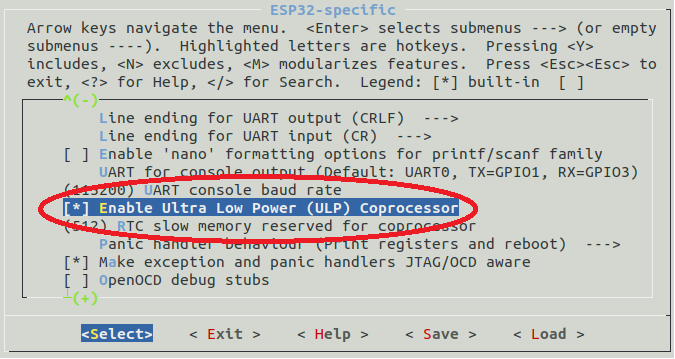
  • ULP Testing (pycom firmware with ULP support)

    ulp firmware github
    5
    5 Votes
    5 Posts
    140 Views
    DualMaticD
    @Géza-Husi Yes! I've tested with some code from different repositories and it works, I'll prepare some sample code and post here. I'm neither makefile nor esp-idf expert, so my current procedure is to use ThomasWaldmann py-esp32-ulp on my local computer with micropython v1.12 in order to compile .S file to .ulp and then upload to pycom module via FTP, this allowed me to quick test if ULP works but has some downsides (some of them because my lack of knowledge): You have to load and run the ulp file at every boot py-esp32-ulp converter doesn't take into account Espressif ULP macros/helpers issue#19 (READ_RTC_REG, WRITE_RTC_REG, and so on...) I'm still figuring out how to do I/O manipulation from ULP (read digital input accomplished, but figuring out how digital output works) I don't know how to signal main processor to wake up from ULP. I think the best way to implement ULP is to flash or generate binary file with esp-idf (in order to make use of macros) Maybe someone at pycom (Géza ;-) ) or people with more esp-idf knowledge than me can shed us some light. My use case with ULP is more or less the same as @Calvin-Foo but for water metering, counting pulses while asleep and waking up the module every 'N' pulses in order to take actions or save values. Regards and thanks for chiming in!

  • Creating a library for DF Robot - Water Level Transmitter

    2
    0 Votes
    2 Posts
    47 Views
    L
    @Roberto-De-Oliveira said in Creating a library for DF Robot - Water Level Transmitter: I understand that this sensor would use both the ADC and I2C This sensor use only ADC. Look into docs how to use ADC: https://docs.pycom.io/firmwareapi/pycom/machine/adc/#app do not have this sensor then you must test it self. Below code can contain errors but should be good for start: import machine from time import sleep_ms ANALOG_PIN = 'P16' RANGE = 5000 # Depth measuring range 5000mm (for water) CURRENT_INIT=4.00 # Current @ 0mm (uint: mA) DENSITY_WATER=1 # Pure water density normalized to 1 DENSITY_GASOLINE = 0.74 # Gasoline density PRINT_INTERVAL = 1000 adc = machine.ADC() # create an ADC object apin = adc.channel(pin=ANALOG_PIN, attn=ADC.ATTN_11DB) # create an analog pin on P16 while True: dataVoltage = apin() dataCurrent = dataVoltage / 120.0 # Sense Resistor:120ohm depth = (dataCurrent - CURRENT_INIT) * (RANGE/ DENSITY_WATER / 16.0) #Calculate depth from current readings if (depth < 0): depth = 0.0; #Serial print results print('depth:', depth, 'mm') sleep_ms(PRINT_INTERVAL) Above your sensor is connected to pin P16 - you can choose different one. look also at attenuation - i choose ADC.ATTN_11DB but maybe different should be used. Remember also that all pins work on 3V3. Excceeding it can damage the board.
  • how to pip3 install properly in order to use LoRa?

    9
    0 Votes
    9 Posts
    116 Views
    G
    I looked around in the firmware to find any double definitions, but could not find anything concrete why these three are duplicated. Though its probably limited to only the help-function printing code, meaning there's no fundamental flaw in the firmware
  • How to receive data from UDP socket (over WiFi)

    6
    0 Votes
    6 Posts
    114 Views
    N
    Hi @robert-hh, I really appreciate the support you’ve given me. Thank you. Also functional on my side. Regards, Vojtech
  • Raw Lora Nano-Gateway Timing

    1
    0 Votes
    1 Posts
    43 Views
    No one has replied
  • UMQTT & AWS IoT

    mqtt micropython aws umqtt ssl
    5
    5 Votes
    5 Posts
    4k Views
    F
    Hello, i am trying very hard to subscribe to a topic and actually receive something. I am using the integrated client on the AWS side to debug. i am observing that i am successful when it comes to publishing topics. It works well. If i subscribe to a topic i just do not receive anything at all. I have tried with both simple and the guide in the pycom documentation. I suspect at this point a misconfiguration from the side of AWS. I have permission in my policy to subscribe to any resource. Subscription itself works. No messages are ever displayed though. Callback is never called. any help is appreciated!
  • DMA usage

    1
    0 Votes
    1 Posts
    54 Views
    No one has replied
  • How to send UDP packet over NB-IoT

    8
    0 Votes
    8 Posts
    202 Views
    A
    @nadvorvo Code 9 stands for NB-IoT RAT, so your connection is ok. You might get your packets lost over-the-air, as plain UDP does not allow for confirmation. You can also check with TCP or MQTT if your operator allows it (many operators block non-UDP communication)
  • Ultra Low Power (ULP) processor - Part 1

    4
    2
    5 Votes
    4 Posts
    572 Views
    I
    @oligauc What are the developments regarding the ULP processor? It already works on a regular ESP32 with MicroPython firmware... I can't get it to work with the Pycom firmware.

Pycom on Twitter