CAT-M1 and ADC interaction? Calling on EE experts
-
For the last few weeks I had continuous problems delivering data to the cloud using MQTT over CAT-M1. The messages were hanging up after a few transmissions. As I discovered recently the culprit was initialization of ADC (even without reading data from the sensor). I used the following code:
def initECG(analogInputPin, voltref):

    adc = ADC(bits=12)
    print("adc: {}".format(adc))

    # Analogog Input Pin on Expansion Board 3.1 should be P13, P14, P17, P18 (G4, G5, G30, G31)
    adc_c = adc.channel(pin=analogInputPin, attn=ADC.ATTN_11DB) # •	Output Voltage: 0 - 3.3V
    print("got adc channel on P18")

    return adc_c
and calling it:
adc_channel = initECG('P18', 460)Without initializing ADC the delivery of messages worked just fine and I could send thousand messages without any problem. I discovered that this line is the one that causing problems:
adc_c = adc.channel(pin=analogInputPin, attn=ADC.ATTN_11DB)I tried using ADC(bits=10) and also tried not to use ADC.ATTN_11DB parameter, but at no avail...
So, I thought maybe it is because the wires are not connected to the sensor...
Is it possible? likely?So then I connected the sensor as I did in the past (and nothing changed since then in physical connection)
 image url)
To my surprise when I do that, the LTE modem does not connect at all...
I checked and re-checked the wire connections. The Expansion Board 3.1 firmware was updated from the get go, and yet, I am getting this:rst:0x7 (TG0WDT_SYS_RESET),boot:0x13 (SPI_FAST_FLASH_BOOT) configsip: 0, SPIWP:0xee clk_drv:0x00,q_drv:0x00,d_drv:0x00,cs0_drv:0x00,hd_drv:0x00,wp_drv:0x00 mode:DIO, clock div:1 load:0x3fff8020,len:8 load:0x3fff8028,len:2136 load:0x4009fa00,len:19944 entry 0x400a05e8 Disable MicroPython control and heartbeat of LED Traceback (most recent call last): File "main.py", line 268, in <module> OSError: Couldn't connect to Modem! Pycom MicroPython 1.20.1.r1 [15b6d69] on 2019-11-02; FiPy with ESP32 Type "help()" for more information. >>>where line 268 is
lte = LTE()Since I am not EE I have no idea what are possible reasons to this and how and why initialization of ADC without connected sensor can affect LTE transmissions at all... And why with connected sensor I cannot initialize LTE at all...
HELP!!!
-
Maybe;
- try moving lte antenna well away from the rest of the wiring
- try 100k resistor between p18 & sensor analog out
- check Vin is >3.5v
- check Fipy 3v3 output is 3,2-3.4v
-
@securigy You probably didn't notice that
P18is used for communication with the LTE modem.Check out the FiPy pinout
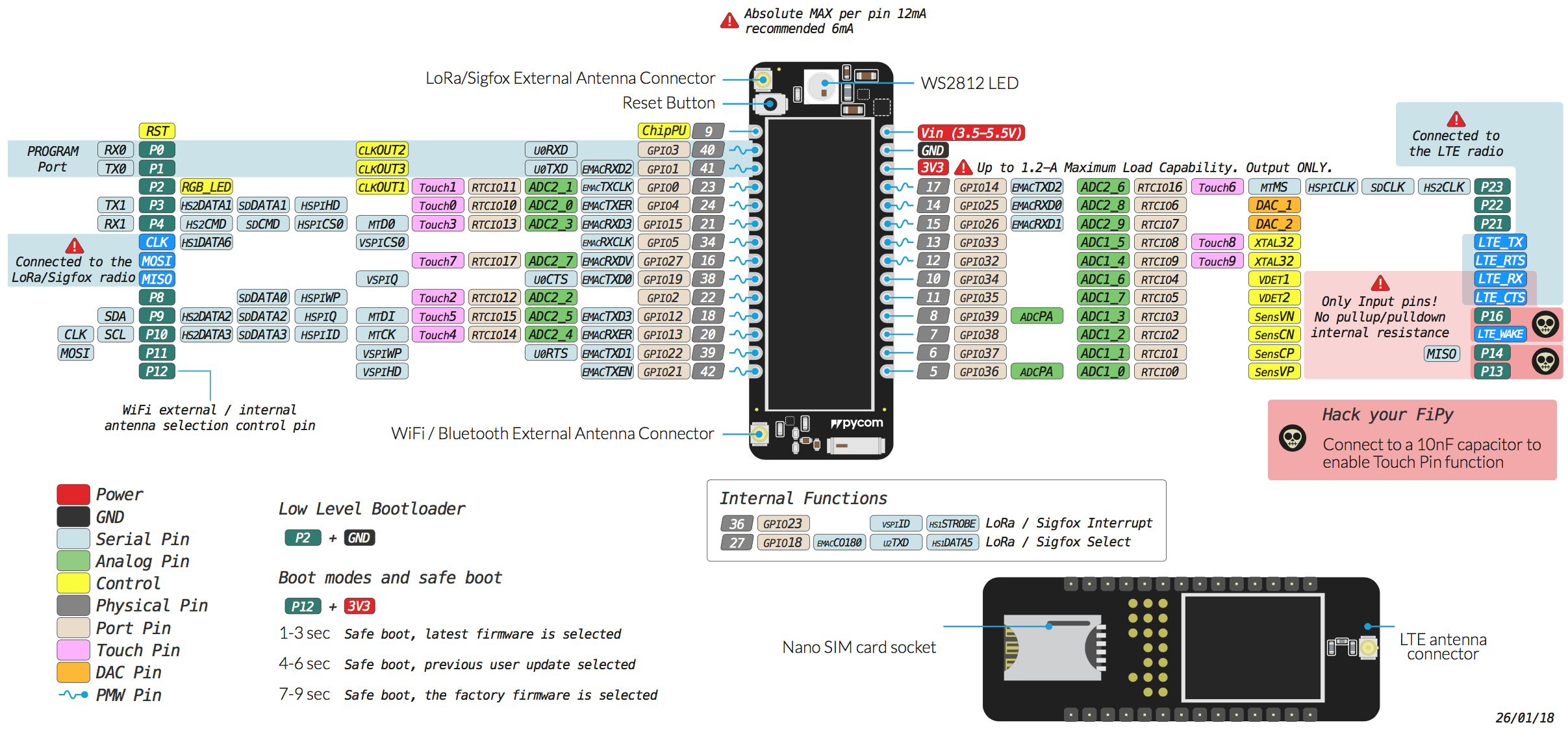
P18isLTE_RXon the FiPy (it is available on some of the other modules which don't have LTE). You'll have to switch to another pin. -
@jcaron Thank you a lot for telling... I am not EE and pinouts are still a mystery to me - so. No I didn't notice ;-) I simply picked up one pin out of available... Which pin should I use for getting data from analog sensor?
-
@jcaron I use now P13 and it looks like it is working now...

Hello! It looks like you're interested in this conversation, but you don't have an account yet.
Getting fed up of having to scroll through the same posts each visit? When you register for an account, you'll always come back to exactly where you were before, and choose to be notified of new replies (either via email, or push notification). You'll also be able to save bookmarks and upvote posts to show your appreciation to other community members.
With your input, this post could be even better 💗
Register Login