How can I check what filesystem is used on a current pycom board
-
Re: File system problems & solutions
I have flashed some FiPys with a custom firmware via
pycom-fwtool-cli.exe --port COM9 flash --tar FiPy-1.20.1.r1-0.7.0-vanilla-dragonfly-onewire.tar.gzpycom-fwtool-cli.exe has afaik no option to set a specific file system (FAT-FS vs. littleFS) So I dont know what the command makes regarding file system.
In contraast to the command line tool you can set the file system in the GUI-version:
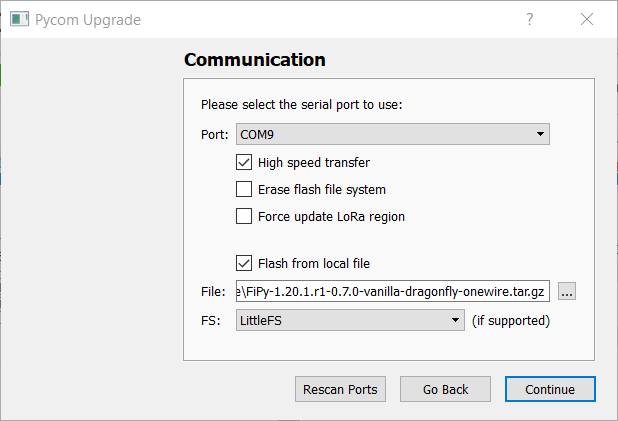
How can I check what file system is use on a current FiPy, a time ago you found this output right after startup:
load:0x4009fa00,len:19208
entry 0x400a05f4
Initializing filesystem as LittleFS!
Starting boot process...
but with the latest versions (the above mentioned but also the official 1.20.1.r2) I get only
ets Jun  8 2016 00:22:57

rst:0x1 (POWERON_RESET),boot:0x12 (SPI_FAST_FLASH_BOOT)
configsip: 0, SPIWP:0xee
clk_drv:0x00,q_drv:0x00,d_drv:0x00,cs0_drv:0x00,hd_drv:0x00,wp_drv:0x00
mode:DIO, clock div:1
load:0x3fff8020,len:8
load:0x3fff8028,len:2136
load:0x4009fa00,len:19860
entry 0x400a05d0
Pycom MicroPython 1.20.1.r1-0.7.0-vanilla-dragonfly-onewire [13d82ea5-dirty] on 2019-11-17; FiPy with ESP32
Type "help()" for more information.
>>>
or
ets Jun  8 2016 00:22:57

rst:0x1 (POWERON_RESET),boot:0x12 (SPI_FAST_FLASH_BOOT)
configsip: 0, SPIWP:0xee
clk_drv:0x00,q_drv:0x00,d_drv:0x00,cs0_drv:0x00,hd_drv:0x00,wp_drv:0x00
mode:DIO, clock div:1
load:0x3fff8020,len:8
load:0x3fff8028,len:2136
load:0x4009fa00,len:19880
entry 0x400a05d0
Smart Provisioning started in the background
See https://docs.pycom.io/smart for details
Pycom MicroPython 1.20.1.r2 [v1.11-06dfad0] on 2019-11-30; FiPy with ESP32
Pybytes Version: 1.3.0
Type "help()" for more information.
>>>
and no debug or startup information about the used file system.
Is there any command or hack to find out the used file system??
-
Try Roberts trick....
import pycom; pycom.bootmgr() -
@kjm No trick, just reading the instructions.
-
Many thanks! In fact the command puts out:
>>> import pycom; pycom.bootmgr()
('Factory', 'LittleFS', 'SafeBoot: False', 'Status: Ready')
I had a discussion with @andreas yesterday about the issue and used the same firmware image with the GUI. In the GUI I have choosen FatFS for testing:
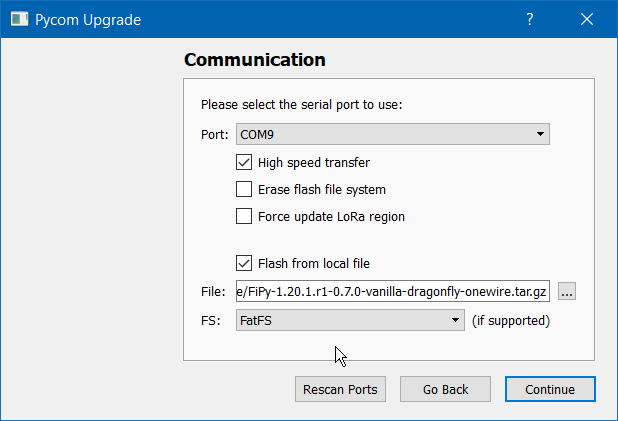
There is a remark "if supported" on the screen but I got this confirmation "File system type set to FatFS" after flashing:
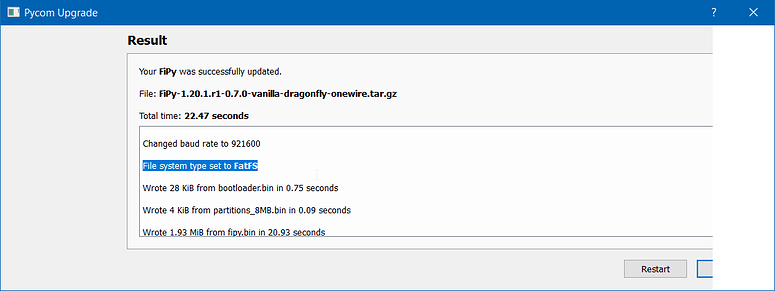
So I assume FatFS was used. But on the REPL you see ...
>>> import pycom; pycom.bootmgr()
('Factory', 'LittleFS', 'SafeBoot: False', 'Status: Ready')
>>>
Something must be wrong in the end, the output of the GUI "File system type set to FatFS" or the output of pycom.bootmgr(). :-/
Btw I did not found any information via pycom-fwtool-cli --help but this thread may be interesting: https://forum.pycom.io/topic/5375/using-pycom-fwtool-cli/
-
@Clemens If a LittleFS filesystem was on the device before firmware upgrade, it will not be touched. You have to erase the device to get the new selection in place. Or you may manually use
import pycom
pycom.bootmgr(fs_type=pycom.LittleFS)
and then reboot. About pycom.bootmgr(), look here:
https://development.pycom.io/firmwareapi/pycom/pycom/ -
Many thanks @robert-hh! There was no filesystem before! I did
pycom-fwtool-cli.exe --port COM9 erase_allbefore flashing the firmware. So the only thing / information about the Filesystem should be the preset / default in the firmware. I assume that it is respected while using
pycom-fwtool-cli.exe --port COM9 flash --tar FiPy-1.20.1.r1-0.7.0-vanilla-dragonfly-onewire.tar.gzeven when there is no information / option in pycom-fwtool-cli.exe to use a specific file system.
Ok I found in your link https://development.pycom.io/firmwareapi/pycom/pycom/
Note: When the firmware is built with option FS_USE_LITTLEFS the file system for /flash is forced to be LittleFS.
-
@robert-hh In that case "try Roberts discovery arising from his masterful ability to ferret out these pearls from the great pile of info, much of it no longer current."

Hello! It looks like you're interested in this conversation, but you don't have an account yet.
Getting fed up of having to scroll through the same posts each visit? When you register for an account, you'll always come back to exactly where you were before, and choose to be notified of new replies (either via email, or push notification). You'll also be able to save bookmarks and upvote posts to show your appreciation to other community members.
With your input, this post could be even better 💗
Register Login