I flashed old firmware to Pysense 2.0 boards
-
I followed manual and flashed boards with 0.8 dfu.
Is possible to repair ?Thanks
-
I got myself into the same issue. I received the Pysense 2.0 board just yesterday and in a hurry, I updated the firmware as per the instructions, not noticing the warning.
I realized this when I tried to run the sample Pysense code and got an error of 'Firmware Out of date'. I am kind of stuck as the sample code of pysense will not work.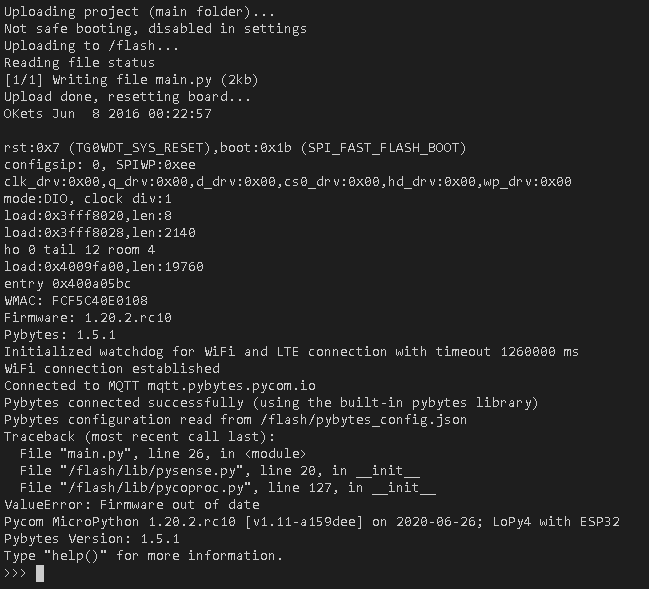
Please help. Thanks
-
Hi, I have the firmware revisions here:
pysense_app_v15.py
(the forum does not allow for .dfu uploads, so change the extension back to .dfu after downloading ;) )You should be able to update it like normally!
Best -
@Gijs Thanks
One of my Pysense 2 board are start working.But other board have a special problem, Vin pin not connecting to Lopy vin, so no power on Lopy4.
Checked other box and this is ok, all other pins are ok, but Vin not connecting. -
Did you insert the Lopy4 correctly? There is virtually nothing in the signal path between the USB connector and the Vin pin that can block the voltage. Other than a direct short ofcourse. Do you have loose metal bits laying around your workbench maybe?
-
@Gijs I checked all pin holes,
Two front pin holes are very loose, dont hold pin.(Vin and Pin9) -
@Gijs said in I flashed old firmware to Pysense 2.0 boards:
Did you insert the Lopy4 correctly? There is virtually nothing in the signal path between the USB connector and the Vin pin that can block the voltage. Other than a direct short ofcourse. Do you have loose metal bits laying around your workbench maybe?
I solved problem with a very thin copper wire, now working fine,
Thanks
Hello! It looks like you're interested in this conversation, but you don't have an account yet.
Getting fed up of having to scroll through the same posts each visit? When you register for an account, you'll always come back to exactly where you were before, and choose to be notified of new replies (either via email, or push notification). You'll also be able to save bookmarks and upvote posts to show your appreciation to other community members.
With your input, this post could be even better 💗
Register Login