USB device malfunctioned when connected to Windows
-
I plugged in my Pycom board to my computer and received the following error message:
"The last USB device you connected to this computer malfunctioned and Windows does not recognise it"
I have a pytrack board and with the gpy extension.
-
Hi,
I sometimes get that message with all sorts of devices (ranging from my mouse to webcam). Usually, replugging the device helps, or rebooting your computer.If that is no solution, you can try to attach only the pytrack (without the GPy) and see if it shows up in device manager and as which device.
Let me know if that works for you
Gijs
-
Thanks for responding so quickly. Just tried your suggestion but still getting the error.
It does show up in the Device Manager as 'Unknown USB Device (Device Descriptor Request Failed)". Maybe I should try re-flashing it?
It's also getting quite warm while it's plugged in. Not too hot to touch but warm.
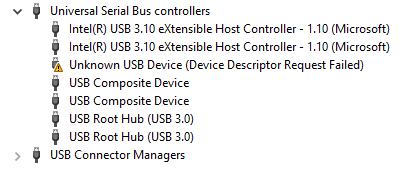
-
Is that with- or without the Gpy inserted?
If it's also getting quite warm, Im afraid its not looking very bright unfortunately. Can you identify which part is getting warm? In normal operation, some parts can get quite warm.
Hello! It looks like you're interested in this conversation, but you don't have an account yet.
Getting fed up of having to scroll through the same posts each visit? When you register for an account, you'll always come back to exactly where you were before, and choose to be notified of new replies (either via email, or push notification). You'll also be able to save bookmarks and upvote posts to show your appreciation to other community members.
With your input, this post could be even better 💗
Register Login