Guru Meditation Error: sqnsupgrade.info()
-
Hello. I faced with problems while testing LTE modem on GPy. Modem is not able to find any network. I decided to update the LTE firmware but faced with problem. sqnsupgrade.info() finishes with Guru Meditation Error.
Backtrace translation is
ppp_close
/home/peter/docs/pycom-esp-idf/components/lwip/lwip/src/netif/ppp/ppp.c:326
pppapi_do_ppp_close
/home/peter/docs/pycom-esp-idf/components/lwip/lwip/src/netif/ppp/pppapi.c:372
tcpip_thread
/home/peter/docs/pycom-esp-idf/components/lwip/lwip/src/api/tcpip.c:124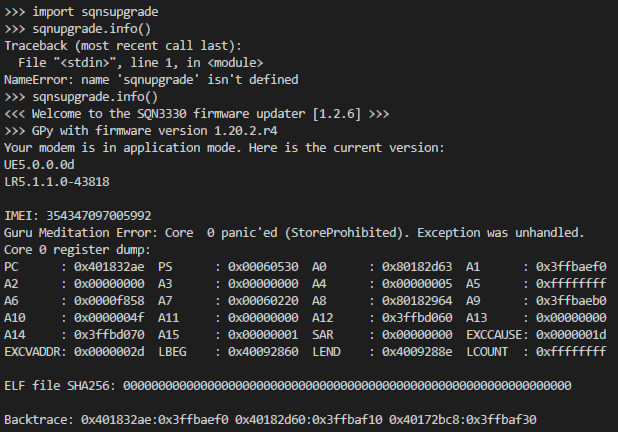
Moreover, sqnspudate.run('COM','xxx,dup') freezes on "Attempting AT wakeup..." and nothing happens.
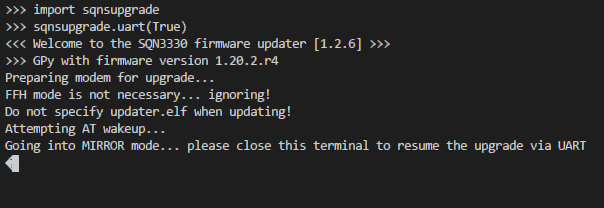
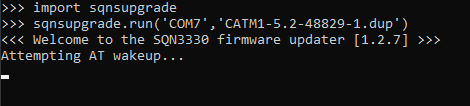
I tried to power GPy from both DC source and Li-Ion battery but behaviour was the same in both cases. How can I solve my problem and make LTE modem work?
-
Hi,
The issue is only withsqnsupgrade.info()(as you decoded, the closing of the ppp), and does not affect the rest of the modem operation, nor the update functionality.Concerning your issue with
sqnsupgrade.run(), could you add thedebug=Trueflag in the command? This should give more insight in the AT commands being send. Note that you'll have to close the Pymakr connection to your Gpy. -
Now the process goes successfully.
import sqnsupgrade
sqnsupgrade.run('COM7','CATM1-5.2-48829-1.dup',debug=True)
Welcome to the SQN3330 firmware updater [1.2.7] >>>
File CATM1-5.2-48829-1.dup has size 416448
file_path? CATM1-5.2-48829-1.dup mirror? False recover? False resume? False direct? False atneg_only? False bootrom? False load_fff? True
baudrate: 921600 target_baudrate: 921600
Setting port COM7
Setting baudrate to 921600
Initial prepartion complete...
Loading CATM1-5.2-48829-1.dup
Attempting AT wakeup... [921600]
b'\r\nOK\r\n'
AT+BIND=AT returned b'\r\nOK\r\n'
ATE0 returned b'\r\nOK\r\n'
Entering upgrade mode...
Sending AT+SMLOG?
AT+SMLOG? returned b'\r\n+SMLOG: LOG_INHERIT\r\nOK\r\n'
AT+SMOD? returned 2
AT+SQNSUPGRADENTF="started" returned b'\r\n\r\nOK\r\n'
Sending AT+SQNWL="sqndcc",2
AT+SQNWL="sqndcc",2 returned b'\r\n+SQNWL: "sqndcc",2\r\n\r\nOK\r\n'
Sending AT+CFUN=4
AT+CFUN=4 returned b'\r\nOK\r\n\r\n+CEREG: 0\r\n'
Starting STP [FFF]
Sending AT+SMSTPU
Starting STP code upload with pkgdebug=False
running m.wipe
running m.reset
magic=0x74736166, op=0x80, sid=0x0, plen=0x0, tid=0x0, hcrc=0x0, pcrc=0x0
Correct SRSP signature: 0x74736166
running m.open_session
Session opened: version 1, max transfer 8192 bytes
running push(m)
Sending 416448 bytes: [########################################] 100%
running dev.set_timeout(2)
running m.reset(True)
start returned True type <class 'bool'>
Code download done, returning to user mode
Waiting for modem to finish the update...
This might take several minutes!
<<<=== DO NOT DISCONNECT POWER ===>>> [921600]
b'\r\nOK\r\n'
AT+SMUPGRADE? returned b'\x00' [timeout: 0.4780917167663574]
AT+SMUPGRADE? returned b'\r\n+SYSSTART\r\n' [timeout: 5.001538515090942]
AT+SMUPGRADE? returned b'\r\n+SMUPGRADE: success\r\n\r\nOK\r\n' [timeout: 5.478849411010742]
AT+SMSWBOOT? returned b'\r\nFFF\r\nOK\r\n'
AT+SMUPGRADE? returned b'\r\n+SMUPGRADE: success\r\n\r\nOK\r\n'
This is my result: success
Sending AT+SQNSUPGRADENTF="success"
AT+SQNSUPGRADENTF="success" returned b'\r\nOK'
Your modem has been successfully updated.
Here is the current firmware version:file_path? None mirror? False recover? False resume? True direct? True atneg_only? False bootrom? False load_fff? False
baudrate: 921600 target_baudrate: 921600
Setting port COM7
Setting baudrate to 921600
SYSTEM VERSIONFIRMWARE VERSION
Bootloader0 : 5.1.1.0 [43818]
Bootloader1* : 5.2.1.0 [48829]
Bootloader2 : NA
NV Info : 1.1,0,0
Software : 5.1.1.0 [43818] by robot-soft at 2019-05-29 15:58:56
UE : 5.0.0.0d
COMPONENTS
ZSP0 : 1.0.99-13616
ZSP1 : 1.0.99-12376IMEI: 354347097005992
-
There are two files in archive provided by pycom: CATM1-5.2-48829-1.dup and CATM1-5.2-48829-2.dup. What should i do with CATM1-5.2-48829-2.dup ?
-
As mentioned on the LTE modem firmware update page: https://docs.pycom.io/updatefirmware/ltemodem/ the 5.2-48829 update is a two-step process. You'll first need to load file 1, and then file 2: https://docs.pycom.io/updatefirmware/ltemodem/#note-on-updating-to-cat-m1-52-48829 :)
Hello! It looks like you're interested in this conversation, but you don't have an account yet.
Getting fed up of having to scroll through the same posts each visit? When you register for an account, you'll always come back to exactly where you were before, and choose to be notified of new replies (either via email, or push notification). You'll also be able to save bookmarks and upvote posts to show your appreciation to other community members.
With your input, this post could be even better 💗
Register Login