SDI-12 Soil Moisture Probe Help
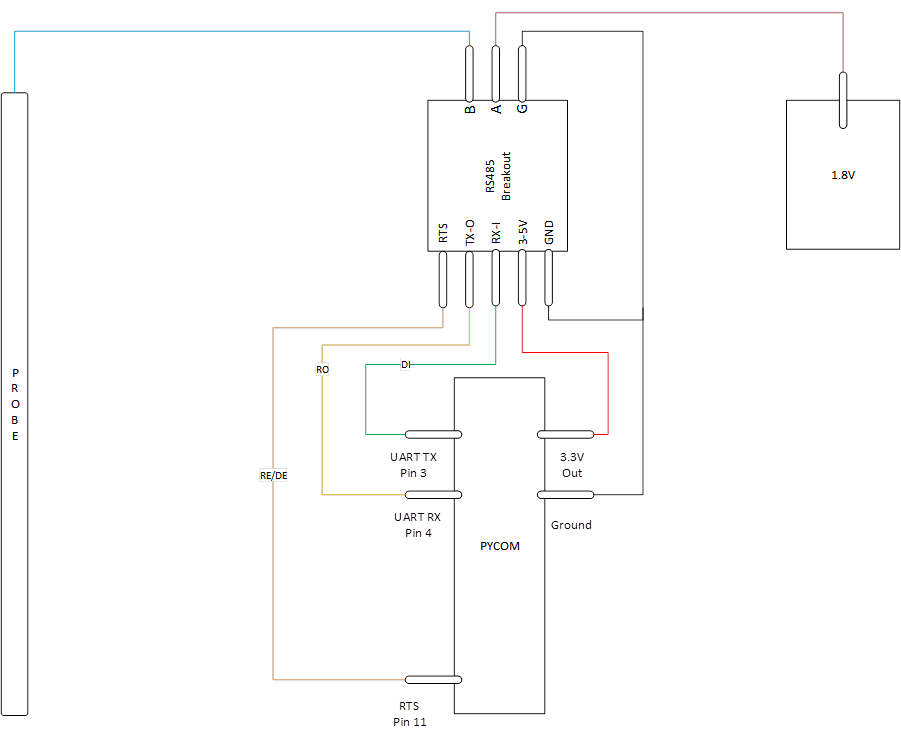
-
@robert-hh Thank you! i rigged up the battery and got the response. I also just tried used a DAC output on Pin22 set at 55% which is roughly 1.77V and it seems to work as well without any special power supply
dac = machine.DAC('P22') # create a DAC object
dac.write(0.55) # set output to 55% ~1.77V -
@Bryan-Hom @robert-hh Hello, I've tried the program and do the wiring diagram like this
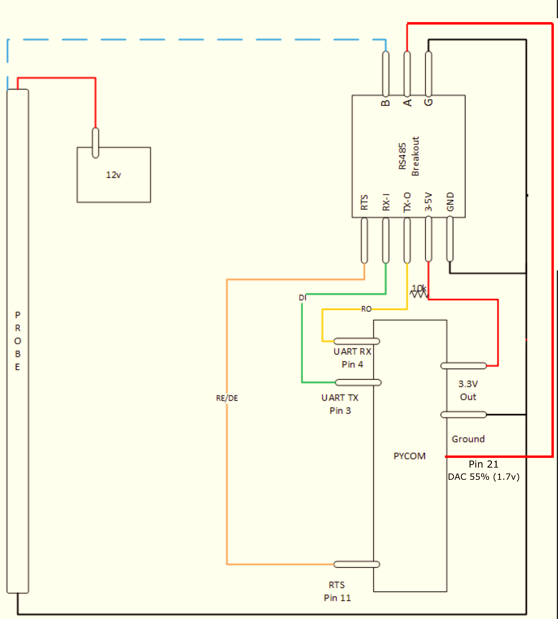
but it still can't seem to get any reply from the sensor.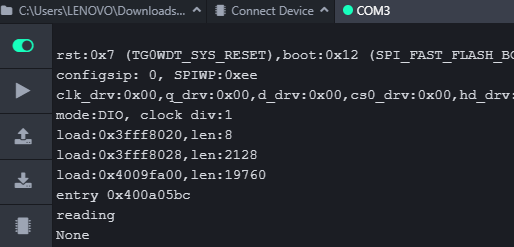 ,
,here is my program
import utime
from machine import Pin, UART, DAC
# from machine import UART

uart = UART(1, baudrate=1200)
p_tx = Pin('P10', mode=Pin.OUT)
p_dir = Pin('P11', mode=Pin.OUT)
pin12 = Pin('P3', mode=Pin.OUT)
dac = DAC('P21') # create a DAC object


def SDI12(cmd):
    uart.deinit()
    p_tx.value(0)
    p_dir.value(1)        # set output dir
    utime.sleep_us(12800)  # send BREAK
    p_tx.value(1)
    utime.sleep_us(8333)   # send MARK
    uart.init(1200, bits=7, parity=UART.EVEN, stop=1, timeout_chars=75)     # init with given parameters
    uart.write(cmd)       # send command
    utime.sleep_us(8333 * len(cmd))  # wait to send command (byte time * command lenght)
    p_dir.value(0)    # output set to read
    line = uart.readline()      # read data from UART
    return line;

while True:
    print("reading")
    pin12.value(1)
    dac.write(0.55) # set output to 55% ~1.77V
    utime.sleep(2)
    line = SDI12("?!")
    utime.sleep(3)
    print(line)
    # pin12.value(0)
    utime.sleep(10)
I need your help to fix it, Thank you
-
@Gusti-Made-Arya-Wijaya Compqring with the port of the previous poster, you use different pins for p_tx. In the previous post, p_tx is the same a UART 1 TX, and that is by intention.
-
@robert-hh @Bryan-Hom Hello, I've updated the program like this
import utime
from machine import Pin, UART, DAC
# from machine import UART

# uart = UART(1, baudrate=1200, pins=('P10','P11'))
uart = UART(1, baudrate=1200)
p_tx = Pin('P3', mode=Pin.OUT)
# p_tx = Pin('P10', mode=Pin.OUT)
p_dir = Pin('P11', mode=Pin.OUT)
# pin12 = Pin('P3', mode=Pin.OUT)
dac = DAC('P21') # create a DAC object


def SDI12(cmd):
    uart.deinit()
    p_tx.value(0)
    p_dir.value(1)                                                          # set output dir
    # utime.sleep_us(12800)                                                   # send BREAK
    utime.sleep_us(14000)
    p_tx.value(1)
    utime.sleep_us(8333)                                                    # send MARK
    uart.init(1200, bits=7, parity=UART.EVEN, stop=1, timeout_chars=75)     # init with given parameters
    uart.write(cmd)                                                         # send command
    utime.sleep_us(8333 * len(cmd))                                         # wait to send command (byte time * command lenght)
    # p_dir.value(0)                                                          # output set to read
    line = uart.readline()                                                  # read data from UART
    return line;

while True:
    print("reading")
    # pin12.value(1)
    dac.write(0.55) # set output to 55% ~1.77V
    utime.sleep(2)
    line = SDI12('?!')
    utime.sleep(3)
    print(line)
    # line = SDI12('0M!')
    # utime.sleep(3)
    # print(line)
    # pin12.value(0)
    utime.sleep(10)
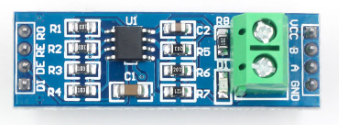
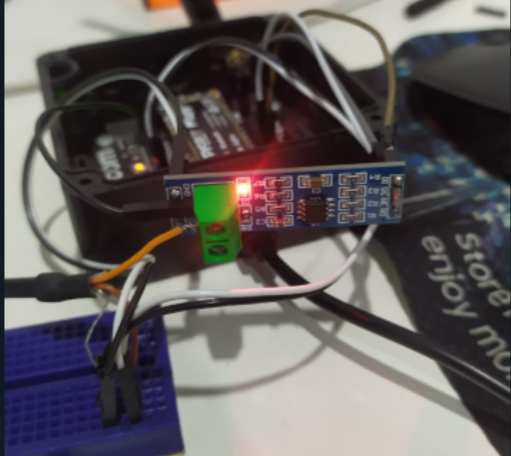
but the response is still "none", and I use rs485 module like this (max485)
-
@Gusti-Made-Arya-Wijaya As far I see it, the chip has both transmit enable DE and receive enable /RE. For Transmit, the DE has to be high, for receive, the /RE has to be low. Unless you have an inverter connected between DE and /RE, you have to control both in software.
-
@robert-hh I've followed the wiring by @AntonioValente's reply in https://forum.pycom.io/topic/1924/sdi-12/6 he uses SN65HVD1780 chip that has same pinout as MAX485.
-
@Gusti-Made-Arya-Wijaya But still you have to control both DE and /RE. You code seems to control only one of them.
-
Here is my code. You may also have issues with your board. i would recommend the sp3485 chip as that is what i am using
def SDI12(cmd): uart = UART(1, baudrate=1200) p_tx = Pin('P3', mode=Pin.OUT) p_dir = Pin('P11', mode=Pin.OUT) #RTS pin on rs485 breakout board dac = machine.DAC('P22') # create a DAC object for rs485 board to be used as reference voltage for terminal A dac.write(0.50) # set output to 50% ~1.59V Note: if this voltage output is greater than 1.77, the sensor will no longer read uart.deinit() p_tx.value(0) p_dir.value(1) # set output dir time.sleep_us(12500) # send BREAK p_tx.value(1) utime.sleep_us(8333) # send MARK uart.init(1200, bits=7, parity=UART.EVEN, stop=1, timeout_chars=75) # init with given parameters uart.write(cmd) # send command time.sleep_us(8333 * len(cmd)) # wait to send command (byte time * command lenght) p_dir.value(0) # output set to read line = uart.read() # read data from UART return line;``` -
@Gusti-Made-Arya-Wijaya Did you connect both /RE and DE to the p_dir Pin?
-
@robert-hh yes I did
-
@Bryan-Hom oh okay thanks for your advice. I only have max485 and max3485 now


Hello! It looks like you're interested in this conversation, but you don't have an account yet.
Getting fed up of having to scroll through the same posts each visit? When you register for an account, you'll always come back to exactly where you were before, and choose to be notified of new replies (either via email, or push notification). You'll also be able to save bookmarks and upvote posts to show your appreciation to other community members.
With your input, this post could be even better 💗
Register Login