Welcome to the Pycom forum Forum
    • \[\[global:header.categories\]\]
    • \[\[global:header.recent\]\]
    • \[\[global:header.tags\]\]
    • \[\[global:header.popular\]\]
    • Login

    Explore Pybytes | Official Documentation | Report a Firmware Bug/Issue | GitHub

    Send data requests http post. **SOLVED**

    Scheduled Pinned Locked Moved LoPy
    http postpostrequest.pyurequest.pyubidots
    40 Posts 7 Posters 22.5k Views 7 Watching
    Loading More Posts
    • Oldest to Newest
    • Newest to Oldest
    • Most Votes
    Reply
    • Reply as topic
    Log in to reply
    This topic has been deleted. Only users with topic management privileges can see it.
    • B Offline
      bucknall
      last edited by

      Hi @scg94,

      Can you let me know the specific error that is coming up?

      I've had some small issues with urequest.py in the past but should be easy to resolve them!

      Developer Evangelist - Pycom

      S 1 Reply Last reply Reply Quote 0
      • S Offline
        scg94 @bucknall
        last edited by

        @bucknall Hello Friend,

        Thank you very much for your help, as I told you in the previous comment, I have tried different ways. What I want to do is send data, either by POST request or by MQTT to the Ubidots platform. I tried with both methods and the two libraries but I could not.

        These are the urequest.py errors, I hope you can help me...

        0_1491485602923_Error 1.PNG

        0_1491485615698_Error 2.PNG

        0_1491485625351_Error 3.PNG

        L B 2 Replies Last reply Reply Quote 0
        • L Offline
          livius @scg94
          last edited by livius

          @scg94
          Is your board connceted to your router?
          https://docs.pycom.io/pycom_esp32/pycom_esp32/tutorial/includes/wlan.html

          think about people first, then computers

          S 1 Reply Last reply Reply Quote 1
          • S Offline
            scg94 @livius
            last edited by

            @livius Hi bro,

            Yes, of course, it's connected...

            0_1491486201855_Connect.PNG

            L 1 Reply Last reply Reply Quote 0
            • L Offline
              livius @scg94
              last edited by livius

              @scg94

              0_1491485602923_Error 1.PNG
              you call request without specify method - first argument e.g. 'POST'

              0_1491485615698_Error 2.PNG

              it looks like not connected to network or host is really unavaiable - but
              for test try get instead of post form some of this page - to get some content

              0_1491485625351_Error 3.PNG

              same as first

              think about people first, then computers

              1 Reply Last reply Reply Quote 1
              • B Offline
                bucknall @scg94
                last edited by

                Hi @scg94,

                This appears to be a problem with their use of SSL within their library, I'm having a look at this and I'm getting the same issues. Let me see if I can fix their code!

                I'll let you know soon what I discover!

                Thanks,

                Alex

                Developer Evangelist - Pycom

                S 2 Replies Last reply Reply Quote 0
                • R Offline
                  RadioTek
                  last edited by

                  I have been trying to do the same thing using urequest, and have been getting the same error message. Hours spent trying to get to the bottom of it.

                  1 Reply Last reply Reply Quote 0
                  • D Offline
                    danielm
                    last edited by

                    Hi, try this urequests.py library, I modified it recently to make it work on LoPy with SSL. Unfortunately I did not comment my changes.
                    https://drive.google.com/file/d/0B2mvAuXuxQ6BOW5Sa210Wm9SWkk

                    S W 2 Replies Last reply Reply Quote 0
                    • S Offline
                      scg94 @danielm
                      last edited by

                      @danielm Hi,

                      Do you have any examples of using your library?

                      1 Reply Last reply Reply Quote 0
                      • D Offline
                        danielm
                        last edited by

                        @scg94

                        response = urequests.post("https://<url>", auth=("user", "pass"), headers={"Content-Type": "application/xxx+json", "Accept": "application/xxx+json"}, data='{"id": "%s"}' % myID)

                        The response will have several properties like response.text, response.status_code, ....
                        As you probably know you can list them via dir(response).

                        It is not my library, I just modified it to make it work on my LoPy :)

                        1 Reply Last reply Reply Quote 0
                        • R Offline
                          RadioTek
                          last edited by

                          Digging deeper after much time, I find that,
                          addr = socket.getaddrinfo('www.google.com', 80)[0][-1]
                          print(addr)
                          always returns the the same ip address "200.249.64.63"
                          From lookup on the web this address appears to be registered in Brazil.
                          Does not matter what URL I use or what DNS address I set in the WIFI
                          configuration. I have a connection and this is what is returned as the
                          looked up IP

                          J 1 Reply Last reply Reply Quote 0
                          • J Offline
                            jmarcelino @RadioTek
                            last edited by

                            @RadioTek
                            Can you post the result of
                            print(WLAN().ifconfig())

                            Also any chance you can try it on a completely different WiFi network? or maybe check the DNS result from another computer on the same network?

                            R 1 Reply Last reply Reply Quote 0
                            • R Offline
                              RadioTek @jmarcelino
                              last edited by

                              @jmarcelino Hi ,
                              The result of print(wlan.ifconfig()) is ('10.1.1.37','255.255.255.0','10.1.1.1','8.8.4.4')
                              I have set the WIFI to a static address. I have tried 10.1.1.1, 8.8.8.8, 8.8.4.4, and
                              my providers DNS address, and all return the same result.
                              addr = socket.getaddrinfo('http://www.checkthat.com.au', 80)[0][-1]
                              print(addr) # returns ('200.249.64.63',80')
                              Then entering the known IP address for "www.checkthat.com.au"
                              addr = ('116.0.20.2',80)
                              print(addr) # returns ('116.0.20.2',80)
                              sa = socket.socket()
                              sa.connect(addr)
                              sa.send(b'GET / HTTP/1.1\r\nHost: checkthat.com.au\r\n\r\n')
                              data = sa.recv(1000)
                              sa.close()
                              print(data) # returns the header information of the page

                              I have tried this on my mobile network as well, with alternate IP address's
                              wlan.ifconfig(config=('192.168.43.10', '255.255.255.0', '192.168.43.1', '192.168.43.1')) and it has behaved exactly the same way.

                              Thanks from Alex

                              J 1 Reply Last reply Reply Quote 0
                              • J Offline
                                jmarcelino @RadioTek
                                last edited by

                                @RadioTek
                                Thank you for posting those. Just to be sure you're running the latest firmware on the LoPy?

                                os.uname()

                                Also when you connected to the mobile network was that using a mobile phone as the WiFi AP?

                                R 1 Reply Last reply Reply Quote 0
                                • R Offline
                                  RadioTek @jmarcelino
                                  last edited by

                                  @jmarcelino said in Send data requests http post.:

                                  os.uname()

                                  (sysname='LoPy', nodename='LoPy', release='1.6.10.b1', version='v1.8.6-556-g989d5ac9 on 2017-03-30', machine='LoPy with ESP32', lorawan='1.0.0'

                                  Yes connection to my mobile network was via WIFI using phone as AP

                                  My Laptop "as using now" is worked through my office WIFI network back in to ADSL2. DNS functioning of all computers on the network seems perfect.

                                  Regards Alex

                                  1 Reply Last reply Reply Quote 0
                                  • S Offline
                                    scg94 @bucknall
                                    last edited by

                                    @bucknall @RadioTek @jmarcelino

                                    Hello everyone,

                                    I keep trying to send the requests but I still can not, I want you to see this that came out...
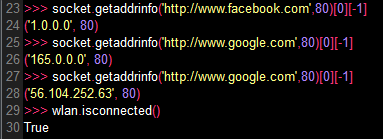
                                    0_1491830116867_Ping.PNG

                                    I do not know how to send requests, I even tried connecting the LoPy to the Raspberry through Tx and Rx but I also did not find positive result.

                                    I really need help! Thank you...

                                    1 Reply Last reply Reply Quote 0
                                    • S Offline
                                      scg94 @bucknall
                                      last edited by

                                      @bucknall Hello again,

                                      I think I'm slowly solving things, what I did was change the domain name by IP, and now it works, but I have an error again with the library, this time it speaks of: "TypeError: object with buffer protocol required"...

                                      0_1491834052837_Error.PNG

                                      Do you know what it is about?

                                      L 1 Reply Last reply Reply Quote 0
                                      • L Offline
                                        livius @scg94
                                        last edited by livius

                                        @scg94
                                        cast data as bytes

                                        urequest.request("POST", url, bytes([your_data])
                                        

                                        or create it at start as buffered

                                        think about people first, then computers

                                        S 1 Reply Last reply Reply Quote 0
                                        • S Offline
                                          scg94 @livius
                                          last edited by scg94

                                          @livius Hi,

                                          I tried with this and look at the result ...

                                          >>> datos={"temperatura_rpi": 500}
                                          >>> data=bytes([datos])
                                          Traceback (most recent call last):
                                            File "<stdin>", line 1, in <module>
                                          TypeError: cant convert dict to int
                                          >>> urequest.request("POST" ,"http://50.23.124.68/api/v1.6/devices/raspxxx?token=xxxxxxxxx",{"temperatura_rpi": bytes(500)})
                                          Traceback (most recent call last):
                                            File "<stdin>", line 1, in <module>
                                            File "/flash/lib/urequest.py", line 74, in request
                                          TypeError: object with buffer protocol required
                                          >>>
                                          

                                          Can you help me?? Thank u...

                                          L 1 Reply Last reply Reply Quote 0
                                          • L Offline
                                            livius @scg94
                                            last edited by

                                            @scg94 said in Send data requests http post.:
                                            third parameter must be buffered
                                            e.g. string or bytes
                                            you can not send dictionary

                                            {"temperatura_rpi": bytes(500)}
                                            

                                            do you try to send string?
                                            if yes then concat it

                                            '{"temperatura_rpi": 500}'
                                            

                                            or if you have int variable

                                            '{"temperatura_rpi": ' + str(int_var) + '}'
                                            

                                            think about people first, then computers

                                            S 1 Reply Last reply Reply Quote 0

                                            Hello! It looks like you're interested in this conversation, but you don't have an account yet.

                                            Getting fed up of having to scroll through the same posts each visit? When you register for an account, you'll always come back to exactly where you were before, and choose to be notified of new replies (either via email, or push notification). You'll also be able to save bookmarks and upvote posts to show your appreciation to other community members.

                                            With your input, this post could be even better 💗

                                            Register Login
                                            • 1
                                            • 2
                                            • 1 / 2
                                            • First post
                                              Last post

                                            Pycom on Twitter

                                            Pycom

