Pymakr behavior
-
Hi All! I just wanted to make you aware of behavior I'm seeing with the 1.0.0.6b release of the tool. This is running on an iMax with macOS 10.12.1,
I have two LoPys that I was attempting to connect to. FYI - they have both been updated to the current release of the firmware using the standalone tool.
Pymakr was able to connect to the first LoPy I connected. When disconnected the first LoPy and connected up the second one, I was flagged with a pop-up warning. I've attached a screen capture
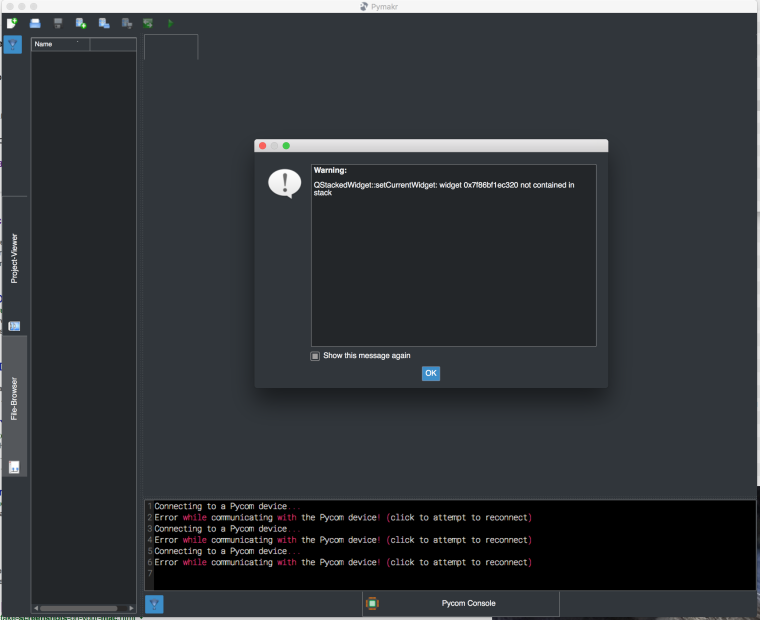
What I'm encountering is that I can't get this dialog to go away without using the activity monitor to kill/force kill Pymakr. I tried disconnecting the LoPy and then tried to close this warning dialog but it still refused to close using either the OK or "Red Ball" approach.This just leads me to a general question about Pymakr. Should we connect the LoPy to the system first and then start up Pymakr, or can Pymakr survive a LoPy board switch while active? As it happens, when I cold started Pymakr, it seemed to find the board. It makes me feel that after you attach a LoPy, the host OS is going to have to get things set up first. This isn't unexpected. So a follow up question I have is if you have two LoPys that you want to work with on the same host computer, can we expect to reach them with a common device specification such as/dev/cu.usbserial-DQ008D4O. Or will the host OS set up a separate usbserial device for each board? I understand that each device will have a unique wifi identification.
Cheers!
-
click on do not show again
-
Hi @geobike ,
Thanks for the extended feedback. I put this issue on my tasklist. (It should be a very easy fix in the form of removing a print() somewhere, but I've yet to find it in the code.) For now, please uncheck the 'Show this message again' checkbox, like @livius is saying.
Pymakr should be able to handle board switches without a restart, but you'll have to change the comport setting for each specific board since they indeed all get new comport addresses from the OS (right click the Pycom console for quick access).
There is a known issue with the Pycom console tab getting stuck in some situations after a while or when unplugging boards, but this is on our list to fix. -
@geobike, to further reply your question:
if you have two LoPys that you want to work with on the same host computer, can we expect to reach them with a common device specification such as/dev/cu.usbserial-DQ008D4O. Or will the host OS set up a separate usbserial device for each board? I understand that each device will have a unique wifi identification.
Each expansion board has an USB to serial port, and the final part of the name is related to that chip. If you swap LoPys over the same expansion board, you'll be able to connect to them over the same
/dev/....string.If you plug two expansion boards at the same time, they'll indeed appear with different names (different serial ports). The MAC addresses are used for the WiFi part, so each device has it's own access point name (SSID).
I'm refering to expansion boards, but is the same with any kind of USB-to-serial adaptor you can have.
Hope this was helpful for now, if you have more questions, please ask them :)
Hello! It looks like you're interested in this conversation, but you don't have an account yet.
Getting fed up of having to scroll through the same posts each visit? When you register for an account, you'll always come back to exactly where you were before, and choose to be notified of new replies (either via email, or push notification). You'll also be able to save bookmarks and upvote posts to show your appreciation to other community members.
With your input, this post could be even better 💗
Register Login