Welcome to the Pycom forum Forum
    • \[\[global:header.categories\]\]
    • \[\[global:header.recent\]\]
    • \[\[global:header.tags\]\]
    • \[\[global:header.popular\]\]
    • Login

    Explore Pybytes | Official Documentation | Report a Firmware Bug/Issue | GitHub

    Screen blank

    Scheduled Pinned Locked Moved WiPy 2&3
    wipy 2
    14 Posts 4 Posters 3.3k Views 4 Watching
    Loading More Posts
    • Oldest to Newest
    • Newest to Oldest
    • Most Votes
    Reply
    • Reply as topic
    Log in to reply
    This topic has been deleted. Only users with topic management privileges can see it.
    • RobTuDelftR Offline
      RobTuDelft
      last edited by

      You can boot in safe mode, then execution of both boot.py and main.py is skipped.

      Without data you're just another person with an opinion.
      Hackster | About me

      1 Reply Last reply Reply Quote 0
      • R Offline
        robmarkcole
        last edited by

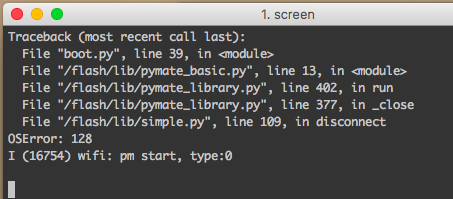
        Thanks, I have booted it in safe mode and have the slow blink blue light, but now different issue with screen. I have identified the port using the Arduino app

        0_1491850867209_upload-5e490e8c-d6e1-455e-9d43-8ed83ad39cbc

        Now I should be able to connect with

        0_1491850891901_upload-fcb9dcb7-4efa-439c-abe5-eaf5cdfd81f9

        But I get a very quick message stating something like 'cannot open line.. resource busy' and 'Sorry, could not find a PTY'... Any advice? Thanks

        RobTuDelftR J 2 Replies Last reply Reply Quote 0
        • RobTuDelftR Offline
          RobTuDelft @robmarkcole
          last edited by

          @robmarkcole, sorry I don't have a Mac. But have you tried the instructions from this link?

          Without data you're just another person with an opinion.
          Hackster | About me

          R 1 Reply Last reply Reply Quote 0
          • R Offline
            robmarkcole @RobTuDelft
            last edited by

            Thanks Rob, tried both methods in the link but no luck

            0_1491851904672_upload-04829b7f-cee0-4208-aa41-bd786a169c5c

            RobTuDelftR 1 Reply Last reply Reply Quote 0
            • RobTuDelftR Offline
              RobTuDelft @robmarkcole
              last edited by

              @robmarkcole Just checking, are you connected to your Wipy's Wi-Fi network?

              Without data you're just another person with an opinion.
              Hackster | About me

              R 1 Reply Last reply Reply Quote 0
              • R Offline
                robmarkcole @RobTuDelft
                last edited by

                @RobTuDelft I can see the Wipy wifi but am not connected to it. I previously configured the wipy to connect to my home network, but suppose that in safe mode it wouldn't connect..?

                0_1491852920654_upload-28020cb9-aaee-4808-93c1-03fc1210fabb

                RobTuDelftR 1 Reply Last reply Reply Quote 0
                • J Offline
                  jmarcelino @robmarkcole
                  last edited by

                  @robmarkcole
                  "Resource busy" probably means you have another screen session attached to the serial device. Make sure you kill all your screens.

                  R 1 Reply Last reply Reply Quote 0
                  • RobTuDelftR Offline
                    RobTuDelft @robmarkcole
                    last edited by

                    @robmarkcole Correct, in safe boot boot.py will not run, and this would mean that your WiPy will run in access point mode. Therefore you would have to connect to its network in that case.

                    Without data you're just another person with an opinion.
                    Hackster | About me

                    R 1 Reply Last reply Reply Quote 0
                    • R Offline
                      robmarkcole @jmarcelino
                      last edited by

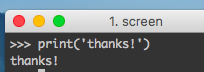
                      @jmarcelino Thanks that was it, restarted my mac now connecting OK
                      0_1491857386192_upload-c6d6a987-e596-4b62-8dc4-5b6a31f22d0c

                      1 Reply Last reply Reply Quote 0
                      • R Offline
                        robmarkcole @RobTuDelft
                        last edited by

                        @RobTuDelft Whilst I can connect via Screen, Telnet times out, as does FTP.. Any ideas? Wrong address? I note that my usb connection differs slightly from the example being /dev/cu.usbserial-DQ0058HD

                        0_1491888723018_upload-74aa71d2-bf3d-4cfe-918a-b83d559e429f

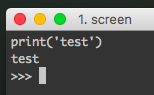
                        Also after I connect via screen, I am initially presented with a blank screen, and only get the >>> after entering the first command (as below), is this normal?
                        0_1491888812836_upload-54756443-3bd9-4fbd-ad87-89d550b1aaa0

                        Thanks!

                        RobTuDelftR robert-hhR 2 Replies Last reply Reply Quote 0
                        • RobTuDelftR Offline
                          RobTuDelft @robmarkcole
                          last edited by

                          @robmarkcole I don't think you can use telnet of ftp over a usb connection (correct me if I'm wrong). For that I use Wi-Fi only, so the address would then be its ip-address. It's no problem that your usb connection gets named a little bit different.

                          Maybe the connection will only trigger when sending something? I don't experience this issue with putty or my own simple Python telnet client for that matter.

                          Without data you're just another person with an opinion.
                          Hackster | About me

                          1 Reply Last reply Reply Quote 1
                          • robert-hhR Offline
                            robert-hh @robmarkcole
                            last edited by

                            @robmarkcole The empty screen at the beginning of the screen session is normal. While you were absent, your WiPy has booted and sent it's greetings, and now that you come with screen, it's simply waiting.
                            For Telnet and FTP. You have to connect you PC to the AP wipy-wlan-ac14 (?) created by the WiPy, with the password 'www.pycom.io' . This creates the "air cable" between your mac and the WiPy, and assigns you to your computer an IP address in the 192.168.4.x range. Then you can use protocols like Telnet and FTP, which require the login name 'micro' and password 'python'.
                            Please note, that while you are connected with WIFi to the WiPy, you cannot have a WiFi connection to the internet at the same time.

                            R 1 Reply Last reply Reply Quote 1
                            • R Offline
                              robmarkcole @robert-hh
                              last edited by

                              @robert-hh and @RobTuDelft thanks for your help, I am now up and programming! Perhaps a few of the issues I had could be better explained in the documentation, happy to provide some feedback if requested. Cheers!


                              1 Reply Last reply Reply Quote 0

                              Hello! It looks like you're interested in this conversation, but you don't have an account yet.

                              Getting fed up of having to scroll through the same posts each visit? When you register for an account, you'll always come back to exactly where you were before, and choose to be notified of new replies (either via email, or push notification). You'll also be able to save bookmarks and upvote posts to show your appreciation to other community members.

                              With your input, this post could be even better 💗

                              Register Login
                              • 1 / 1
                              • First post
                                Last post

                              Pycom on Twitter

                              Pycom
