Welcome to the Pycom forum Forum
    • \[\[global:header.categories\]\]
    • \[\[global:header.recent\]\]
    • \[\[global:header.tags\]\]
    • \[\[global:header.popular\]\]
    • Login

    Explore Pybytes | Official Documentation | Report a Firmware Bug/Issue | GitHub

    Pymakr Atom Plugin released

    Scheduled Pinned Locked Moved Announcements & News
    pymakrpluginatom
    91 Posts 29 Posters 63.5k Views 26 Watching
    Loading More Posts
    • Oldest to Newest
    • Newest to Oldest
    • Most Votes
    Reply
    • Reply as topic
    Log in to reply
    This topic has been deleted. Only users with topic management privileges can see it.
    • R Offline
      robmarkcole
      last edited by

      I guess this is reported..

      0_1492103898695_upload-31ad01b8-1e4c-46e1-8907-4b00c05f4593

      L R S 3 Replies Last reply Reply Quote 0
      • L Offline
        livius @robmarkcole
        last edited by

        @robmarkcole
        what os?
        For me on Windows 10 64bit - work without problems

        think about people first, then computers

        1 Reply Last reply Reply Quote 0
        • RobTuDelftR Offline
          RobTuDelft
          last edited by RobTuDelft

          Bug?
          It will timeout when there is a running script going on.

          I guess the REPL plugin expects a "Password: " password line and not a sensor value?

          Without data you're just another person with an opinion.
          Hackster | About me

          R 1 Reply Last reply Reply Quote 0
          • R Offline
            Ralph @robmarkcole
            last edited by

            @robmarkcole Are you on Debian? robert-hh reported the same problem on debian. He solved it by completely re-installing atom and the pymakr plugin. Can you post the os and atom version you are on? I'll see if I can test it properly myself if it's a debian problem.

            1 Reply Last reply Reply Quote 0
            • R Offline
              Ralph @RobTuDelft
              last edited by

              @RobTuDelft The login procedure is a seperate thread from the sensor code that is running and they shoudn't interfere with each other. Did you confirm you can login through telnet from the commandline or putty?

              RobTuDelftR 1 Reply Last reply Reply Quote 0
              • R Offline
                robmarkcole
                last edited by

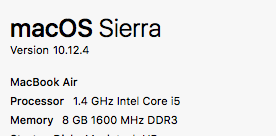
                I'm on OSX Yosemite

                1 Reply Last reply Reply Quote 0
                • R Offline
                  rdixey
                  last edited by

                  Would appreciate if the console text were colorized in the Atom plugin the same as it is in Pymakr. I found a lot of Atom UI/Syntax themes to play with but nothing that effects the Pymakr console. I see no way to set a theme or color / font in the Atom plugin settings. Is there a simple config setting somewhere?

                  R 1 Reply Last reply Reply Quote 0
                  • RobTuDelftR Offline
                    RobTuDelft @Ralph
                    last edited by

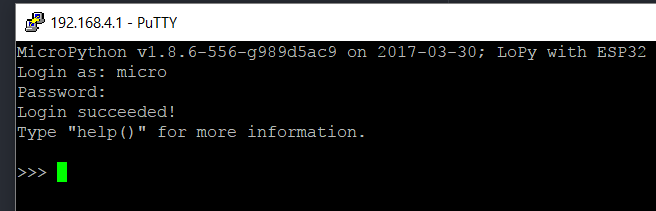
                    @Ralph Yes, Putty works fine.
                    0_1492108619143_2.PNG

                    Unfortunately the Atom plugin does not.
                    Credentials and everything is still as default.
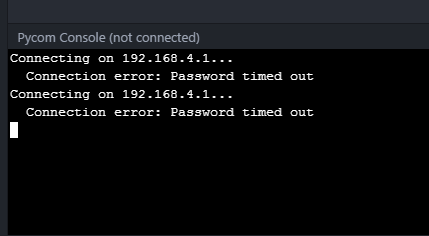
                    0_1492108612295_1.PNG

                    Also there are no active sessions on the Lopy when I try to connect through Atom. I try fresh after power cycle.

                    This is the exact message:

                    Connection error: Password timed out

                    Without data you're just another person with an opinion.
                    Hackster | About me

                    RobTuDelftR 1 Reply Last reply Reply Quote 0
                    • R Offline
                      Ralph @rdixey
                      last edited by

                      @rdixey The Syntax hilighting is a good idea, I think that has to be build into the terminal specifically. Added to the wishlist.
                      You can choose general themes for atom in the settings. The pymakr plugin will take the colors and fonts from the theme you select for atom.

                      1 Reply Last reply Reply Quote 0
                      • R Offline
                        robmarkcole
                        last edited by

                        I uninstalled and reinstalled both Atom and the pymakr plugin, yet the problem remains unfortunately.

                        0_1492146875425_upload-4c3649db-9c44-4dd0-8882-660949f24309

                        0_1492146898680_upload-acb38075-cd7e-43c6-b3a0-8ab0207cb343

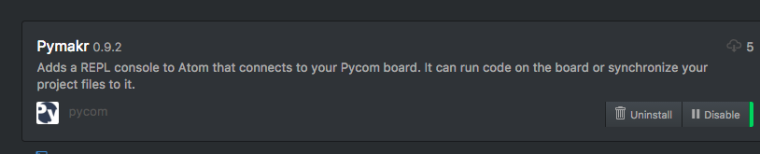
                        Pymaker has installed, but when I select one of the functions from Pycom Sync, nothing happens
                        0_1492146929526_upload-96595e60-43f9-40b0-81f9-9f01e0330ffb

                        1 Reply Last reply Reply Quote 0
                        • RobTuDelftR Offline
                          RobTuDelft @RobTuDelft
                          last edited by

                          @RobTuDelft To update on my own post, it did manage to connect today. After that I tried some commands and clicked 'close' to close the panel in Atom. This seems to be the source of the problem, the telnet connection will stay active on the Lopy, but not in Atom. When you want to reopen again you will get the password timed out error.

                          Without data you're just another person with an opinion.
                          Hackster | About me

                          R 1 Reply Last reply Reply Quote 0
                          • R Offline
                            Ralph @RobTuDelft
                            last edited by

                            @RobTuDelft Normally if a connection is still active to the device, you'll get a connection refused. if you get a 'password timed out' means that it reaches the device but something goes wrong during authentication. I've had this error a lot when the router at our office was not cooperating well and it just timed out. I'll do some testing on telnet today to see if I can reproduce it.
                            Which firmware version do you have running on your lopy?

                            RobTuDelftR 1 Reply Last reply Reply Quote 0
                            • RobTuDelftR Offline
                              RobTuDelft @Ralph
                              last edited by

                              @Ralph v1.6.12.b1. Thanks.

                              Without data you're just another person with an opinion.
                              Hackster | About me

                              1 Reply Last reply Reply Quote 0
                              • R Offline
                                robmarkcole
                                last edited by robmarkcole

                                0_1492162908815_upload-2710d56b-9b6e-4793-9d8c-04c7a5c238f9

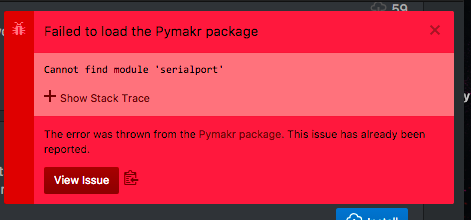
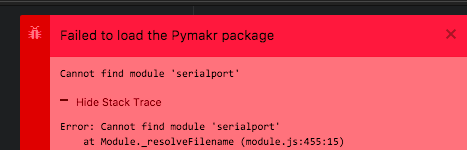
                                Here are the errors:

                                Failed to load the Pymakr package
                                Cannot find module 'serialport'
                                Hide Stack Trace
                                Error: Cannot find module 'serialport'
                                at Module._resolveFilename (module.js:455:15)
                                at Module._resolveFilename (/Applications/Atom.app/Contents/Resources/electron.asar/common/reset-search-paths.js:35:12)
                                at Function.Module._resolveFilename (/Applications/Atom.app/Contents/Resources/app.asar/src/module-cache.js:383:52)
                                at Function.Module._load (module.js:403:25)
                                at Module.require (module.js:483:17)
                                at require (/Applications/Atom.app/Contents/Resources/app.asar/src/native-compile-cache.js:50:27)
                                at Object.<anonymous> (/Users/robincole/.atom/packages/Pymakr/lib/connections/pyserial.js:4:16)
                                at Module._compile (/Applications/Atom.app/Contents/Resources/app.asar/src/native-compile-cache.js:109:30)
                                at Object.value [as .js] (/Applications/Atom.app/Contents/Resources/app.asar/src/compile-cache.js:216:21)
                                at Module.load (module.js:473:32)
                                at tryModuleLoad (module.js:432:12)
                                at Function.Module._load (module.js:424:3)
                                at Module.require (module.js:483:17)
                                at require (/Applications/Atom.app/Contents/Resources/app.asar/src/native-compile-cache.js:50:27)
                                at Object.<anonymous> (/Users/robincole/.atom/packages/Pymakr/lib/board/pyboard.js:3:34)
                                at Module._compile (/Applications/Atom.app/Contents/Resources/app.asar/src/native-compile-cache.js:109:30)
                                at Object.value [as .js] (/Applications/Atom.app/Contents/Resources/app.asar/src/compile-cache.js:216:21)
                                at Module.load (module.js:473:32)
                                at tryModuleLoad (module.js:432:12)
                                at Function.Module._load (module.js:424:3)
                                at Module.require (module.js:483:17)
                                at require (/Applications/Atom.app/Contents/Resources/app.asar/src/native-compile-cache.js:50:27)
                                at Object.<anonymous> (/Users/robincole/.atom/packages/Pymakr/lib/main.js:7:21)
                                at Module._compile (/Applications/Atom.app/Contents/Resources/app.asar/src/native-compile-cache.js:109:30)
                                at Object.value [as .js] (/Applications/Atom.app/Contents/Resources/app.asar/src/compile-cache.js:216:21)
                                at Module.load (module.js:473:32)
                                at tryModuleLoad (module.js:432:12)
                                at Function.Module._load (module.js:424:3)
                                at Module.require (module.js:483:17)
                                at require (/Applications/Atom.app/Contents/Resources/app.asar/src/native-compile-cache.js:50:27)
                                The error was thrown from the Pymakr package. This issue has already been reported.
                                View Issue

                                R 2 Replies Last reply Reply Quote 0
                                • R Offline
                                  Ralph @robmarkcole
                                  last edited by

                                  @robmarkcole This is the error you get when anything goes wrong during installation of the dependencies, either of the serialport library or somewhere else during installation. If you remove the node_modules folder, the serialport library is the first one it will encounter and throw this error.

                                  I noticed that everybody who got this error is on Atom 1.16, while I'm still on Atom 1.15 (on El Capitan). Possibly there is a compatibility issue there, which I'll check out.

                                  1 Reply Last reply Reply Quote 1
                                  • R Offline
                                    Ralph @robmarkcole
                                    last edited by

                                    @robmarkcole This issue has been solved in this github issue. The problem is that for some users, atom is using python 3.x while the compiler for serialport needs python 2.x (you can check it using apm --version).

                                    I've added an explanation on the bottom of the readme file in the develop branch on github. The short story is, until we've automated it, the issue is solved by running the folling command and then re-installing Pymakr.

                                    echo "python=/usr/bin/python2.7" >> ~/.atom/.apmrc

                                    R mmbermudezaM 2 Replies Last reply Reply Quote 2
                                    • R Offline
                                      robmarkcole @Ralph
                                      last edited by

                                      @Ralph Thanks Ralph, working now!

                                      1 Reply Last reply Reply Quote 0
                                      • R Offline
                                        robmarkcole
                                        last edited by

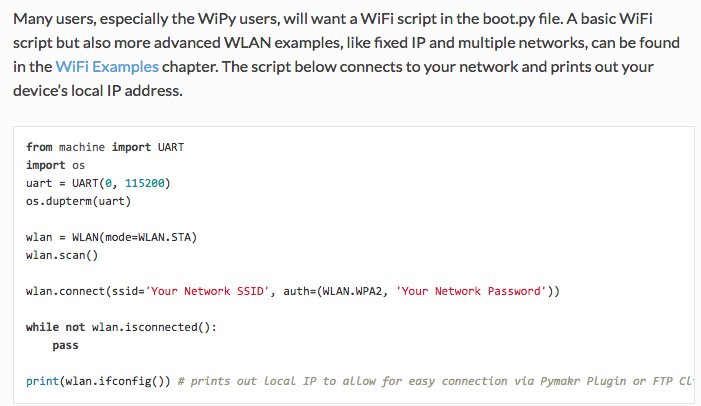
                                        @Ralph There is an error in your getting started doc, WLAN has not been imported. Is there a better way to provide this kind of feedback, e.g. Github? Cheers
                                        0_1492236162455_upload-b6ef2a46-a893-4ee6-8582-c8a24c57dd4f

                                        https://docs.pycom.io/pycom_esp32/pycom_esp32/getstarted.html#creating-a-project

                                        B 1 Reply Last reply Reply Quote 1
                                        • B Offline
                                          bucknall @robmarkcole
                                          last edited by

                                          @robmarkcole thanks! We'll get this fixed :)

                                          Developer Evangelist - Pycom

                                          1 Reply Last reply Reply Quote 0
                                          • S Offline
                                            smssms @robmarkcole
                                            last edited by

                                            @robmarkcole

                                            +1 for this error (on Linux Mint 18 64-bit). I've tried all the solutions listed but they did not work.


                                            P 1 Reply Last reply Reply Quote 0

                                            Hello! It looks like you're interested in this conversation, but you don't have an account yet.

                                            Getting fed up of having to scroll through the same posts each visit? When you register for an account, you'll always come back to exactly where you were before, and choose to be notified of new replies (either via email, or push notification). You'll also be able to save bookmarks and upvote posts to show your appreciation to other community members.

                                            With your input, this post could be even better 💗

                                            Register Login
                                            • 1
                                            • 2
                                            • 3
                                            • 4
                                            • 5
                                            • 4 / 5
                                            • First post
                                              Last post

                                            Pycom on Twitter

                                            Pycom