Welcome to the Pycom forum Forum
    • \[\[global:header.categories\]\]
    • \[\[global:header.recent\]\]
    • \[\[global:header.tags\]\]
    • \[\[global:header.popular\]\]
    • Login
    1. Home
    2. Tags
    3. atom

    Explore Pybytes | Official Documentation | Report a Firmware Bug/Issue | GitHub

    Log in to post

    • All categories
    • G

      pymakr will not update in atom 1.60.0 on Ubuntu 20.04

      Watching Ignoring Scheduled Pinned Locked Moved Issues & Bugs atom pymakr linux npm
      10
      0 Votes
      10 Posts
      80 Views
      G
      @Jakob-Rosenberg-0 Good news. Given the content of the EOL announcement email sent out recently, specifically the focus on the platform as a service I did begin to wonder whether the Pymakr plugin would continue to be maintained. I really hope it is. I have no desire to switch to using Pybytes whatsoever.
    • P

      Pymakr install failing in Atom on MacOS

      Watching Ignoring Scheduled Pinned Locked Moved Pymakr pymakr installation atom macos
      5
      0 Votes
      5 Posts
      78 Views
      P
      @ahmadelmasri I solved this with a tip from the README. Python version was incompatible.
    • H

      Confusion on Atom projects, module locations, libraries, etc.

      Watching Ignoring Scheduled Pinned Locked Moved Discussion atom modules library project
      1
      0 Votes
      1 Posts
      107 Views
      No one has replied
    • K

      using lib files

      Watching Ignoring Scheduled Pinned Locked Moved GPy lib folder gpy atom
      2
      0 Votes
      2 Posts
      239 Views
      robert-hhR
      @kjm Since main.py is executed on the target, it is accessing the files on the target. The GPY has no acces to the PC file system. The only thing that you can get is synchronizing the lib files form you Atom/PC library to GPY. I do not work with the pymakr plug-ins, so I cannot give you details, but there were threads of synchronizing a project directory with the target module.
    • E

      Stuck at "Failed to connect (Error: Port is not open)" between Atom and GPy/Pysense on Fedora computer

      Watching Ignoring Scheduled Pinned Locked Moved GPy gpy pysense startup setup atom
      5
      0 Votes
      5 Posts
      783 Views
      E
      I ended up using Atom on my windows pc and was able to talk on the port no problem. I'm not sure why the port was closed on the fedora pc. Hopefully this helps someone in their setup.
    • R

      PyMakr 2.0 for Atom Plans: Feedback wanted [video]

      Watching Ignoring Scheduled Pinned Locked Moved Beta Announcements & Development News pymakr atom video
      11
      1 Votes
      11 Posts
      1k Views
      S
      Thanks for this information. It is useful
    • M

      Connection issue to WiPy 3.0r

      Watching Ignoring Scheduled Pinned Locked Moved Issues & Bugs wipy 3.0 pysense atom
      6
      0 Votes
      6 Posts
      661 Views
      robert-hhR
      @momentaj When using the pycom uploader 1.15.2, you have tghe option to erase the device on uploading a new firmware image.
    • R

      Pymakr Atom release v1.4.9 - Upload using zlib compression

      Watching Ignoring Scheduled Pinned Locked Moved Announcements & News atom pymakr
      7
      1 Votes
      7 Posts
      1k Views
      R
      @protean Pymakr is indeed using the zlib.decompress() micropython function for this feature. Normal upload also still works of course, but this way is faster for large files. Let me give you some pointers on how to code it: The zlib function on the micropython side is documented here. Pymakr is compressing the files before uploading (here using this python file), writing the compressed file to the board with os.write() like always, and then decompressing them right after that (here). It'll definitely make uploading bigger files faster. Just realise that for files under 4k, it's actually slower because the overhead of compressing/decompressing is bigger than the savings of compressing the file.
    • K

      Atom foibles.

      Watching Ignoring Scheduled Pinned Locked Moved Support & Troubleshooting atom gpy repl
      4
      0 Votes
      4 Posts
      481 Views
      J
      @kjm But maybe since we are mentioning it... someone who already has a fix can pass it along. Or someone who didn't realize it was a problem can make the next version a little bit better. Hopefully shared misery will have a shared cure. ;)
    • W

      Fipy läuft nicht richtig ohne Atom

      Watching Ignoring Scheduled Pinned Locked Moved FiPy fipy atom
      29
      0 Votes
      29 Posts
      12k Views
      robert-hhR
      @mraj That's the way: Either it is called main.py, or main.py contains a line import mycode or boot.py contains a statement machine.main("mycode.py"), which causes mycode.py to be executed instead of main.py
    • P

      pycom wipy pysense problem

      Watching Ignoring Scheduled Pinned Locked Moved WiPy 2&3 pycom wipy file transfer atom
      7
      0 Votes
      7 Posts
      817 Views
      P
      @dan I finally made it work! But only because of your advice! Thank you so much!!!
    • B

      Import Custom Library

      Watching Ignoring Scheduled Pinned Locked Moved MicroPython i2c atom library import fipy
      3
      2
      0 Votes
      3 Posts
      840 Views
      B
      @dan I understand that and get this error when I flash it, but I would also like it to link in Atom so I can build and run it right away without having to flash it. [image: 1537809779016-2f6c007e-17d2-4496-a1eb-b82c77973113-image.png]
    • G

      NameError: name '​' is not defined when upload the "Lopy to Lopy" example

      Watching Ignoring Scheduled Pinned Locked Moved MicroPython fipy lora main.py micropython atom
      3
      0 Votes
      3 Posts
      1k Views
      danD
      Hi @grideagle, Thank you for reporting that, I've reported it to GitBook. The current workaround is to use the "copy" button it the top right corner of the code section.
    • N

      Fipy, no FTP, Atom no project, no files on Fipy.

      Watching Ignoring Scheduled Pinned Locked Moved FiPy fipy atom ftp
      4
      0 Votes
      4 Posts
      875 Views
      danD
      @nickboots Great! I'm glad you sorted it out. The project name label might be related to this issue, you should be still able to upload/run your project, it's just the label that doesn't update. FTP only works with WiFi, if you want to use the serial connection, you can use Pymakr with Atom/VSCode, or rshell.
    • R

      New Pymakr Atom Release v1.4.0 - No more FTP?

      Watching Ignoring Scheduled Pinned Locked Moved Announcements & News pymakr atom
      1
      2 Votes
      1 Posts
      911 Views
      No one has replied
    • F

      File not uploaded to the board

      Watching Ignoring Scheduled Pinned Locked Moved Issues & Bugs atom pymakr upload
      1
      0 Votes
      1 Posts
      600 Views
      No one has replied
    • M

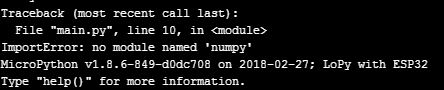
      How to import "numpy" in Atom

      Watching Ignoring Scheduled Pinned Locked Moved Comments & Feedback atom
      5
      1
      0 Votes
      5 Posts
      2k Views
      J
      @mj It's just some math, you don't need a module to do it. However, be aware that most trilateration formulas are based on exact distances, which you are very unlikely to get, so you'll end up with no solutions if you try to solve the equations as equalities. Also, I don't know your use case, but it may indeed make more sense to do this stuff network-side rather than on the node.

    • U

      Atom with Pymakr have some promble

      Watching Ignoring Scheduled Pinned Locked Moved Issues & Bugs pymakr bug atom
      2
      1
      0 Votes
      2 Posts
      804 Views
      sebS
      We are aware of this issue, expect and update very soon to resolve this.
    • 1
    • 2
    • 3
    • 1 / 3