Welcome to the Pycom forum Forum
    • \[\[global:header.categories\]\]
    • \[\[global:header.recent\]\]
    • \[\[global:header.tags\]\]
    • \[\[global:header.popular\]\]
    • Login

    Explore Pybytes | Official Documentation | Report a Firmware Bug/Issue | GitHub

    Pymakr Atom Plugin released

    Scheduled Pinned Locked Moved Announcements & News
    pymakrpluginatom
    91 Posts 29 Posters 63.5k Views 26 Watching
    Loading More Posts
    • Oldest to Newest
    • Newest to Oldest
    • Most Votes
    Reply
    • Reply as topic
    Log in to reply
    This topic has been deleted. Only users with topic management privileges can see it.
    • R Offline
      Ralph @MaSePreetz
      last edited by

      @MaSePreetz You are right, the behaviour is a little less straight forward. Turns out Atom stores this state per project. So if you have one project open, close the terminal and then close atom, the terminal will still be closed when opening that same project. But when opening another project, the state will be set to 'open' again.

      Considering that, it might be useful for some people to have a 'don't open on startup' setting for the plugin, so it will always stay closed by default.

      1 Reply Last reply Reply Quote 0
      • R Offline
        robmarkcole
        last edited by

        Hi @Ralph I see you have a lot on your plate, but I wonder if it will also be possible to one day program via a Jupyter notebook? This would be fantastic for rapid expolration of data generated by the board.
        Of interest https://github.com/adafruit/jupyter_micropython_kernel

        1 Reply Last reply Reply Quote 0
        • T Offline
          tuxtof
          last edited by

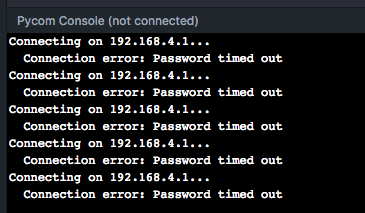
          Same problem for me

          0_1492846714191_upload-6fcc324a-8297-44d7-90de-abf0717b00be

          MacOS X 10.12.4
          Atom 1.16.0
          Pymakr 0.9.3
          Lopy FW 1.6.12.b1

          any other solution to use my Lopy ?

          L 1 Reply Last reply Reply Quote 0
          • L Offline
            livius @tuxtof
            last edited by

            @tuxtof
            First test if your ping reach device
            show us response

            ping 192.168.4.1
            

            think about people first, then computers

            T 1 Reply Last reply Reply Quote 0
            • T Offline
              tuxtof @livius
              last edited by

              @livius

              ping is OK
              telnet is working
              i can connect on the python interpreter with the default login / password

              only Atom/Pymakr is not working

              @pycom please help

              1 Reply Last reply Reply Quote 1
              • P Offline
                pwest @smssms
                last edited by

                @smssms Same problem on Linux Mint 17.3, Cinnamon, 64-bit

                R 1 Reply Last reply Reply Quote 0
                • R Offline
                  Ralph @pwest
                  last edited by

                  @pwest @smssms If you have time, please test the code on the develop branche on github (instructions for manual installation are in the readme file on the develop branch). This code contains pre-compiled versions of the serialport lib for both mac and linux (64 bit), which should solve both of your issues.
                  Let me know if it works.

                  1 Reply Last reply Reply Quote 0
                  • C Offline
                    cylex
                    last edited by

                    Hey there! So after testing the plugin for a few days I have to remark that debugging with the pymakr Plugin is quite hard. When it comes to an error the compiler output is often times incomplete and changes after running the same error-having code for several times... However, the compiler output is complete when I use my terminal.

                    R 1 Reply Last reply Reply Quote 0
                    • B Offline
                      bnjroos
                      last edited by

                      On windows 10 I cannot see any package named pymakr when searching in the installation tab and when i try to install it manually i get thee following:

                      0_1493263990828_atom_2017-04-27_10-31-40.png

                      How to install the pymakr plugin sucessfully ?

                      Thanks,

                      B R 2 Replies Last reply Reply Quote 0
                      • R Offline
                        Ralph @cylex
                        last edited by

                        Hi @cylex, The same problem (in a different form) was reported in this topic and the bug was fixed (on the develop branch only, not yet released). Very likely this fix also solves your issue. You can do a manual install from the develop branch to test it if you want, or wait for the next release.

                        1 Reply Last reply Reply Quote 0
                        • B Offline
                          bnjroos @bnjroos
                          last edited by

                          @bnjroos said in Pymakr Atom Plugin released:

                          On windows 10 I cannot see any package named pymakr when searching in the installation tab and when i try to install it manually i get thee following:
                          0_1493263990828_atom_2017-04-27_10-31-40.png

                          How to install the pymakr plugin sucessfully ?

                          Thanks,

                          Found the solution by running npm install inside the package folder.

                          Thanks

                          1 Reply Last reply Reply Quote 0
                          • R Offline
                            Ralph @bnjroos
                            last edited by

                            Hi @bnjroos, Good to hear! For future reference, there is a short instruction for 'manual install' in the readme file on the develop branch

                            B 1 Reply Last reply Reply Quote 0
                            • B Offline
                              bnjroos @Ralph
                              last edited by

                              @Ralph said in Pymakr Atom Plugin released:

                              Hi @bnjroos, Good to hear! For future reference, there is a short instruction for 'manual install' in the readme file on the develop branch

                              Yes but on windows I don't have apm installed by default hehehe. Maybe a 'npm install' should be added to the manual.

                              A 1 Reply Last reply Reply Quote 0
                              • A Offline
                                Andrea Filippini @bnjroos
                                last edited by

                                @bnjroos you can find apm in the Atom install location, under /bin folder

                                B 1 Reply Last reply Reply Quote 1
                                • B Offline
                                  bnjroos @Andrea Filippini
                                  last edited by

                                  @Andrea-Filippini thank you for the info, i usually use sublime or Visual Studio Code, I am pretty new to Atom.

                                  1 Reply Last reply Reply Quote 0
                                  • R Offline
                                    Ralph
                                    last edited by

                                    Version 0.9.4 has been released with a few bugfixes and stability improvements:

                                    • Include precompiled serialport libs for mac and linux
                                    • Improved error handling and stability on sync
                                    • Running files is now possible for unsaved files
                                    • Bugfixes for pasting multiple lines and cmd-c/cmd-v commands.
                                    • Fixed connection issue when using telnet to a device's access point
                                    O 2 Replies Last reply Reply Quote 2
                                    • O Offline
                                      obviate @Ralph
                                      last edited by

                                      @Ralph Hi Ralph, I installed 0.9.4 and upgraded firmware on my LoPy modules to 1.6.13.b1 and now I can't sync using a serial connection. It was OK with 0.9.3 but I don't know whether to blame the firmware or the Atom plugin update. I am running Atom on a Windows 7 x64 PC.

                                      1 Reply Last reply Reply Quote 0
                                      • O Offline
                                        obviate @Ralph
                                        last edited by

                                        @Ralph I re-built the filesystem on each LoPy and now the sync is working. All good.

                                        1 Reply Last reply Reply Quote 0
                                        • R Offline
                                          Ralph
                                          last edited by

                                          V1.0.0 has just been released. A few problems concerning the synchronize feature using a serial connection are now solved and some new features have been added:

                                          • Added project specific settings
                                          • Added serial port detection (in sub-navigation under the 'more' button)
                                          • Multiple bug fixes for synchronization over serial
                                          • Terminal height now resizable by dragging the top edge
                                          • Fixed 'failed to connect' bug when reconnecting on telnet

                                          The project specific settings might need some explanation:
                                          When clicking the new 'project settings' option, a config file is created inside your project folder. Any settings changed inside this file will override the global settings. This can be useful when you are using different project for different devices or when each project has a different folder that has to be synchronized.
                                          Remove the settings from this file that you don't want to override.

                                          1 Reply Last reply Reply Quote 2
                                          • M Offline
                                            mcook @Ralph
                                            last edited by

                                            @Ralph

                                            Hi,

                                            Maybe I am doing something dumb. When I set up the Atom plugin, by going to Atom > Preferences > Packages > Pymakr, all I see is the PyMakr Readme.

                                            This is what I see... I don't see a place to configure the IP Address of the LoPy.

                                            Any idea what I am doing incorrectly?

                                            Thanks,
                                            Mike
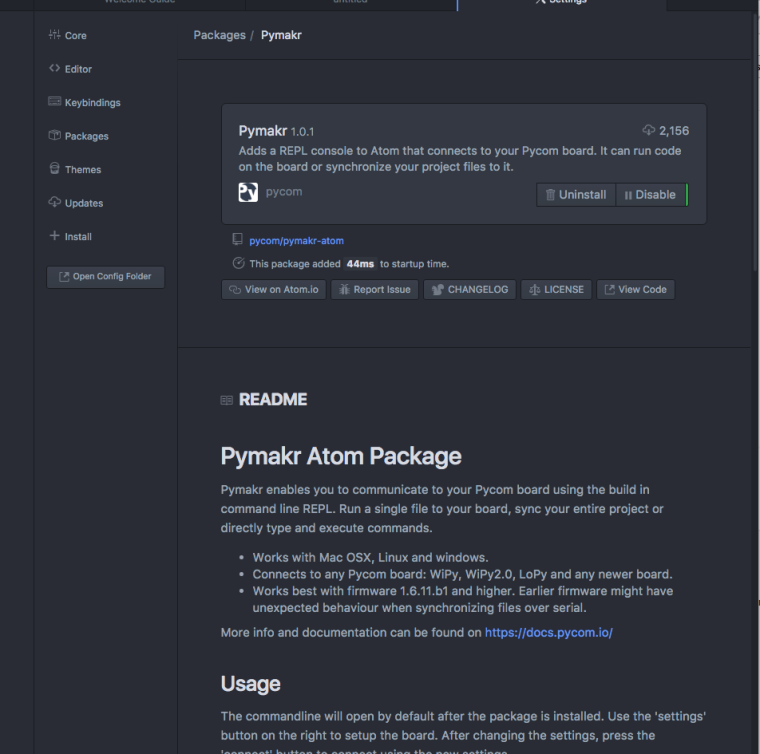
                                            0_1496924816310_upload-695f7c17-dac2-45e2-a8ee-f5c0b3682d28

                                            B 1 Reply Last reply Reply Quote 0

                                            Hello! It looks like you're interested in this conversation, but you don't have an account yet.

                                            Getting fed up of having to scroll through the same posts each visit? When you register for an account, you'll always come back to exactly where you were before, and choose to be notified of new replies (either via email, or push notification). You'll also be able to save bookmarks and upvote posts to show your appreciation to other community members.

                                            With your input, this post could be even better 💗

                                            Register Login
                                            • 1
                                            • 2
                                            • 3
                                            • 4
                                            • 5
                                            • 2 / 5
                                            • First post
                                              Last post

                                            Pycom on Twitter

                                            Pycom