Welcome to the Pycom forum Forum
    • \[\[global:header.categories\]\]
    • \[\[global:header.recent\]\]
    • \[\[global:header.tags\]\]
    • \[\[global:header.popular\]\]
    • Login

    Explore Pybytes | Official Documentation | Report a Firmware Bug/Issue | GitHub

    Pymakr Atom Plugin released

    Scheduled Pinned Locked Moved Announcements & News
    pymakrpluginatom
    91 Posts 29 Posters 63.5k Views 26 Watching
    Loading More Posts
    • Oldest to Newest
    • Newest to Oldest
    • Most Votes
    Reply
    • Reply as topic
    Log in to reply
    This topic has been deleted. Only users with topic management privileges can see it.
    • R Offline
      Ralph
      last edited by

      This morning a patch has been released under v1.0.3.

      It fixes issues with serialport library on windows32 and problems in newer atom versions (1.17.2 and 1.18). If you had any installation issues before, this update should to resolve it.

      O 1 Reply Last reply Reply Quote 0
      • O Offline
        ozeta @Ralph
        last edited by ozeta

        @Ralph I have atom 1.18 and before pymakr 1.0.3 all worked fine. after last update I get: "Failed to load the Pymakr package" ... stacktrace.... then: The error was thrown from the Pymakr package. This issue has already been reported.
        View Issue ( https://github.com/pycom/pymakr-atom/issues/1 )

        is it possible to revert to 1.0.2?

        M 1 Reply Last reply Reply Quote 0
        • M Offline
          Manuel @ozeta
          last edited by

          @ozeta I have the same problem in 2 windows 10 machines (64 bits).

          Using this https://forum.pycom.io/topic/1137/downgrade-atom-pymkr-plugin should fix the problem.

          Try with "apm install Pymakr@1.0.2" in cmd or PowerShell (if you are using windows). It worked for me.

          R 1 Reply Last reply Reply Quote 1
          • R Offline
            Ralph @Manuel
            last edited by

            @Manuel That works, but if you want to use 1.0.3, you can completely uninstall and then re install the plugin to make it work. There is an issue with a few files that fail to update to the new code in the folder, for unknown reasons. Only happens on windows it seems. We're working on a permanent solution.

            M 1 Reply Last reply Reply Quote 0
            • M Offline
              Manuel @Ralph
              last edited by

              @Ralph Thank you. It works.

              A 1 Reply Last reply Reply Quote 0
              • A Offline
                amartinez Pybytes Beta @Manuel
                last edited by

                @Ralph I' m getting this error when I try to install Pymakr plugin 1.0.3 (I' ve tried to update from 1.0.2 and it crashed, so I' ve unistalled to reinstall it).
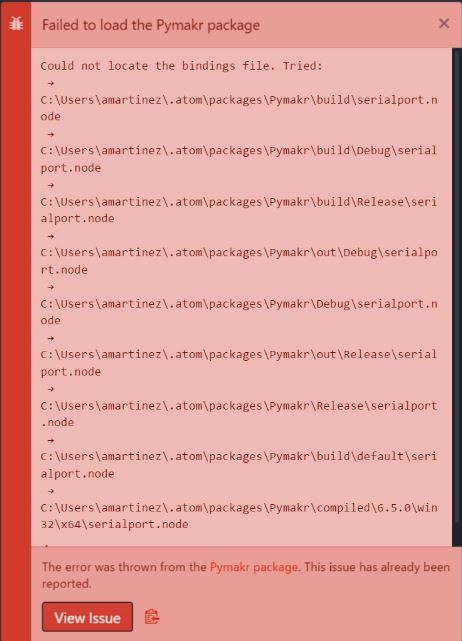
                0_1500029112717_Error Pymakr.JPG

                1 Reply Last reply Reply Quote 0
                • R Offline
                  Ralph
                  last edited by

                  V1.1.0 update. Includes a big refactor round that gets the code in line with the VSCode plugin. This has very little effect on the UI and features, except for a new config option 'open_on_start' that can be used to hide the plugin by default. All problems with the serialport should also be resolved (bindings file not found and serialport version mismatch errors), as long as you are on the latest atom version (1.19 or higher)

                  • Big refactor to get a shared base code with the VSCode plugin
                  • Added 'open_on_start' config
                  • Fixes issues with serialport lib for newer versions of atom
                  • Bugfix in the run feature on linux.
                  • More relaxed keep-alive protocol on telnet (ping has to fail twice before connection break)
                  1 Reply Last reply Reply Quote 1
                  • C Offline
                    Colateral
                    last edited by Colateral

                    On my Mac I installed last ver of Atom (1.20.0 x64) and pymakr plugin (1.0.3). I'm connected to LoPy through serial.
                    After I created a simple file test.py containing this:

                    import uos
                    uos.uname()
                    

                    Sync &Running the project with Atom raise errors. Do I have to configure something to run a simple python file?

                    >>>
                    >>
                    Traceback (most recent call last):
                      File "<stdin>", line 2, in <module>
                    NameError: name 'null' is not defined
                    >
                    MicroPython 8a4f37d-dirty on 2017-09-17; LoPy with ESP32
                    Type "help()" for more information.
                    
                    1 Reply Last reply Reply Quote 0
                    • D Offline
                      danielm
                      last edited by

                      On Windows 7 with Atom 1.20.1x64 only Pymakr version 1.0.3 is offered as latest compatible version.
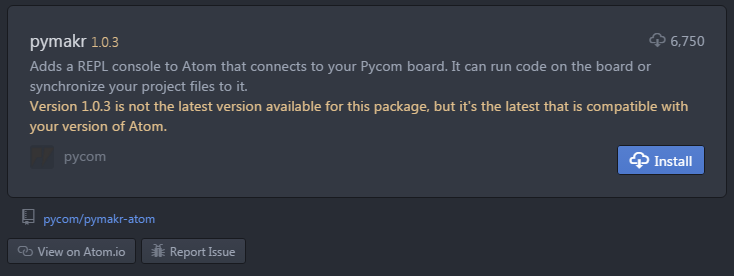
                      0_1506173579924_pymakr.png

                      Then the package fails to be loaded anyway:
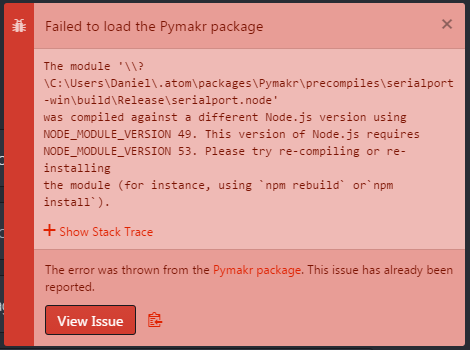
                      0_1506173753011_pymakr2.png

                      M 1 Reply Last reply Reply Quote 0
                      • M Offline
                        MJ @danielm
                        last edited by

                        @danielm Hi, i am new here. I also facing the same problem as you. May i know how can we fix it?

                        R 1 Reply Last reply Reply Quote 0
                        • R Offline
                          Ralph @MJ
                          last edited by

                          @mj @danielm I see your issue. To explain: from pymakr 1.1.0 on we added a version limit to the plugin (<=1.20.0), with the goal to make sure that when a new version of atom comes out, we can test it before we release the plugin for it as well. The problem is that if you are on an old pymakr version before this limiter, but update straight to a new release (1.20.1 was released last week) you'll be stuck with an incompatible version.

                          I'll test pymakr with the latest Atom and will release 1.1.2 very soon. A quick fix would be to downgrade to atom 1.20.0, then update pymakr to 1.1.1

                          R M 2 Replies Last reply Reply Quote 0
                          • R Offline
                            Ralph @Ralph
                            last edited by

                            @MJ @danielm A new version has been released. Let me know if this solves your issues.

                            1 Reply Last reply Reply Quote 0
                            • L Offline
                              lesure1
                              last edited by

                              Hello,

                              I am trying to connect to Pycom (1.1.3) from Atom editor (Atom: 1.20.1, Electron: 1.6.9, Chrome: 56.0.2924.87, Node: 7.4.0) on Ubuntu 14.04. I added Pymkr 1.1.3 automatically using the Atom GUI. The Atom editor crashes when clicking on connect, after retrieving and setting the USB serial port for Pycom. The message displayed is "Editor has crashed. Please report this issue". I am totally new to the environment and trying to do my first set up. Could anyone help me identify the source of the problem and fix it?

                              Thank you!

                              R 1 Reply Last reply Reply Quote 0
                              • R Offline
                                Ralph @lesure1
                                last edited by

                                Hi @lesure1, thanks for reporting this. I've just tested it on ubuntu and it seems that the serialport lib is not working properly for this version on ubuntu. I'm inspecting and fixing it now and will send you an updated plugin tomorrow to see if it's working.

                                L 1 Reply Last reply Reply Quote 0
                                • L Offline
                                  lesure1 @Ralph
                                  last edited by

                                  @ralph, okay thank you. Looking for the update.

                                  1 Reply Last reply Reply Quote 0
                                  • M Offline
                                    mahe
                                    last edited by mahe

                                    Hi,

                                    I just updated to Pymakr 1.1.3 in Atom (macOS). Ever since the update I get the following error when trying to sync:

                                    Reading file status
                                    Synchronizing failed: timeout. Please reboot your device manually.

                                    I do have a connection and Running files doesn't seem to be a problem. But I can not get it to sync.

                                    I've tried both soft, hard and factory reset of the LoPy as instructed on:

                                    https://docs.pycom.io/chapter/toolsandfeatures/bootmodes.html

                                    If anyone can help I would be grateful.

                                    Mathies

                                    edit: I've also tried upgrading the firmware.

                                    JaltetJ 1 Reply Last reply Reply Quote 0
                                    • M Offline
                                      MJ @Ralph
                                      last edited by

                                      @ralph Thanks. Our problem solved.

                                      1 Reply Last reply Reply Quote 0
                                      • JaltetJ Offline
                                        Jaltet @mahe
                                        last edited by Jaltet

                                        @mahe
                                        Hi! I have had the same problem today.
                                        Pymakr 1.1.3 in Atom (Windows) gives the same error:

                                        Reading file status
                                        Synchronizing failed: timeout. Please reboot your device manually

                                        I solved the problem by uninstalling Pymakr 1.1.3 and reinstalling Pymakr 1.1.1

                                        To do so, I used the apm command like this:

                                        apm install Pymakr@1.1.1

                                        I got the 1.1.1 version from https://libraries.io/atom/pymakr

                                        I hope this will work for you.

                                        R 1 Reply Last reply Reply Quote 1
                                        • R Offline
                                          Ralph @Jaltet
                                          last edited by

                                          @jaltet @mahe If you didn't notice yet, we deployed an update on Friday (v1.1.4) that solves the issue introduces in 1.1.3.

                                          Let me know if this is indeed the case on your machines.

                                          M 1 Reply Last reply Reply Quote 0
                                          • M Offline
                                            mahe @Ralph
                                            last edited by

                                            @ralph

                                            Thanks,

                                            I'm still experience problems though:

                                            Synchronizing failed: undefined. Please reboot your device manually.

                                            sorenS 1 Reply Last reply Reply Quote 0

                                            Hello! It looks like you're interested in this conversation, but you don't have an account yet.

                                            Getting fed up of having to scroll through the same posts each visit? When you register for an account, you'll always come back to exactly where you were before, and choose to be notified of new replies (either via email, or push notification). You'll also be able to save bookmarks and upvote posts to show your appreciation to other community members.

                                            With your input, this post could be even better 💗

                                            Register Login
                                            • 1
                                            • 2
                                            • 3
                                            • 4
                                            • 5
                                            • 3 / 5
                                            • First post
                                              Last post

                                            Pycom on Twitter

                                            Pycom
