Pymakr Atom Plugin released
-
After a good number of weeks developing, we are ready to announce that the Pymakr Atom plugin has been released to the Atom registry! It's got all the important features the old Pymakr app has, but build right into Atom. The old Pymakr desktop app will still be available to download, but will not be maintained anymore.
Installation
To install the package, go ahead and:- Download and install Atom from atom.io
- Open the settings page in Atom and go to the 'Install' tab
- Perform a search for 'pymakr'
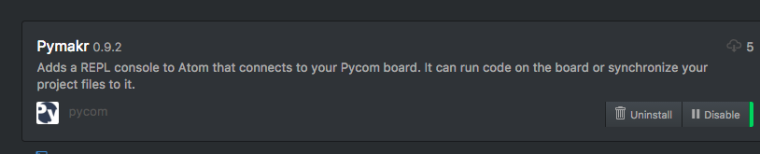
- Pymakr 0.9.2 will show up on the bottom of the search results (because it doesn't have any reputation yet)
- Click 'install'. This might take a minute or so, for installing all the dependencies.
- Update your devices to the latest firmware (1.6.11.b1 or higher)
Features
The plugin features a REPL terminal on the bottom of the screen, that opens on startup. The terminal has all the features you're used to from the old Pymakr and commandline; directly running commands on the board, arrow keys for previous commands, tab to autocomplete, ctrl-b/c/d commands, copy paste support, and more.It has a row of action buttons just above the terminal that can be used to setup the board, run one file or sync your entire project to the board. You can also close the terminal, which will disconnect the board. It will remember the open/closed state when restarting atom so it's not in the way when you are using Atom for other projects.
Initial config:
To setup the board use the Settings button on the right top of the terminal. There you can enter the device address as an IP or comport. Change the username and password if needed. Now click the Connect button above the terminal and you are set!Synchronizing
As soon as you have a project opened with your main.py and boot.py file, you can go ahead and press the sync button to upload all files in your project to the board.
If you have your python files in a subfolder of the project, there is a 'Sync folder' setting to tell the plugin which folder you want to sync to the board.Running code
With any python file open, press the run button to run the code to the board. Any output will be printed to the terminal. Either wait for the script to finish or press the cancel button to stop the script.Useful links
- docs.pycom.io - The pycom docs have been updated with extended instructions for the Atom plugin (chapters 1.5 and 2.7)
- atom.io/packages/pymakr - The pymakr package on the atom repository
- github.com/pycom/pymakr-atom - Code repository. Please file bugreports here
Some improvements we already have planned are:
- Auto detect of comports
- Running files even when they are not saved yet
- Making the terminal panel resizable
- Making a subset of the settings project specific
Please let us know what you think of the plugin. Any feedback or questions are welcome. Bug reports can be posted on github. We'll stay active in bugfixing and improving the plugin, especially in this first period after release.
Next up: the Visual Studio Code plugin!
EDIT 0.9.4 released
- Include precompiled serialport libs for mac and linux
- Improved error handling and stability on sync
- Running files is now possible for unsaved files
- Bugfixes for pasting multiple lines and cmd-c/cmd-v commands.
- Fixed connection issue when using telnet to a device's access point
EDIT 1.0.0 released
- Added project specific settings
- Added serial port detection (in sub-navigation under the 'more' button)
- Multiple bug fixes for synchronization over serial
- Terminal height now resizable by dragging the top edge
- Fixed 'failed to connect' bug when reconnecting on telnet
EDIT 1.0.1 released
- Multiple typo's and small bugfixes
- Added an option to get the wifi AP SSID from the board
- UI updates including pycom logo
- Increased maximum lines in terminal to 5000
EDIT 1.0.2 released
- Added timeout and reconnect logic on serial connection (useful for pysense/pytrack sleep)
- Pysense/pytrack serialport detection
- Bugfix related to project settings not refreshing (issue #23)
- Ignoring hidden and empty subfolders during synchronize
EDIT 1.0.3 released
- Fixes issues with serialport library on windows32 and problems in newer atom versions (1.17.2 and 1.18)
EDIT 1.1.0 released
- Big refactor to get a shared base code with the VSCode plugin
- Added 'open_on_start' config
- Fixes issues with serialport lib for newer versions of atom
- Bugfix in the run feature on linux.
- More relaxed keep-alive protocol on telnet (ping has to fail twice before connection break)
EDIT 1.2.0 released
- Splits 'sync' into 'download' and 'upload'
- Adds detection for selected project in the tree-view
- Better stability for upload
-
Nice, I'll give it a try and see if Atom's performance has improved (Sublime Text user).
-
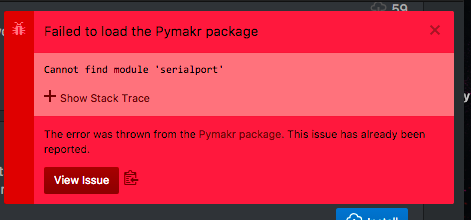
I guess this is reported..
-
@robmarkcole
what os?
For me on Windows 10 64bit - work without problems -
Bug?
It will timeout when there is a running script going on.I guess the REPL plugin expects a
"Password: "password line and not a sensor value? -
@robmarkcole Are you on Debian? robert-hh reported the same problem on debian. He solved it by completely re-installing atom and the pymakr plugin. Can you post the os and atom version you are on? I'll see if I can test it properly myself if it's a debian problem.
-
@RobTuDelft The login procedure is a seperate thread from the sensor code that is running and they shoudn't interfere with each other. Did you confirm you can login through telnet from the commandline or putty?
-
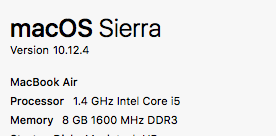
I'm on OSX Yosemite
-
Would appreciate if the console text were colorized in the Atom plugin the same as it is in Pymakr. I found a lot of Atom UI/Syntax themes to play with but nothing that effects the Pymakr console. I see no way to set a theme or color / font in the Atom plugin settings. Is there a simple config setting somewhere?
-
@Ralph Yes, Putty works fine.
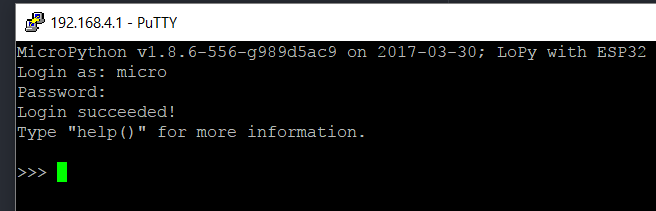
Unfortunately the Atom plugin does not.
Credentials and everything is still as default.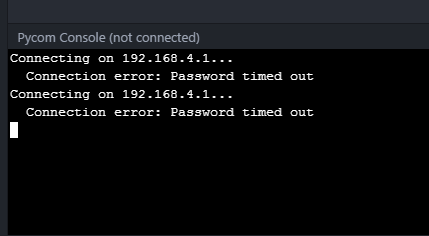
Also there are no active sessions on the Lopy when I try to connect through Atom. I try fresh after power cycle.
This is the exact message:
Connection error: Password timed out -
@rdixey The Syntax hilighting is a good idea, I think that has to be build into the terminal specifically. Added to the wishlist.
You can choose general themes for atom in the settings. The pymakr plugin will take the colors and fonts from the theme you select for atom. -
I uninstalled and reinstalled both Atom and the pymakr plugin, yet the problem remains unfortunately.
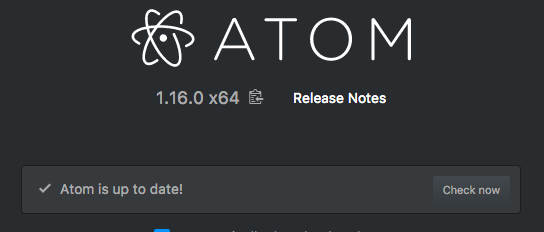
Pymaker has installed, but when I select one of the functions from Pycom Sync, nothing happens
-
@RobTuDelft To update on my own post, it did manage to connect today. After that I tried some commands and clicked 'close' to close the panel in Atom. This seems to be the source of the problem, the telnet connection will stay active on the Lopy, but not in Atom. When you want to reopen again you will get the password timed out error.
-
@RobTuDelft Normally if a connection is still active to the device, you'll get a connection refused. if you get a 'password timed out' means that it reaches the device but something goes wrong during authentication. I've had this error a lot when the router at our office was not cooperating well and it just timed out. I'll do some testing on telnet today to see if I can reproduce it.
Which firmware version do you have running on your lopy? -
@Ralph v1.6.12.b1. Thanks.
-
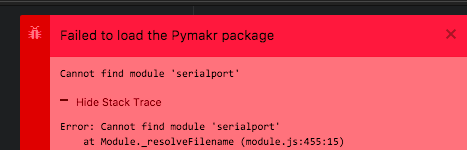
Here are the errors:
Failed to load the Pymakr package
Cannot find module 'serialport'
Hide Stack Trace
Error: Cannot find module 'serialport'
at Module._resolveFilename (module.js:455:15)
at Module._resolveFilename (/Applications/Atom.app/Contents/Resources/electron.asar/common/reset-search-paths.js:35:12)
at Function.Module._resolveFilename (/Applications/Atom.app/Contents/Resources/app.asar/src/module-cache.js:383:52)
at Function.Module._load (module.js:403:25)
at Module.require (module.js:483:17)
at require (/Applications/Atom.app/Contents/Resources/app.asar/src/native-compile-cache.js:50:27)
at Object.<anonymous> (/Users/robincole/.atom/packages/Pymakr/lib/connections/pyserial.js:4:16)
at Module._compile (/Applications/Atom.app/Contents/Resources/app.asar/src/native-compile-cache.js:109:30)
at Object.value [as .js] (/Applications/Atom.app/Contents/Resources/app.asar/src/compile-cache.js:216:21)
at Module.load (module.js:473:32)
at tryModuleLoad (module.js:432:12)
at Function.Module._load (module.js:424:3)
at Module.require (module.js:483:17)
at require (/Applications/Atom.app/Contents/Resources/app.asar/src/native-compile-cache.js:50:27)
at Object.<anonymous> (/Users/robincole/.atom/packages/Pymakr/lib/board/pyboard.js:3:34)
at Module._compile (/Applications/Atom.app/Contents/Resources/app.asar/src/native-compile-cache.js:109:30)
at Object.value [as .js] (/Applications/Atom.app/Contents/Resources/app.asar/src/compile-cache.js:216:21)
at Module.load (module.js:473:32)
at tryModuleLoad (module.js:432:12)
at Function.Module._load (module.js:424:3)
at Module.require (module.js:483:17)
at require (/Applications/Atom.app/Contents/Resources/app.asar/src/native-compile-cache.js:50:27)
at Object.<anonymous> (/Users/robincole/.atom/packages/Pymakr/lib/main.js:7:21)
at Module._compile (/Applications/Atom.app/Contents/Resources/app.asar/src/native-compile-cache.js:109:30)
at Object.value [as .js] (/Applications/Atom.app/Contents/Resources/app.asar/src/compile-cache.js:216:21)
at Module.load (module.js:473:32)
at tryModuleLoad (module.js:432:12)
at Function.Module._load (module.js:424:3)
at Module.require (module.js:483:17)
at require (/Applications/Atom.app/Contents/Resources/app.asar/src/native-compile-cache.js:50:27)
The error was thrown from the Pymakr package. This issue has already been reported.
View Issue -
@robmarkcole This is the error you get when anything goes wrong during installation of the dependencies, either of the serialport library or somewhere else during installation. If you remove the node_modules folder, the serialport library is the first one it will encounter and throw this error.
I noticed that everybody who got this error is on Atom 1.16, while I'm still on Atom 1.15 (on El Capitan). Possibly there is a compatibility issue there, which I'll check out.
-
@robmarkcole This issue has been solved in this github issue. The problem is that for some users, atom is using python 3.x while the compiler for serialport needs python 2.x (you can check it using
apm --version).I've added an explanation on the bottom of the readme file in the develop branch on github. The short story is, until we've automated it, the issue is solved by running the folling command and then re-installing Pymakr.
echo "python=/usr/bin/python2.7" >> ~/.atom/.apmrc -
@Ralph Thanks Ralph, working now!
-
@Ralph There is an error in your getting started doc, WLAN has not been imported. Is there a better way to provide this kind of feedback, e.g. Github? Cheers
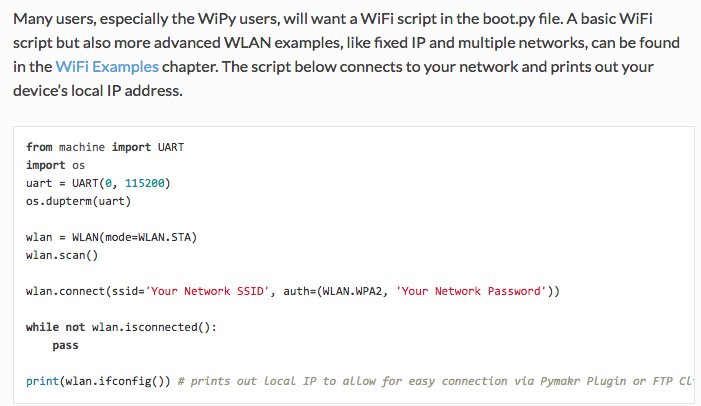
https://docs.pycom.io/pycom_esp32/pycom_esp32/getstarted.html#creating-a-project


Hello! It looks like you're interested in this conversation, but you don't have an account yet.
Getting fed up of having to scroll through the same posts each visit? When you register for an account, you'll always come back to exactly where you were before, and choose to be notified of new replies (either via email, or push notification). You'll also be able to save bookmarks and upvote posts to show your appreciation to other community members.
With your input, this post could be even better 💗
Register Login