Pure Python library for reading DHT sensor on Pycom boards
-
I am still getting
false. Using DHT11, pins double checked and, module works on arduino.using @RobTuDelft 's main.py, but changed
th = DTH(Pin('P4', mode=Pin.OPEN_DRAIN),0)
as using GHT11 on Pin G11 on expansion boardany ideas?
Thanks guys -
-
Hi @Jurassic-Pork, yes I am using your dht library.
and yes I have tried pulling it up to 3.3v and 5v, and have tried other pins.
Not sure what the problem is.
Here is my main py: https://gist.github.com/tairea/3607708a403b7501de142d125b07b7b8
and photo of set up: https://pasteboard.co/1p8ETKipZ.jpg -
@palmy-nz said in Pure Python library for reading DHT sensor on Pycom boards:
Pin G11 on expansion board
G11? If is see this right
in code you have P3 which is G24 not G11.
G11 is P4.
Or did you changed it from previous post?
Image quality is not enough to say for sure.P.S. i have upvoted your posts then you can now write faster - and maybe you will be allowed to post images directly
-
@livius I was trying other pins in the code example and photo and am making sure they match. Has to be something else?
-
@palmy-nz
on the photo , it seems that you have wired the dht11 in a strange manner.

it must be :
3.3v on pin 1
signal on pin 2
gnd on pin 4may be it is not the same chip.
-
@Jurassic-Pork
I am using this DHT11 sensor...
https://pasteboard.co/e4ZITp59g.png
This image just made me realize the pull up resistor is already embedded.
I have removed the resistor i had in my circuit, but still the same problem. -
@palmy-nz
ok it seems good for your module and you have a pull up resistor on your module.
be careful if you have powered your module with 5v may be you have the signal pin on your pycom module out of order. Try to check it without the dht11 module (input level 0 (gnd) input level 1 (pull up resistor to 3.3v)). -
@Jurassic-Pork
I got it working now. the problem was i was running an older firmware, after updating to latest, it seems to be working now.
Thanks to @livius for troubleshooting it with me.
and @Jurassic-Pork for the library.
This is a great forum. -
@RobTuDelft in Pure Python library for reading DHT sensor on Pycom boards:
Hi Rob, using your library (https://github.com/rbraggaar/DHT_PyCom), DHT22 on Wipy with 10 kOhm pullup, I am getting a temp of 25 deg (correct) but humidity of 99.9% (incorrect). Any ideas what could be wrong?
Cheers -
@robmarkcole that one I forked from JP. I was using a 4k7 resistor and it worked well.
Do you have
print('Humidity: {:3.2f}'.format(result.humidity / 1.0))? And
You did declare the sensor object asth = DTH(Pin('P3', mode=Pin.OPEN_DRAIN), 1)? The last one declares it as a DHT22.Does the humidity fluctuate at all?
-
@RobTuDelft Yes used those. Humidity and temp constant. Swapped in a DHT11 now and seeing same behaviour. Any tips on how to debug?
Cheers -
@robmarkcole Can you try it with a 4k7 resistor, maybe 10k is too much? You could also post a picture of your setup and the code fragments you are using.
-
@RobTuDelft I would, but I only have 1 and 10 k Ohm available at the moment.
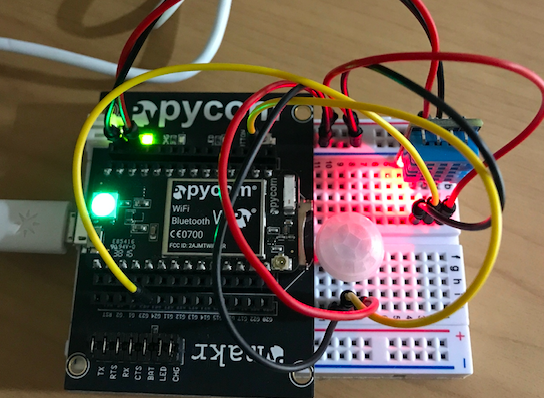
-
Annoyingly I am unable to upload the code, as it is 'marked as spam' when I try. Nevertheless I am just using the examples in your Github repo
-
hello,
@robmarkcole
to see what is wrong, you can uncomment some lines in the file dht.py. The lines 49, 53, 54, 63 with the print function.
you must see something like that for the dht11 :
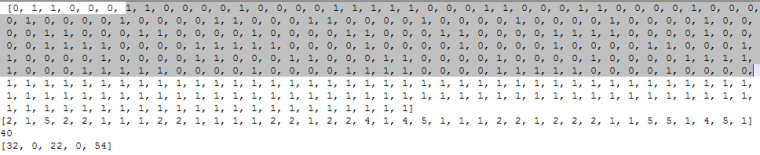
the last line in the photo (line 63 print(the_bytes)) has the values for the humidity (32) and for the temperature (22).
May be something is wrong with the WiPy module :
i use a SiPy module and the other people who have used the library seems to use a LoPy module. If someone can try to use the library with a WiPy module to see if it is OK.Friendly, J.P
-
Hi @Jurassic-Pork thanks for the tips. Here is what I get. The temp and humidity values change each time I reset the board, but look incorrect. E.g. humidity went from 18 to 37 on a restart.
Cheersentry 0x4009fd9c
('192.168.0.23', '255.255.255.0', '192.168.0.1', '192.168.0.1')
[1, 0, 1, 1, 0, 0, 1, 1, 0, 0, 0, 1, 1, 1, 0, 0, 0, 1, 1, 0, 0, 0, 1, 0, 0, 0, 1, 1, 1, 1, 0, 0, 0, 1, 0, 0, 0, 1, 1, 1,
1, 0, 0, 0, 1, 0, 0, 0, 1, 0, 0, 0, 1, 0, 0, 0, 1, 0, 0, 0, 1, 1, 0, 0, 0, 1, 0, 0, 0, 1, 0, 0, 0, 1, 0, 0, 0, 1, 0, 0,
0, 1, 1, 0, 0, 0, 1, 0, 0, 0, 1, 1, 1, 1, 0, 0, 0, 1, 0, 0, 0, 1, 0, 0, 0, 1, 1, 1, 1, 0, 0, 0, 1, 0, 0, 0, 1, 0, 0, 0,
1, 0, 0, 0, 0, 1, 0, 0, 0, 1, 0, 0, 0, 1, 0, 0, 0, 1, 0, 0, 0, 1, 0, 0, 0, 1, 1, 0, 0, 0, 1, 0, 0, 0, 1, 0, 0, 0, 1, 1,
1, 1, 0, 0, 0, 1, 1, 1, 1, 0, 0, 0, 1, 0, 0, 0, 1, 1, 1, 1, 0, 0, 1, 1, 1, 1, 0, 0, 0, 1, 1, 1, 1, 0, 0, 0, 1, 1, 1, 1,
1, 1, 1, 1, 1, 1, 1, 1, 1, 1, 1, 1, 1, 1, 1, 1, 1, 1, 1, 1, 1, 1, 1, 1, 1, 1, 1, 1, 1, 1, 1, 1, 1, 1, 1, 1, 1, 1, 1, 1,
1, 1, 1, 1, 1, 1, 1, 1, 1, 1, 1, 1, 1, 1, 1, 1, 1, 1, 1, 1, 1, 1, 1, 1, 1, 1, 1, 1, 1, 1, 1, 1, 1, 1, 1, 1, 1, 1, 1, 1,
1, 1, 1, 1, 1, 1, 1, 1, 1, 1, 1, 1, 1, 1, 1, 1, 1, 1]
[2, 2, 3, 2, 1, 4, 1, 4, 1, 1, 1, 1, 2, 1, 1, 1, 1, 2, 1, 4, 1, 1, 4, 1, 1, 1, 1, 1, 1, 1, 1, 2, 1, 1, 4, 4, 1, 4, 4, 4]
40
[37, 0, 18, 0, 55]
8
Temperature: 18 C
Humidity: 37 % -
hello,
@robmarkcole
look at this this timing for the AM2302 data acquisition :
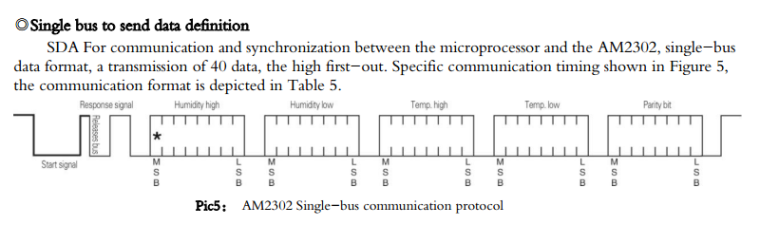
the acquisition begins when the start signal after 19 ms is put to level 1 :def read(self): #time.sleep(1) # send initial high #self.__send_and_sleep(1, 0.025) # pull down to low self.__send_and_sleep(0, 0.019) # collect data into an array data = self.__collect_input()def __collect_input(self): # collect the data while unchanged found unchanged_count = 0 # this is used to determine where is the end of the data max_unchanged_count = 100 last = -1 data = [] m = bytearray(800) # needs long sample size to grab all the bits from the DHT irqf = disable_irq() self.__pin(1)then we store the level values :
       for i in range(len(m)):
            m[i] = self.__pin()      ## sample input and store value
your samples data begin with a 1 and me with a zero (begining of the response signal)
try to see if you have always a 1 for the first data. -
@Jurassic-Pork Appears to always start with 1..
-
hello,
@robmarkcole
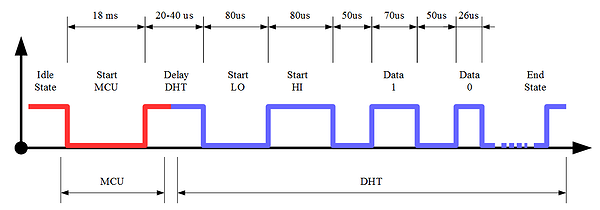
May be you have the Delay DHT in your first data and not me.
In the parse data function :
    def __parse_data_pull_up_lengths(self, data):
        STATE_INIT_PULL_DOWN = 1
        STATE_INIT_PULL_UP = 2
        STATE_DATA_FIRST_PULL_DOWN = 3
        STATE_DATA_PULL_UP = 4
        STATE_DATA_PULL_DOWN = 5

        state = STATE_INIT_PULL_UP

        lengths = [] # will contain the lengths of data pull up periods
        current_length = 0 # will contain the length of the previous period

        for i in range(len(data)):

            current = data[i]
            current_length += 1

            if state == STATE_INIT_PULL_DOWN:
                if current == 0:
                    # ok, we got the initial pull down
                    state = STATE_INIT_PULL_UP
                    continue
                else:
                    continue
            if state == STATE_INIT_PULL_UP:
                if current == 1:
                    # ok, we got the initial pull up
                    state = STATE_DATA_FIRST_PULL_DOWN
                    continue
                else:
                    continue
            if state == STATE_DATA_FIRST_PULL_DOWN:
                if current == 0:
                    # we have the initial pull down, the next will be the data pull up
                    state = STATE_DATA_PULL_UP
                    continue
                else:
                    continue
            if state == STATE_DATA_PULL_UP:
                if current == 1:
                    # data pulled up, the length of this pull up will determine whether it is 0 or 1
                    current_length = 0
                    state = STATE_DATA_PULL_DOWN
                    continue
                else:
                    continue
            if state == STATE_DATA_PULL_DOWN:
                if current == 0:
                    # pulled down, we store the length of the previous pull up period
                    lengths.append(current_length)
                    state = STATE_DATA_PULL_UP
                    continue
                else:
                    continue
        return lengths
try to put the state variable to STATE_INIT_PULL_DOWN at the begining of the function :
state = STATE_INIT_PULL_DOWNFriendly, J.P



Hello! It looks like you're interested in this conversation, but you don't have an account yet.
Getting fed up of having to scroll through the same posts each visit? When you register for an account, you'll always come back to exactly where you were before, and choose to be notified of new replies (either via email, or push notification). You'll also be able to save bookmarks and upvote posts to show your appreciation to other community members.
With your input, this post could be even better 💗
Register Login