Connect and send data via WiFi from WiPy to LoPy
-
Regarding the problems we found to do the same by BLE (https://forum.pycom.io/topic/1282/send-data-from-wipy-to-lopy-with-ble/6), I' m asking if it is possible to send data via WiFi from WiPy to LoPy.
Reading the documentation, it seems easy to connect, and then create a socket, but I prefer to ask you if it is possible before wasting my time...
Thank you.
-
@amartinez
Yes, it is possible
But i tested this with 2xWipy2 without lopy
But it should work same. -
@livius thank you. Could you share any code to step on? Or any recommendations about the necessary code?
What WLAN mode have I to choose? And what about the network security?
I guess the connection is done similar than the example:import network import time # setup as a station wlan = network.WLAN(mode=network.WLAN.STA) wlan.connect('your-ssid', auth=(network.WLAN.WPA2, 'your-key')) while not wlan.isconnected(): time.sleep_ms(50) print(wlan.ifconfig()) # now use socket as usual ...And then, how do I send the data?
-
@amartinez
you can useSTA_AP
or
in "server node" AP
in "client" node STAon server you must
listen
look here for sample
https://docs.python.org/2/howto/sockets.html
or
here
https://pymotw.com/2/socket/tcp.html -
@livius So, the server will be the listener (LoPy) and the Client sends the data (WiPy)?
It's a bit confusing because on BLE its the contrary...In order to listen, have I to set an IP adress?
-
@amartinez The access point has to set an IP address. By default this is 192.168.4.1. The AP will also run an DHCP server, which distributes IP-addresses to the client. The Client has to connect to the AP.
It might be confusing that there are two layers of connection needed:- One at the link level - Access point to Station (this is like plugging in a cable)
- One at the socket level - Client to server
-
@robert-hh thank you Robert. The connection is set correctly, now let's try to send data.
Connection code:
WiPy (Client - STA mode, transmitter):
# WiPy sends data -> Client -> WLAN mode = STA
import network
import time
import pycom

# setup as a station
wlan = network.WLAN(mode=network.WLAN.STA)
wlan.connect('lopy-wlan', auth=(network.WLAN.WPA2, 'www.pycom.io'))
while not wlan.isconnected():
    time.sleep_ms(50)
print(wlan.ifconfig())
pycom.rgbled(0x007f00) # green
# now use socket as usual
...
LoPy (Server - AP mode, listener):
import network import time from network import WLAN # setup as a station wlan = network.WLAN(mode=network.WLAN.AP) wlan.init(mode=WLAN.AP, ssid='lopy-wlan', auth=(WLAN.WPA2,'www.lopy.io'), channel=7, antenna=WLAN.INT_ANT) #wlan.connect('your-ssid', auth=(network.WLAN.WPA2, 'your-key')) while not wlan.isconnected(): time.sleep_ms(50) print(wlan.ifconfig()) -
Update: It's not connecting really, I thought that it was printing the ifcongif but it's not. This is what it prints:
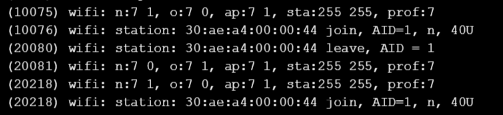
-
@amartinez
for server node it is not good to havewhile not wlan.isconnected(): time.sleep_ms(50)You do not connect wifi here only you start Access Point (AP) - look if it start on network list scan on client node side or your PC

Hello! It looks like you're interested in this conversation, but you don't have an account yet.
Getting fed up of having to scroll through the same posts each visit? When you register for an account, you'll always come back to exactly where you were before, and choose to be notified of new replies (either via email, or push notification). You'll also be able to save bookmarks and upvote posts to show your appreciation to other community members.
With your input, this post could be even better 💗
Register Login