Wipy motion and ambient conditions sensor node
-
So far I have a PIR motion sensor which toggles the Wipy LED from yellow to red when triggered by motion, and it is printing the temp/pressure data from a DHT22. Bit of work to understand some dubious readings from the DHT, and need to add MQTT.
My code (below) needs improvement - in particular some motion events are missed, or there appears to be a delay of a couple of seconds before it is triggered. Perhaps my use of time.sleep() is the problem. Any advice on how to improve the code appreciated :-)
Cheers
Robin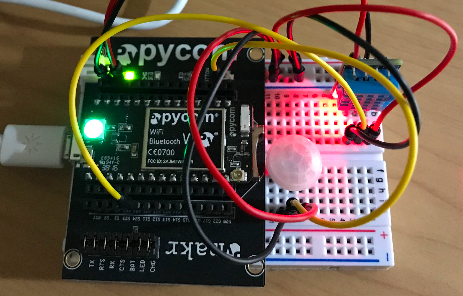
-
Unfortunately I can't post the code directly as I keep getting this wretched 'spam error', so see main.py on https://github.com/robmarkcole/Wipy_multisensor
-
@robmarkcole Hey Robin, your callback takes more than 500 ms. Since they will be queued sequentially you might experience these delays I guess, 16 x 500 ms = 8 seconds.
Which kind of PIR sensor is that?
-
@robmarkcole, I would take the publish and rgbled code out of the callback and only set a global flag. In your
while Trueloop, read the flag and take action when set. This will minimize the callback timing. As for your rgbled, you could use non-blocking delays instead of harddelay(). -
Hi @RobTuDelft the sensor is AM312 Mini PIR Sensor, https://www.amazon.co.uk/gp/product/B016Y10B3O/ref=as_li_ss_tl?tag=brau03-21&ie=UTF8&psc=1&linkCode=ll1&linkId=0bb8888d752ec23f1d451691989542c8
-
Hi @peekay123 thanks for the advice. Rather than using sleep() would I be better off triggering the data post e.g. on the second?
Re using a flag, I guess you mean something like below? I notice that the LED doesn't switch to red when motion is registered.
Cheers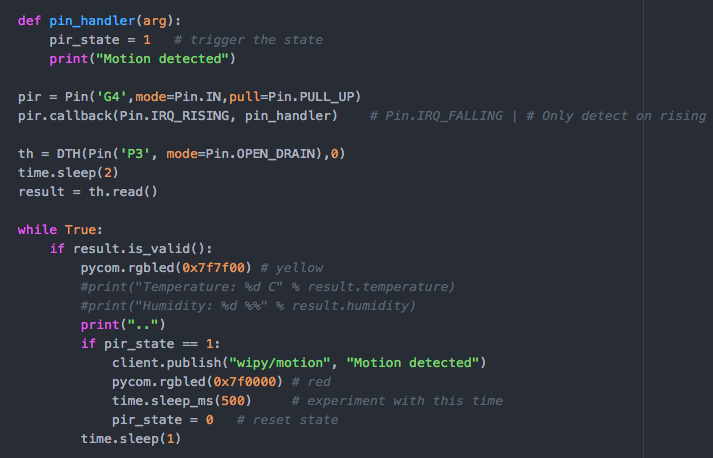
-
@robmarkcole It is not really useful to only read the temperature once and keep validating that result in your if-loop? Maybe also include
result = th.read()in the while True-loop. -
@robmarkcole said in Wipy motion and ambient conditions sensor node:
Hi @RobTuDelft the sensor is AM312 Mini PIR Sensor, https://www.amazon.co.uk/gp/product/B016Y10B3O/ref=as_li_ss_tl?tag=brau03-21&ie=UTF8&psc=1&linkCode=ll1&linkId=0bb8888d752ec23f1d451691989542c8
It is used in https://github.com/bruhautomation/ESP-MQTT-JSON-Multisensor and has on-board processing as described in the linked video

Hello! It looks like you're interested in this conversation, but you don't have an account yet.
Getting fed up of having to scroll through the same posts each visit? When you register for an account, you'll always come back to exactly where you were before, and choose to be notified of new replies (either via email, or push notification). You'll also be able to save bookmarks and upvote posts to show your appreciation to other community members.
With your input, this post could be even better 💗
Register Login