Welcome to the Pycom forum Forum
    • \[\[global:header.categories\]\]
    • \[\[global:header.recent\]\]
    • \[\[global:header.tags\]\]
    • \[\[global:header.popular\]\]
    • Login

    Explore Pybytes | Official Documentation | Report a Firmware Bug/Issue | GitHub

    [SOLVED] Driver USB for PySense Windows 7 64b

    Scheduled Pinned Locked Moved Getting Started
    pysenseusb driverlopy
    10 Posts 4 Posters 4.5k Views 4 Watching
    Loading More Posts
    • Oldest to Newest
    • Newest to Oldest
    • Most Votes
    Reply
    • Reply as topic
    Log in to reply
    This topic has been deleted. Only users with topic management privileges can see it.
    • A Offline
      alvaroBT
      last edited by alvaroBT

      Hi everybody, I'm new.
      I purchased two LoPy and two PySense expansion boards.
      I'm trying to connect the PySense (with the LoPy attached) to the PC.
      My PC have a Windows 7 Pro SP1 64bits.

      The OS not recognise the driver (COM port) automactily.
      I dowloaded this drivers: http://www.ftdichip.com/Drivers/CDM/CDM v2.12.26 WHQL Certified.zip
      At de 'Device Manager' appears a new device named PySense
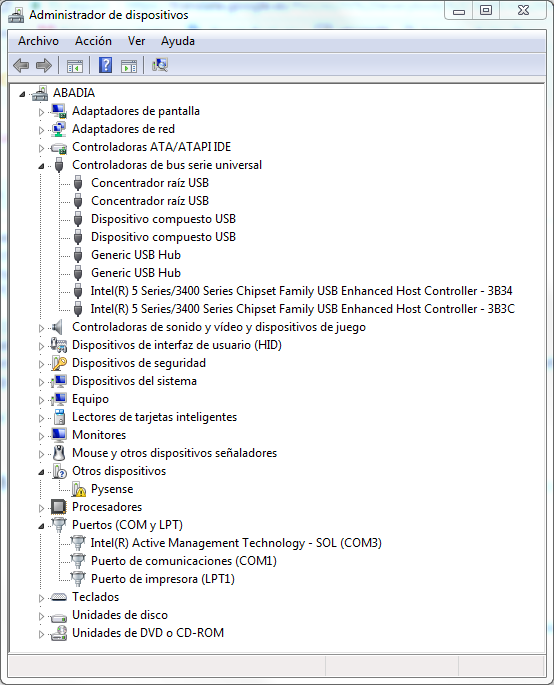
      0_1496819733511_upload-4134cd05-a2df-43b9-8b3b-a1489e7aa3dc
      Then when I update the driver with the downloaded FTDI driver the device appear as a 'Com Port(COM31)' but I can't comunicate with it.
      Can you help me?

      Thanks a lot.

      1 Reply Last reply Reply Quote 0
      • B Offline
        bucknall
        last edited by

        Hi @alvaroBT,

        We have a Windows 7 driver that will be released either today or tomorrow. I will post back here when it is out.

        Thanks for your patience!

        Alex

        Developer Evangelist - Pycom

        M 1 Reply Last reply Reply Quote 0
        • A Offline
          alvaroBT
          last edited by

          OK, thanks a lot. I'll wait for it.

          1 Reply Last reply Reply Quote 0
          • M Offline
            marcozennaro Pycom Ambassadors @bucknall
            last edited by

            @bucknall Thanks Alex for the info. What about Linux and Mac? How to use PySense with them? Thanks! Marco

            B 1 Reply Last reply Reply Quote 0
            • B Offline
              bucknall @marcozennaro
              last edited by

              @marcozennaro You shouldn't need drivers for Linux and Mac - it will work out of the box! Documentation explaining how to get started will be going live soon - I'll drop a link here when it's ready!

              Developer Evangelist - Pycom

              M 1 Reply Last reply Reply Quote 0
              • M Offline
                marcozennaro Pycom Ambassadors @bucknall
                last edited by

                @bucknall I am using a LoPy with the latest firmware. I can connect via WiFi and I have tested the example. I can read the accelerometer. But I cannot connect via USB. I tried on a Mac and on a Linux machine. Connection to the expansion board has always worked fine. Any suggestion? Marco

                B 1 Reply Last reply Reply Quote 0
                • B Offline
                  bucknall @marcozennaro
                  last edited by

                  @marcozennaro Are you using the Pymakr Plugin for Atom?

                  Developer Evangelist - Pycom

                  M 1 Reply Last reply Reply Quote 0
                  • M Offline
                    marcozennaro Pycom Ambassadors @bucknall
                    last edited by

                    @bucknall Yes. What port should I enter in the settings, if listing /dev/cu.* gives me nothing?

                    J 1 Reply Last reply Reply Quote 0
                    • J Offline
                      jmarcelino @marcozennaro
                      last edited by

                      @marcozennaro
                      Should appear as /dev/cu.usbmodemPyxxxxxx
                      Are you using a microUSB cable that is suitable for data? (some are power/charging only)

                      M 1 Reply Last reply Reply Quote 0
                      • M Offline
                        marcozennaro Pycom Ambassadors @jmarcelino
                        last edited by

                        @jmarcelino Thanks! Works fine now. Best, Marco

                        1 Reply Last reply Reply Quote 0

                        Hello! It looks like you're interested in this conversation, but you don't have an account yet.

                        Getting fed up of having to scroll through the same posts each visit? When you register for an account, you'll always come back to exactly where you were before, and choose to be notified of new replies (either via email, or push notification). You'll also be able to save bookmarks and upvote posts to show your appreciation to other community members.

                        With your input, this post could be even better 💗

                        Register Login
                        • 1 / 1
                        • First post
                          Last post

                        Pycom on Twitter

                        Pycom