LoRa packet loss
-
Hi again,
When I'm testing how many LoRa packets the gateway receives from the node (using LoPy to LoPy tutorial), it is incredibly bad. The node sends a packet with message variable i (to track how many packets are received and lost) and it turned out that sending 10 packets/second does not guarantee 1 packet received by gateway when it is listening in the loop with no time.sleep().
Am I supposed to spam gateway with packets or is my approach wrong?
PS: Both have antennas installed
-
Hi @finnzc, the transmission time for a LoRa message depends on the size of the payload and a number of other features. If you're trying to send 10 message per second, you're likely trying to send message before the previous one has been sent.
Could you please paste your script in this thread so I can see what you're trying to do?
Thanks,
Alex
-
@bucknall
Here is my code, I also adjusted the time.sleep to 0.5 to send 2 packets per second but the received packets is very little. I use the variable i to calculate the number of lost packet between each received packet.Node_A:
lora = LoRa(mode=LoRa.LORA)
s = socket.socket(socket.AF_LORA, socket.SOCK_RAW)

i = 0
s.setblocking(False)

while True:
    # send some data
    message = 'Node A: Hello ' + str(i)
    print(message)
    s.send(message)
    i = i + 1
    time.sleep(0.1)
Receiver:
lora = LoRa(mode=LoRa.LORA, rx_iq=True) s = socket.socket(socket.AF_LORA, socket.SOCK_RAW) s.setblocking(False) print('Start') while True: data = s.recv(64) if (len(data) > 0): print(data) -
@finnzc You're going to have issues with this because you're going to be sending message over the previous one with this code. Change s.setblocking(False) to s.setblocking(True). This way the code is synchronous and will wait until the previous message has sent before continuing with the code.
-
I changed to s.setblocking(True) in the sender node but the receiver node still doesn't receive much data... I believe the problem is at the receiver node. Do you have any suggestions where could be the problem? The worst case is that I could have already damaged my board by sending LoRa packets before installing the antennas...
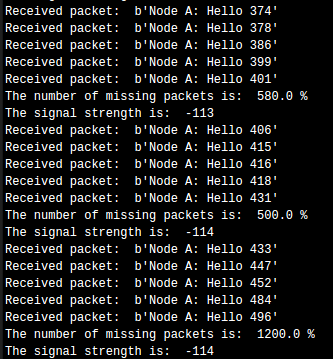
This is what I get when I send 2 packets per second with blocking True and the receiver node as above. For every 5 packets received, it outputs the ratio of lost package / received package(5)
-
How far away are your boards? Indoors or outdoors? What data rate / spreading factor are your using? The RSSI figures are very close to the limits of LoRa.
Also, remember that the lowest data rates (highest spreading factors) mean that it takes forever to send a packet (nearly 1.5s for the smallest packet using SF 12), and that in some regions (the EU for instance) you are not allowed to send on the same sub-band for 99 times the time it took to send the last packet...
-
@jcaron
I tested the packet loss both indoor and outdoor, both have loss rate of >95%. I used the default settings so sf = 7 and coding_rate = LoRa.CODING_4_5. I've also tested the loss using less packets per second and the results are similar... -
@finnzc said in LoRa packet loss:
lora = LoRa(mode=LoRa.LORA, rx_iq=True)
I don't understand why you set
rx_iq=Trueon the receiving node but then not settx_iq=Trueon the sending one ?Since your sending node will have tx_iq=False (the default) I'm surprised you get any packets at all. Not sure what is going on.
Can you try removing inversion altogether, based on the simple LoPy to LoPy example? https://docs.pycom.io/chapter/tutorials/lopy/lopy-lopy.html
Also try another frequency, for example the one on that example
frequency=863000000if you're in Europe or one appropriate for your region -
Guys, mystery solved. It seems like I have already damaged the sender Pycom by sending packets before attaching the antenna to it (improper use...). Now I used another Pycom acting as the sender and there is <1% packet loss. Lesson learned the hard way. Always read all documentation before playing around with the board :/
Hello! It looks like you're interested in this conversation, but you don't have an account yet.
Getting fed up of having to scroll through the same posts each visit? When you register for an account, you'll always come back to exactly where you were before, and choose to be notified of new replies (either via email, or push notification). You'll also be able to save bookmarks and upvote posts to show your appreciation to other community members.
With your input, this post could be even better 💗
Register Login