Pymakr console should not be always up
-
I understand that the Pymakr console (for Atom) can be toggled (show/hide). However, it is extremely annoying to see the console always up even when I am working on a non-Pycom project with Atom. Also I use other 3rd party statusbar that shows below the Pymakr console, and after closing the Pymakr console, that statusbar is also pushed down and becomes invisible. This is super annoying. I would expect the console to be visible only for Pycom projects and not for my other projects (i.e. PHP, Javascript projects).
-
Hi @reefat. I agree. For the new VSCode plugin we added a 'open_on_start' config that you can use to disable it. We'll also add this to the atom code soon. In your case you can set this to false to prevent it from opening, but override it to 'true' in your project-config for the pycom project.
About the status bar: which other plugin are you using, which statusbar is pushed down by the pymakr console? That shouldn't happen, maybe we can test with that and fix it.
-
This post is deleted! -
Hi @Ralph. Thank you for promising the feature to Atom. By the way, I didn't really get in which "project-config" I can set "open_on_start" to true? There is no such file in Pycom project. I only have "pymakr.conf" file there.
And regarding the status bar, I am not so sure which plugin I have since I have so many and I think multiple plugins share this same statusbar. Please see the screenshot below.
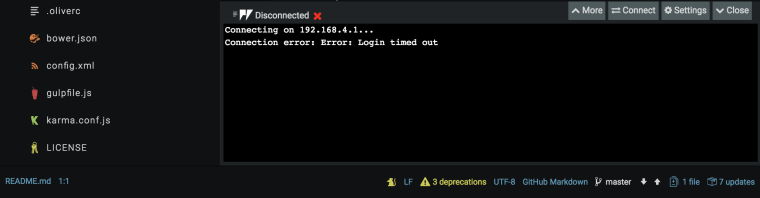
It looks like this statusbar is being used by Atom itself, Git and more. FYI, I am using the popular "Seti" theme which comes with "seti-ui" and "seti-syntax" packages.
-
@reefat yes with project config I ment the pymakr.conf in your project. In VSCode, you can indeed set 'open_on_start' to true in that file. In atom it's ignored right now.
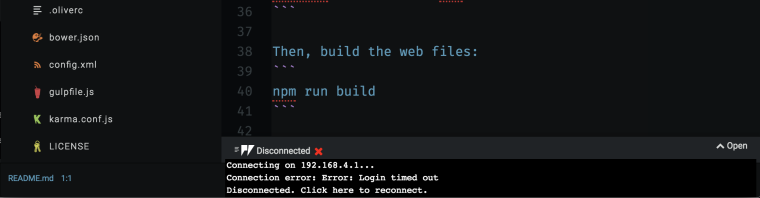
Can you share another screenshot like this, after you clicked the 'close' button, where the status bar is pushed away?
-
@Ralph See how it looks after closing the console. The statusbar is gone.
Hello! It looks like you're interested in this conversation, but you don't have an account yet.
Getting fed up of having to scroll through the same posts each visit? When you register for an account, you'll always come back to exactly where you were before, and choose to be notified of new replies (either via email, or push notification). You'll also be able to save bookmarks and upvote posts to show your appreciation to other community members.
With your input, this post could be even better 💗
Register Login