Welcome to the Pycom forum Forum
    • \[\[global:header.categories\]\]
    • \[\[global:header.recent\]\]
    • \[\[global:header.tags\]\]
    • \[\[global:header.popular\]\]
    • Login

    Explore Pybytes | Official Documentation | Report a Firmware Bug/Issue | GitHub

    Instructions for upgrading Pytrack / LoPy

    Scheduled Pinned Locked Moved Firmware
    lopy
    25 Posts 5 Posters 9.1k Views 5 Watching
    Loading More Posts
    • Oldest to Newest
    • Newest to Oldest
    • Most Votes
    Reply
    • Reply as topic
    Log in to reply
    This topic has been deleted. Only users with topic management privileges can see it.
    • H Offline
      hjl @bucknall
      last edited by

      @bucknall The preconfigured serial port in the updater tools doesn't match my serial port. 0_1501957170445_Screen Shot 2017-08-05 at 20.18.23.png
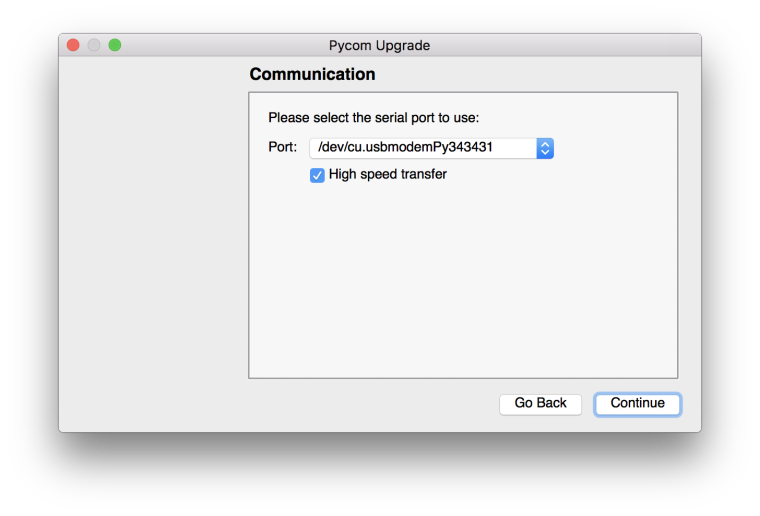
      0_1501957182479_Screen Shot 2017-08-05 at 20.18.37.png

      cu.
      tty.

      difference...? I connect with an adapter through a USB-C port.

      J 1 Reply Last reply Reply Quote 0
      • H Offline
        hjl @hjl
        last edited by

        @hjl @bucknall @jmarcelino any ideas?

        1 Reply Last reply Reply Quote 0
        • J Offline
          jmarcelino @hjl
          last edited by

          @hjl
          You usually get a cu. and tty. port on macOS (actually it's a BSD thing, so the same for FreeBSD and other *nixes) they should be effectively the same thing other than historical differences.

          To be honest I never managed to upgrade the firmware using the Pytrack on high or low speed - neither worked - but I haven't tried in latest Pytrack firmware.

          1 Reply Last reply Reply Quote 0
          • B Offline
            bucknall
            last edited by

            Hi @hjl,

            Apologies for the slow reply, I've been out of office for the last few days.

            I've just tried the update procedure with a Pysense and LoPy, without any problems. I'll try it again with a Pytrack but the firmware is practically identical for the two shields.

            Have you updates the firmware on your Pytrack Shield? If you're using an older version of the firmware then this might be preventing you from updating.

            Thanks,

            Alex

            Developer Evangelist - Pycom

            H 1 Reply Last reply Reply Quote 0
            • H Offline
              hjl @bucknall
              last edited by

              @bucknall Hi, I've use the dfu-util to upgrade it with the 0.0.4 version and that seemed to be going OK..

              H 1 Reply Last reply Reply Quote 1
              • H Offline
                hjl @hjl
                last edited by

                @bucknall But still experiencing upgrade problems for the lopy..

                B 1 Reply Last reply Reply Quote 0
                • B Offline
                  bucknall @hjl
                  last edited by

                  Hi @hjl,

                  What seems to be the issue? Is it still not going in firmware upgrade mode?

                  Developer Evangelist - Pycom

                  1 Reply Last reply Reply Quote 0
                  • H Offline
                    hjl @jcaron
                    last edited by

                    @bucknall I am failing at this point.. Staying in bootloader means I am in firmware upgrade mode, right?

                    B 1 Reply Last reply Reply Quote 0
                    • B Offline
                      bucknall @hjl
                      last edited by

                      @hjl If you use the Pymakr Plugin or a Serial Terminal to view the output from your device when you boot up (with pins GND and G23 connected), you will see a message like this appear:

                      0_1502873747457_Screen Shot 2017-08-16 at 09.55.19.png

                      This means your device is correctly going into firmware update mode.

                      Now to use the Firmware Update Tool, you must unplug the USB cable from your computer and plug it into another port (sometimes Windows/Mac/Linux, do not release the serial address). Ensure that the jumper wire is in exactly the same position as when you saw the message appear above.

                      Now run the Firmware Upgrade Tool and 'un-select' the box for High speed Transfer.

                      This should then run successfully. Let me know if that helps!

                      Thanks,

                      Alex

                      Developer Evangelist - Pycom

                      1 Reply Last reply Reply Quote 0
                      • J Offline
                        jcaron
                        last edited by

                        For those using a Pysense for upgrade, there's actually a much simpler way to connect GND and G23: just connect pins 1 and 5 (GND and EXT_IO0) on the external I/O header.

                        I suppose it's the same on the Pytrack?

                        C 1 Reply Last reply Reply Quote 2
                        • C Offline
                          cinezaster @jcaron
                          last edited by cinezaster

                          @jcaron I can confirm this for PyTrack!

                          H 1 Reply Last reply Reply Quote 2
                          • H Offline
                            hjl @cinezaster
                            last edited by

                            @cinezaster @jcaron thanks guys, I'll try that!

                            1 Reply Last reply Reply Quote 0

                            Hello! It looks like you're interested in this conversation, but you don't have an account yet.

                            Getting fed up of having to scroll through the same posts each visit? When you register for an account, you'll always come back to exactly where you were before, and choose to be notified of new replies (either via email, or push notification). You'll also be able to save bookmarks and upvote posts to show your appreciation to other community members.

                            With your input, this post could be even better 💗

                            Register Login
                            • 1
                            • 2
                            • 1 / 2
                            • First post
                              Last post

                            Pycom on Twitter

                            Pycom