Welcome to the Pycom forum Forum
    • \[\[global:header.categories\]\]
    • \[\[global:header.recent\]\]
    • \[\[global:header.tags\]\]
    • \[\[global:header.popular\]\]
    • Login

    Explore Pybytes | Official Documentation | Report a Firmware Bug/Issue | GitHub

    Pytrack GPS API

    Scheduled Pinned Locked Moved Enhancements
    pytrack
    51 Posts 13 Posters 16.0k Views 20 Watching
    Loading More Posts
    • Oldest to Newest
    • Newest to Oldest
    • Most Votes
    Reply
    • Reply as topic
    Log in to reply
    This topic has been deleted. Only users with topic management privileges can see it.
    • N Offline
      Neuromystix @stefan85e
      last edited by

      @stefan85e If you need the number of satellites used to fix, it's already parsed in l76.coordinates1(). The "Satellites in view" i haven't done it, but it's easy to implement, just parse any $__GSV sentence, the third field is "Satellites in view".

      Researcher @ UALG, Portugal

      S 1 Reply Last reply Reply Quote 0
      • S Offline
        stefan85e @Neuromystix
        last edited by

        @neuromystix said in Pytrack GPS API:

        l76.coordinates1()

        Sorry did not udnerstand that :)

        1 Reply Last reply Reply Quote 0
        • A Offline
          andrethemac
          last edited by

          Hi all. I've taken the original librarya and @Neuromystix addtions and made my own library. It parses aml the sentences from the L76 gps and returns them as a dict. you can get the coordinates parsed, the time, ...
          https://github.com/andrethemac/L76GLNSV4

          I've noticed one (strange?) thing. the RMC (required minimum data to get a fix) message only pass once (just after starting the gps) and does not reappear. Any idea's ?
          best regards

          S 1 Reply Last reply Reply Quote 0
          • S Offline
            stefan85e @Neuromystix
            last edited by

            @neuromystix said in Pytrack GPS API:

            For use it just call l76.coordinates1() which will return (lat, long, time(not formatted), altitude (M), valid fix (true ou false), number of satellites).
            L76GNSS.py
            So what did you do to get the nimber of satellites? We are trying this and we cant get it to work.

            N 1 Reply Last reply Reply Quote 0
            • N Offline
              Neuromystix @stefan85e
              last edited by

              @stefan85e Hello,

              You have to do something like this inside your code, and you'll get the number of satellites used for fix:

              ...
              gps_data = l76.coordinates1()
              n_sat = gps_data[5]
              ...
              

              Or you can use the @andrethemac library which will get you all the data ;)

              Researcher @ UALG, Portugal

              1 Reply Last reply Reply Quote 0
              • S Offline
                stefan85e @andrethemac
                last edited by

                @andrethemac
                (2018, 4, 17, 11, 29, 12, 564887, None)(None(53.33632, 12.53262)
                (None, None) Got when I add this:

                gps_data = l76.coordinates1()
                n_sat = gps_data[5]

                Did also try to use this lib:
                https://github.com/andrethemac/L76GLNSV4

                A 1 Reply Last reply Reply Quote 0
                • S Offline
                  stefan85e @Neuromystix
                  last edited by

                  @neuromystix said in Pytrack GPS API:

                  num_satellites

                  Does this work:

                  return(lat_d, lon_d, gps_time, gps_altitude, valid, num_satellites)

                  I want num_satellites...

                  N 1 Reply Last reply Reply Quote 0
                  • N Offline
                    Neuromystix @stefan85e
                    last edited by

                    @stefan85e If you are using my code (and just my code, not the one from @andrethemac), when you call gps_data = l76.coordinates1() it will return a list gps_data with latitude at first position (gps_data[0]), longitude at second (gps_data[1]), and so on till the sixth position where you get the number of satellites (gps_data[5]). So, number_of_satellites = gps_data[5].

                    Researcher @ UALG, Portugal

                    1 Reply Last reply Reply Quote 0
                    • A Offline
                      andrethemac @stefan85e
                      last edited by

                      @stefan85e An example on how to get the number of satelites with my library

                      from pytrack import Pytrack
                      from L76GNSV4 import L76GNSS
                      
                      py = Pytrack()
                      L76 = L76GNSS(pytrack=py)
                      
                      print("test L76")
                      # returns the info about sattelites in view at this moment
                      # even without the gps being fixed
                      print(L76.gps_message('GSV'))
                      
                      # returns the number of sattelites in view at this moment
                      # even without the gps being fixed
                      print(L76.gps_message('GGA')['NumberOfSV'])
                      
                      # returns the coordinates
                      # with debug true you see the messages parsed by the 
                      # library until you get a the gps is fixed
                      print(L76.coordinates(debug=True))
                      #L76.getUTCDateTime(debug=True)
                      #L76._read_message(debug=True)
                      
                      
                      S 1 Reply Last reply Reply Quote 1
                      • S Offline
                        stefan85e @andrethemac
                        last edited by stefan85e

                        @andrethemac

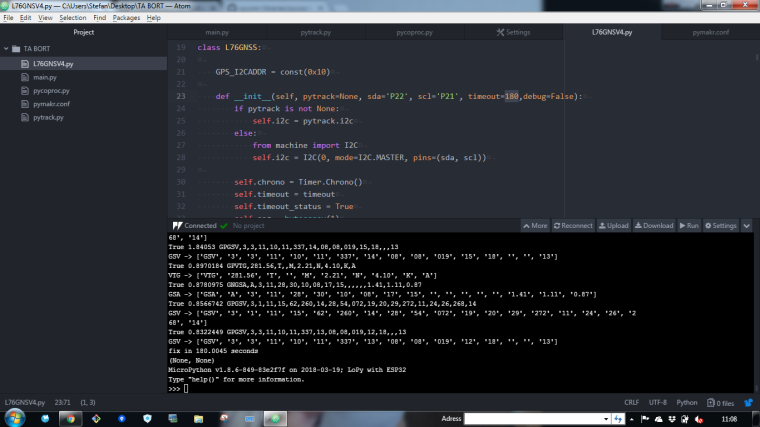
                        0_1524042540467_f2c4b355-5786-4440-8e0e-6e4ab4d095d0-image.png

                        Got this

                        I see that you have a 180 timeout in the code:

                        -> L76GNSV4 - So how do I know how many sattelites i have then :) just so I look at right nr :)

                        ´´´´
                        def init(self, pytrack=None, sda='P22', scl='P21', timeout=180,debug=False):
                        ´´´´

                        A 1 Reply Last reply Reply Quote 0
                        • A Offline
                          andrethemac @stefan85e
                          last edited by

                          @stefan85e The timeout is to prevent the library to wait for ever. 180 seconds (3 minutes) is (for me) most of the time enough to get a fixed location. (that is after a cold start)
                          the GGA sentences contains the number of messages seen by the GPS, In the dict that GGA returns, this is the "NumberOfSV' fied.
                          with this you get this number -> L76.gps_message('GGA')['NumberOfSV']
                          In your screenshot the line that prints the number of satellites has scrolled out of view
                          but if you make this line the last you get the number:
                          print(L76.gps_message('GGA')['NumberOfSV'])
                          or remove the 'debug=True) from the coordinates line (the debug spews out a lot of information)
                          I'm still working on the library to make it faster
                          best regards

                          A S 2 Replies Last reply Reply Quote 0
                          • A Offline
                            andrethemac @andrethemac
                            last edited by

                            @andrethemac published a new version of the Library to github
                            https://github.com/andrethemac/L76GLNSV4

                            If you find some errors or have a request, please ask.
                            best regards

                            S 2 Replies Last reply Reply Quote 0
                            • S Offline
                              stefan85e @andrethemac
                              last edited by

                              @andrethemac

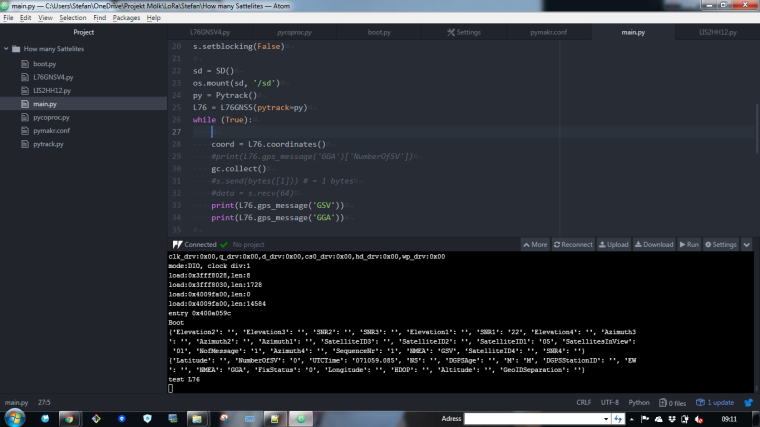
                              The program stop after 180 sec and if I do this:

                              #print(L76.coordinates(debug=True)) it will not do anything :)
                              0_1524127959536_b577631a-0d05-460c-906e-6afe4d29af99-image.png

                              1 Reply Last reply Reply Quote 0
                              • S Offline
                                stefan85e @andrethemac
                                last edited by

                                This post is deleted!
                                1 Reply Last reply Reply Quote 0
                                • S Offline
                                  stefan85e @andrethemac
                                  last edited by stefan85e

                                  @andrethemac

                                  (I dont get any nr due to I done get a signal from the GPS, I have to go outside to get it)

                                  When I do this the program keeps running:

                                  #print(L76.gps_message('GSV'))
                                  print(L76.gps_message('GGA'))
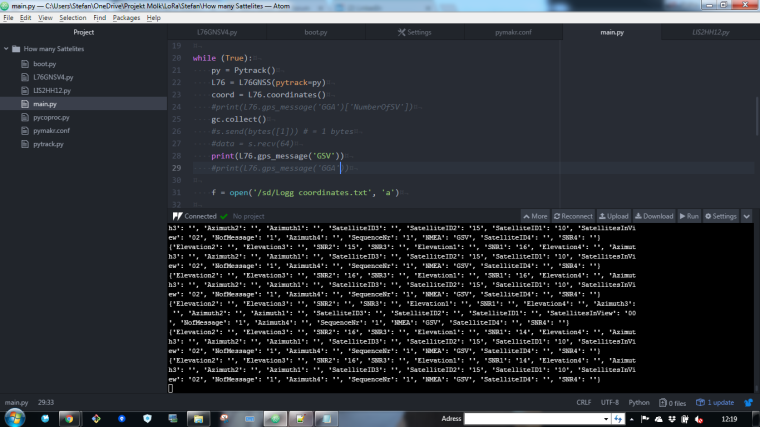
                                  0_1524133170243_82dc4f1c-524e-4fe8-ae72-e6260007f14e-image.png

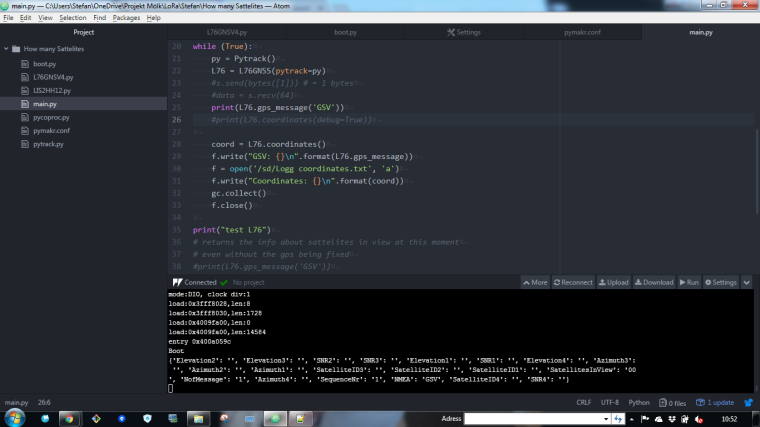
                                  And when I doing this then this happens:

                                  print(L76.gps_message('GSV'))

                                  print(L76.gps_message('GGA'))
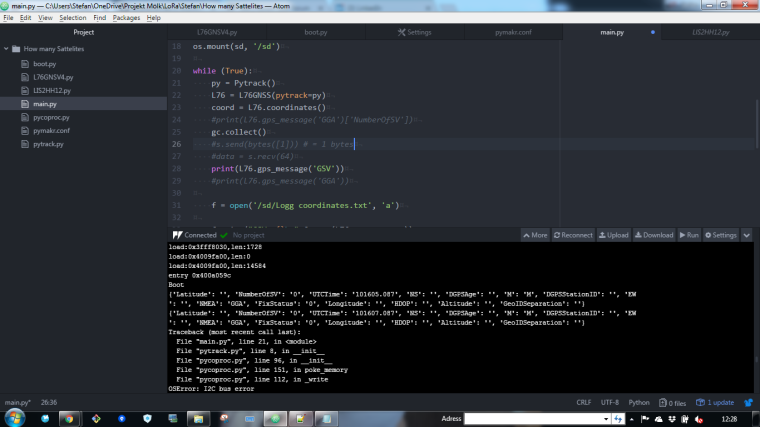
                                  0_1524133705311_8db7519c-c6fa-416c-b145-743597a3be5f-image.png

                                  A 1 Reply Last reply Reply Quote 0
                                  • A Offline
                                    andrethemac @stefan85e
                                    last edited by

                                    @stefan85e Hi Stefan
                                    sorry for the delay. you better put the the two firsts lines following the while(true): before. you don't need to init the library every run . I'll guess it's generating the error's.
                                    the commands stop when the timeout runs out (default aflter 180 seconds). you can change that if needed.
                                    The timeout occurs if the gps itself can't get a fix because it can't see (enough) sattelites.
                                    best regards

                                    S 1 Reply Last reply Reply Quote 0
                                    • A Offline
                                      andrethemac
                                      last edited by

                                      some tweaks to my library https://github.com/andrethemac/L76GLNSV4
                                      methods returning multiple values now return them as a dict;

                                      J 1 Reply Last reply Reply Quote 0
                                      • S Offline
                                        stefan85e @andrethemac
                                        last edited by

                                        @andrethemac Like this?

                                        0_1524467501012_92c1dda9-b3f3-49c3-b873-3e1967959789-image.png

                                        A 1 Reply Last reply Reply Quote 0
                                        • A Offline
                                          andrethemac @stefan85e
                                          last edited by

                                          @stefan85e yes.
                                          maybe of interest. I have 2 pytrack board and testing them side by side I found out that 1 takes way longer to get a fix, almost double as long.
                                          So you need to tweak the timeout parameter to get the best results for your module.
                                          best regards

                                          S 1 Reply Last reply Reply Quote 0
                                          • S Offline
                                            stefan85e @andrethemac
                                            last edited by

                                            @andrethemac Okay thanks... what time are you using!?

                                            A 1 Reply Last reply Reply Quote 0

                                            Hello! It looks like you're interested in this conversation, but you don't have an account yet.

                                            Getting fed up of having to scroll through the same posts each visit? When you register for an account, you'll always come back to exactly where you were before, and choose to be notified of new replies (either via email, or push notification). You'll also be able to save bookmarks and upvote posts to show your appreciation to other community members.

                                            With your input, this post could be even better 💗

                                            Register Login
                                            • 1
                                            • 2
                                            • 3
                                            • 3 / 3
                                            • First post
                                              Last post

                                            Pycom on Twitter

                                            Pycom