Atom Pymakr Serialport.node
-
@ssmith In install-win.js there is this command
electron-rebuild -f -w serialport -v 1.3.13which should recompile the serialport library. However it did not work for me at least. If you find something that works you can post it here https://github.com/pycom/pymakr-atom/issues/1 -
@balibo
Interesting article for those wanting to code using JavaScript, but I fail to see how this can help solving this problem. -
@politick
I guess I will do the same and wait until a new version of the plugin is released before upgrading to Atom 1.19.Thanks everyone for your help and suggestions.
-
A library is an organized collection of useful functionality. A typical library could include functions to handle strings, dates, HTML DOM elements, events, cookies, animations, network requests, and more. This article explains the basics and rudimentary differences between the most popular JavaScript libraries. Whether they become “best” for you is another question. But still all of them worth trying!
-
Same problem with serialport after the automatic upgrading (Windows 10, x64). Ended up downgrading Atom to 1.17 (I know my setup was working back in June), the problem seemed to have gone away (Atom 1.18 had the same incompatible serialport issue). Hope this helps,
-
For who wants to try it, there is a fix for this issue on the develop branch now. See my last comment in https://github.com/pycom/pymakr-atom/issues/1#issuecomment-324798001. People seem to respond that it's working, so It'll likely be released soon.
-
V1.1.0 has been released with a fix for this issue.
Note that the issue could re-appear if you are on 1.18.0. If it does, please update to the latest version (1.19.0 or higher).
-
I have just received my LoPy boards today and am worried that I may have made a mistake.
I have tried to follow the instructions for connecting via atom, but the menus that you are asked to click on don't exist in the latest version of Atom.
Also when I click "Get Serial Ports" I get the following error
[Enter steps to reproduce:]
- ...
- ...
Atom: 1.19.5 x64
Electron: 1.6.9
OS: Microsoft Windows 10 Pro
Thrown From: Pymakr package 1.1.0Stack Trace
Uncaught TypeError: No Binding set on
SerialPort.BindingAt C:\Users\simon\.atom\packages\Pymakr\precompiles\serialport-win\lib\serialport.js:616 TypeError: No Binding set on `SerialPort.Binding` at Function.SerialPort.list (/packages/Pymakr/precompiles/serialport-win/lib/serialport.js:616:11) at Function.list (/packages/pymakr/lib/connections/pyserial.js:138:16) at Pymakr.getSerial (/packages/pymakr/lib/pymakr.js:155:14) at /packages/pymakr/lib/pymakr.js:75:13) at emitNone (events.js:86:13) at PanelView.emit (events.js:185:7) at HTMLDivElement.PanelView.option_get_serial.onclick (/packages/pymakr/lib/main/panel-view.js:143:13)Commands
Non-Core Packages
Pymakr 1.1.0Can someone help me get started or point me to where there is some working documentation.
Thanks
-
@simonjcarr This looks like a new issue indeed, I'll do some extensive testing on my windows 64 machine. Besides the missing menus (could you send me a screenshot of this) and this error when pressing Get Serial Ports, I'm guessing you are not able to connect to the board over serial? Are you able to use telnet and use the REPL? If needed you can change the IP setting via the alternative route of going to the atom preferences, plugins, then clicking the settings button of the Pymakr plugin.
-
@Ralph Sorry, I found the Global Config, Atom is new to me and I was looking under settings in the File Menu. This is should probably be updated in the docs, as not everybody has used Atom before.
Having found the global config, I have tried to connect to my COM Port, COM4 but it just hangs trying to connect. I also tried to connect to other COM ports the it immediately gives an error saying it can't connect, so it seems that COM4 is the correct port and Atom does try to connect but just hangs. I have tried two different devices and get the same problem, both devices have had the firmware updated today.
I have also tried to connect using putty and get the same problem, no error message, it hangs like it is trying to connect but never comes back with a failed message.
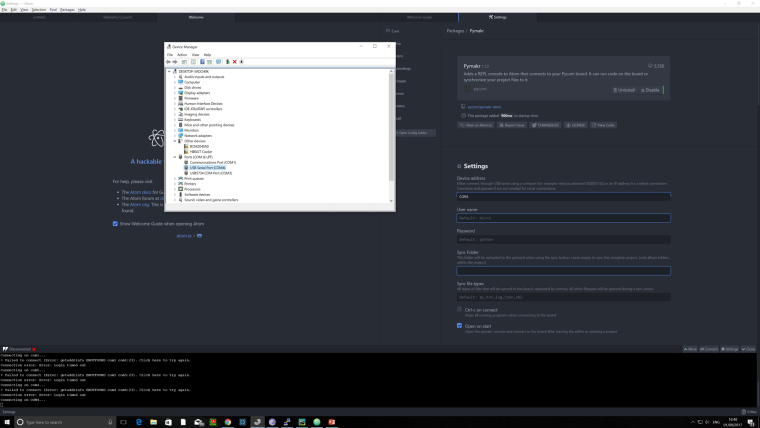
-
I just tested it on Windows 10, upgraded from Atom 1.18 to 1.19, then updated the Pymakr plugin. Works for me.
-
@ledbelly2142 Do I need Python installed. If so which version?
Is there some documentation with screen shots for users who are new to Atom and LoPy?
-
@simonjcarr With atom 1.19.5 on a 64b machine, I got to reproduce your problem. Connection over telnet works, but not over serial, and I get the same error when clicking Get Serial Ports. My development code is working on that same machine, so it should be something simple that got lost in the release.
For now, try to use an alternative, I'll get back to you about this on monday. (Alternatives: using telnet only, downgrading to atom 1.18 + pymakr 1.0.3, using vscode, or use FTP + putty)
-
@simonjcarr said in Atom Pymakr Serialport.node:
@ledbelly2142 Do I need Python installed. If so which version?
Is there some documentation with screen shots for users who are new to Atom and LoPy?
The instructions for installing the Atom plugin are HERE
Installing Atom on Windows, download the Windows installer from atom.io from HERE
Atom uses node.js and should install everything you need to run the Atom code editor.
But... if you have issues with Node missing, you can download node.js as a windows installer HERE
If you are installing Node, you have 2 options, version 6.11 or version 8.4. Both should work. I use version 8.
So many development tools are using Node now that it's a requirement for tons of stuff, other than Atom.
-
@ledbelly2142 Thank you. Do I need to install Python or Micro Python as well?
-
@simonjcarr So I uninstalled PyMakr. I installed node 8.4 and tried to reinstall PyMakr. Now I get a new error. Looks like I am not the only one. The same error was reported on the Git Hub page 22 hours ago.
Atom: 1.19.5 x64
Electron: 1.6.9
OS: Microsoft Windows 10 Pro
Thrown From: Pymakr package 1.1.0Stack Trace
Failed to activate the Pymakr package
At "Bindings" is invalid pass it as `options.binding` or set it on `SerialPort.Binding`

TypeError: "Bindings" is invalid pass it as `options.binding` or set it on `SerialPort.Binding`
    at /packages/Pymakr/precompiles/serialport-win/lib/serialport.js:119:11)
    at /packages/pymakr/lib/connections/pyserial.js:35:19)
    at /packages/pymakr/lib/board/pyboard.js:199:28
    at Function.isSerialPort (/packages/pymakr/lib/connections/pyserial.js:125:7)
    at Pyboard.connect (/packages/pymakr/lib/board/pyboard.js:196:14)
    at Pymakr.continueConnect (/packages/pymakr/lib/pymakr.js:246:21)
    at Pymakr.connect (/packages/pymakr/lib/pymakr.js:205:12)
    at /packages/pymakr/lib/pymakr.js:113:12)
    at Object.activate (/packages/pymakr/lib/main.js:17:19)
    at Package.module.exports.Package.activateNow (~/AppData/Local/atom/app-1.19.5/resources/app/src/package.js:253:25)
    at ~/AppData/Local/atom/app-1.19.5/resources/app/src/package.js:225:38
    at Package.module.exports.Package.measure (~/AppData/Local/atom/app-1.19.5/resources/app/src/package.js:99:21)
    at ~/AppData/Local/atom/app-1.19.5/resources/app/src/package.js:218:32
    at Package.module.exports.Package.activate (~/AppData/Local/atom/app-1.19.5/resources/app/src/package.js:215:40)
    at PackageManager.module.exports.PackageManager.activatePackage (~/AppData/Local/atom/app-1.19.5/resources/app/src/package-manager.js:645:40)
    at ~/AppData/Local/atom/app-1.19.5/resources/app/node_modules/settings-view/lib/package-manager.js:535:35
    at exit (~/AppData/Local/atom/app-1.19.5/resources/app/node_modules/settings-view/lib/package-manager.js:128:22)
    at triggerExitCallback (~/AppData/Local/atom/app-1.19.5/resources/app/src/buffered-process.js:338:17)
    at ChildProcess.<anonymous> (~/AppData/Local/atom/app-1.19.5/resources/app/src/buffered-process.js:368:17)
    at emitTwo (events.js:106:13)
    at ChildProcess.emit (events.js:191:7)
    at Process.ChildProcess._handle.onexit (internal/child_process.js:215:12)
Commands
-0:47.4.0 pane:split-up-and-copy-active-item (a.author)Non-Core Packages
Pymakr 1.1.0 -
@simonjcarr
Try to uninstall the Pymakr plugin. Then go into the dir where it was installed, something like ... .atom/plugins/pymakrand delete the directory. Then try to reinstall it from Atom.
You should not need to install Python.
-
@simonjcarr Try the latest code on the develop branch, that should solve the issue: https://github.com/pycom/pymakr-atom/tree/develop


Hello! It looks like you're interested in this conversation, but you don't have an account yet.
Getting fed up of having to scroll through the same posts each visit? When you register for an account, you'll always come back to exactly where you were before, and choose to be notified of new replies (either via email, or push notification). You'll also be able to save bookmarks and upvote posts to show your appreciation to other community members.
With your input, this post could be even better 💗
Register Login