VS Code Pymakr Extension not installing
-
I then tried to use VS Code with the new Pymakr extension after the compatibility problems with Ver 1.19 of Atom wore me down, but it does not seem to install correctly. I tried this on a different PC and Windows OS, with the same result.
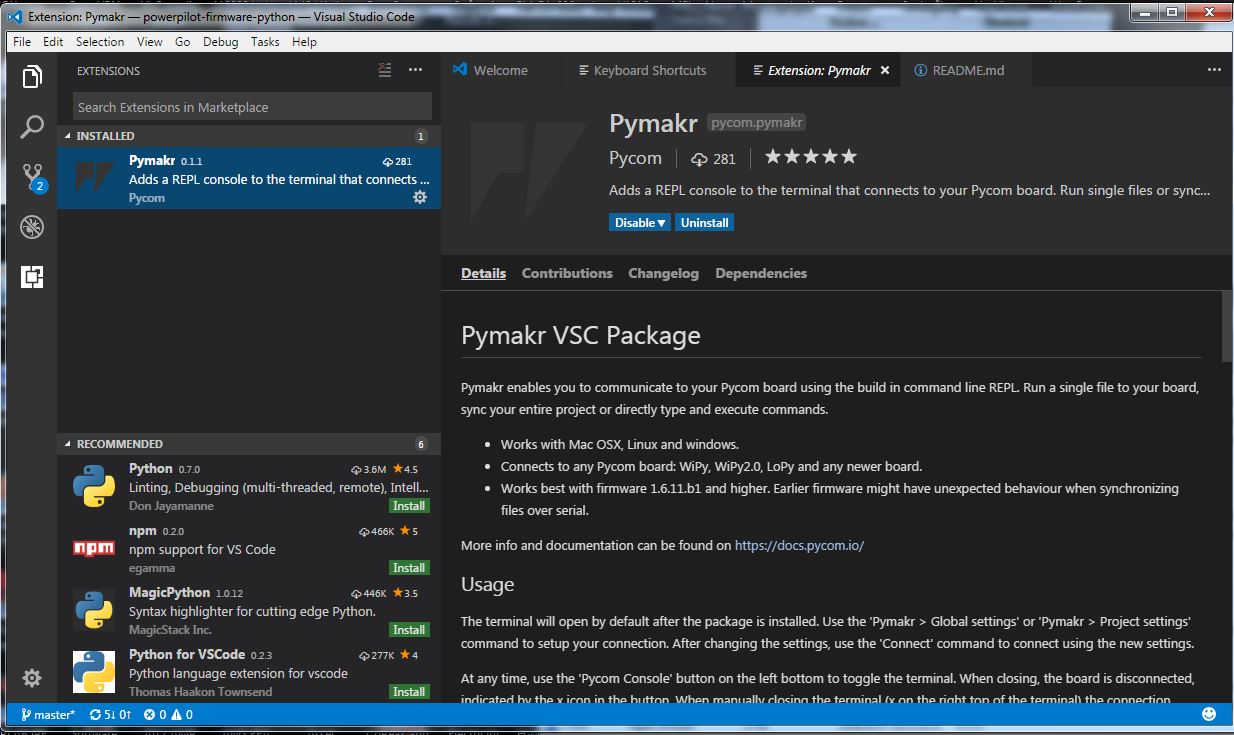
I firstly downloaded VS Code and then followed the Pycom instructions to install Pymakr from within VS Code. Pymakr 0.1.1 shows as installed, before I activated it with a Reload, however, no new icons appear at the bottom left, as per screen shot below

When I try to access Global Settings with <ctrl><shift><g>, I get a WARN tab pop up to say "WARN command 'pymakr.globalSettings' not found".
The only reference I can see anywhere to Pymakr anywhere within VS Code is when I click the "..." area in the top right hand corner, when the a window appears with the options, among others,
Pymakr > Run current file Ctrl+Shift+R
Pymakr > Synchronize project Ctrl+Shift+Sneither of which do anything.
If I hit Ctrl+Shift+R, I get message "WARN command 'pymakr.run' not found".
When I restart VS Code, no terminal window appears and global settings is still unavailable.
I have tried this on two different computers running Windows 10, 64 bit and Windows 7 respectively.
Under my User directory, I can see a folder named .vscode\extensions\pycom.pymakr-0.1.1
with a lot of files and subdirectories, which suggests that the download has worked.Does anyone have any suggestions? For instance, do I need to update the path vriable?
My VS Code Version is 1.15.0, Commit 95971d8cccd3afd86b35d4a0e098c189294ff2
It seems that the pymakr extension is not loading correctly for some reason, but I am not sure why, or even how to check this.
-
Hi @RodgerG,
Have you installed Node JS to your computer? Occasionally, if you don't have node installed it can cause issues with the VSCode Pymakr Plugin.
Please head to https://nodejs.org/ and install the latest stable build!
Thanks!
-
Hi @bucknall
Thanks for the hint.
I unistalled pymakr, went to Node.js and downloaded and installed v6.11.2LTS (Recommended for most users) of node.js.
I then restarted VS Code, reinstalled and reloaded pymakr extension, no change to earlier reported problem.
OK - so I repeated these steps, but this time I installed v8.3.0 of node.js (Latest Features).
Still no change:-(
I did notice that Version 1.15.0 of VS Code is quite new, dated 2017-08-09, and wondered if something in the latest version has broken things???
Do you know if anyone else is successfully running pymakr on this particular version of VS Code?
Thank you for you response and please let me know if I can provide any additional detail to track down the cause.
p.s. I have now tried unsuccessfully on 3 different Windows computers, so there must be something in common. -
-
@RodgerG I have the same problem, but it would be so unlike MS to break something that was working.
-
@rodgerg Has this problem been fixed? I installed the Pymakr extension today and cannot get it to work. I have a recent version of NodeJS (10.9.0) installed using brew.
-

Hello! It looks like you're interested in this conversation, but you don't have an account yet.
Getting fed up of having to scroll through the same posts each visit? When you register for an account, you'll always come back to exactly where you were before, and choose to be notified of new replies (either via email, or push notification). You'll also be able to save bookmarks and upvote posts to show your appreciation to other community members.
With your input, this post could be even better 💗
Register Login