Welcome to the Pycom forum Forum
    • \[\[global:header.categories\]\]
    • \[\[global:header.recent\]\]
    • \[\[global:header.tags\]\]
    • \[\[global:header.popular\]\]
    • Login

    Explore Pybytes | Official Documentation | Report a Firmware Bug/Issue | GitHub

    Serial connection not working

    Scheduled Pinned Locked Moved Firmware
    wipy
    8 Posts 3 Posters 2.3k Views 3 Watching
    Loading More Posts
    • Oldest to Newest
    • Newest to Oldest
    • Most Votes
    Reply
    • Reply as topic
    Log in to reply
    This topic has been deleted. Only users with topic management privileges can see it.
    • P Offline
      PeteD
      last edited by

      I have tried on a Mac and PC. I tried changing usb cables. Each time it says the connection failed when I tried to connect to the WiPY from the firmware update software.

      robert-hhR 1 Reply Last reply Reply Quote 0
      • D Offline
        duffo64
        last edited by duffo64

        ...even using low speed setting, and with new updater ?
        And sorry for the stupid question, but did you set the jumper on the expansion board before trying to update ?

        /Claudio

        1 Reply Last reply Reply Quote 0
        • P Offline
          PeteD
          last edited by

          Yes I set the jumper, and it seems to connect with putty, but nothing happens once it connects

          1 Reply Last reply Reply Quote 0
          • robert-hhR Offline
            robert-hh @PeteD
            last edited by robert-hh

            @PeteD Since we had that recently: What type of WiPy are you using:
            WiPy2 : https://www.pycom.io/product/wipy/
            WiPy 1: https://www.adafruit.com/product/3184
            If it's WiPy 2, which OS are you using? Are you sure you are using the right serial port on the PC? It should disappear if you disconnect the board.
            If it's WiPy 1: Thatz does not conect to USB by default. But both boards support a telnet connection, which you can establish too with putty.

            1 Reply Last reply Reply Quote 0
            • P Offline
              PeteD
              last edited by

              It was one of the original ones from the kickstarter. It has a sticker on the front that has the pinouts on it.

              robert-hhR 1 Reply Last reply Reply Quote 0
              • robert-hhR Offline
                robert-hh @PeteD
                last edited by robert-hh

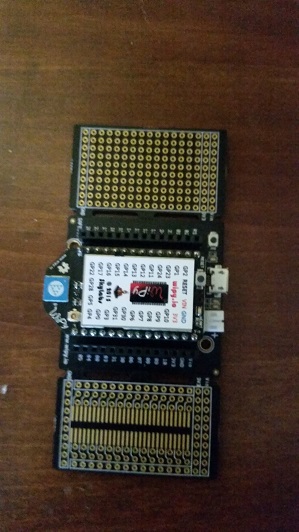
                @PeteD That seems to be a WiPy 1. What is the shape of the board. Is it a clean rectangle or more an arrow shape (rectangle with an kind of extension on the shorter side?
                Support for WiPy1 is here: https://forum.micropython.org/

                P 1 Reply Last reply Reply Quote 0
                • P Offline
                  PeteD @robert-hh
                  last edited by

                  0_1503322502336_2017-08-21 09.29.10.jpg

                  robert-hhR 1 Reply Last reply Reply Quote 0
                  • robert-hhR Offline
                    robert-hh @PeteD
                    last edited by

                    @PeteD Yes, that's a wipy1. By default, REPL is not enabled on boot. You have to enable it in boot.py, by:

                    from machine import UART
                    import os
                    uart = UART(0, 115200)
                    os.dupterm(uart)
                    

                    See also here: http://docs.micropython.org/en/latest/wipy/

                    1 Reply Last reply Reply Quote 0

                    Hello! It looks like you're interested in this conversation, but you don't have an account yet.

                    Getting fed up of having to scroll through the same posts each visit? When you register for an account, you'll always come back to exactly where you were before, and choose to be notified of new replies (either via email, or push notification). You'll also be able to save bookmarks and upvote posts to show your appreciation to other community members.

                    With your input, this post could be even better 💗

                    Register Login
                    • 1 / 1
                    • First post
                      Last post

                    Pycom on Twitter

                    Pycom