WLAN connectivity problem
-
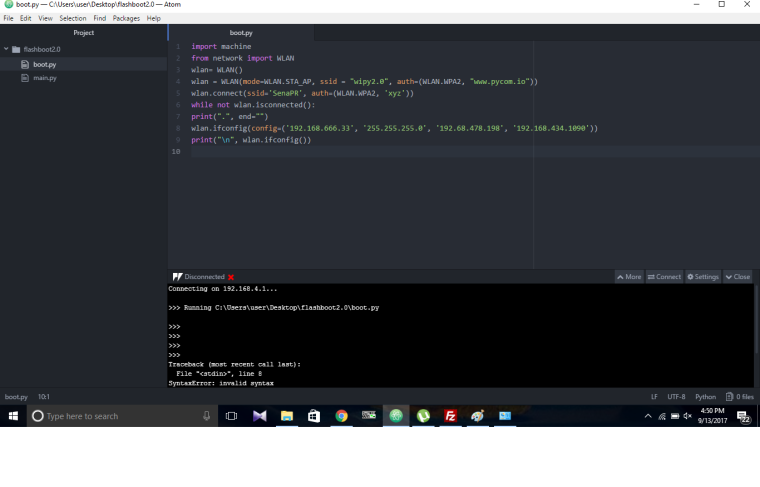
@robert-hh I have followed the same thing, i can connect with my pycom board wifi but i couldnot connect pycom board wifi with the office wifi. i have attached file for your reference. Please go through it and tell me if any changes i need to do to make pycom board wifi to the office wifi. Thank you for your cooperation.
-
@SenaPR Line 7 must be indented by at least one space. It looks as if not. and that is a syntax error.
while not wlan.isconnected():
    print(".", end="")
Also, the IP you give to your WiPy is in a different net than the router. So if 192.168.478.198 is the IP of your gateway, the IP of your WiPy should be 192.168.478.xxx.
But you could remove (or comment out) line 8 which sets the IP parameters and just see what you router assigns to the WiPy. -
@robert-hh are there any libraries which we need to dump on our pycom board after upgrading its firware ??
Thank you. -
@SenaPR No, for the language itself and the standard modules as documented you do not need any special libraries. Especially the Bluetooth and WiFi modules are embedded in the firmware. For you special application, you might need some libraries and scripts, but that's another story.
-
@SenaPR - also, most of these IP addresses are invalid - an IPv4 address can't have an octet above 255 and you have 478 and even 1090. I would expect the libraries to reject these, but in any case you will never get a working network without valid IP addresses.
-
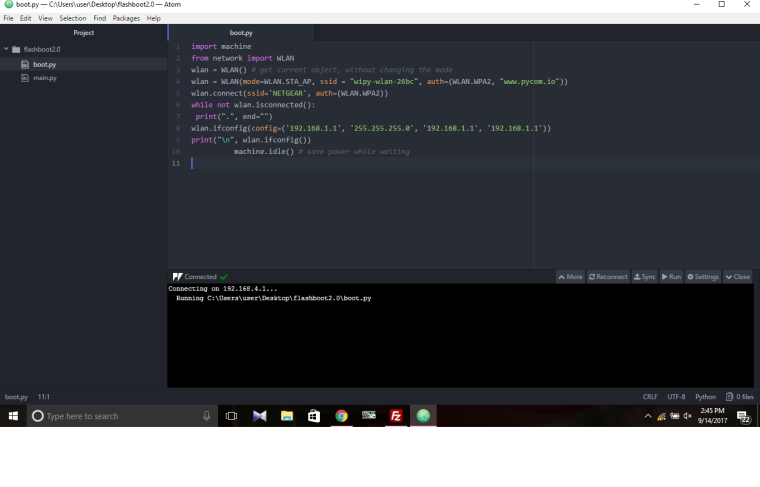
@robert-hh i have attached a file of the WLAN program, using the code i am trying to connect pycom board wifi with the office router. Everything has been developed under your guidance but still i am unable to connect it with the office wifi. Please go through the program and suggest me if i went somewhere wrong. Thank you.
-
@SenaPR Hello SenaPR, What I'm missing is in the auth= parameter of the connect statement the WiFi password of your router. I guess you just dropped that for showing th example..
And you cannot give your own device the IP address of the router, which is 192.168.1.1. So you must use something different, which is not in use at the moment, like 192.168.1.100. You have to ask the network administrator which addresses you may use.
Again, I see a problem with indentation. The last idle() statement is not indented properly and should raise an sytax error.
Are you sure that this boot.py is really loaded to your device? It has to, because is is executed before pymakr steps in. Otherwise, for testing you can give is a different name, like connect.py, and just put a statement like:
import connect
into boot.py.
I do not trust the atom plugin.
Still: if your PC is connected to the office router, open the program cmd.exe, which gives you the good ol' MSDOS command prompt. At the prompt, enter the command:
ipconfig
That will tell you the netmask, the IP address of the router, and the IP-adress of the DNS-Service. -
facing exactly the same issue.Even changed the router and firewall but didn't work.do i have to install any kind of library?
please revert asap as i have to finish my project by the end of this week. -
This post is deleted! -
This post is deleted! -
DO NOT click on the link in the post by Vellin_Boute, it is most certainly an attempt to hack your router...
-
This post is deleted!

Hello! It looks like you're interested in this conversation, but you don't have an account yet.
Getting fed up of having to scroll through the same posts each visit? When you register for an account, you'll always come back to exactly where you were before, and choose to be notified of new replies (either via email, or push notification). You'll also be able to save bookmarks and upvote posts to show your appreciation to other community members.
With your input, this post could be even better 💗
Register Login