WLAN connectivity problem
-
I am using Pycom WiPy v2.0 board. I have upgraded its firmware and downloaded pymakr plugin to run and debug the code, but i couldn't connect it with the home wifi and everytime i need to reset my board to get the wifi network of the pycom board. And i also have Pycom WiPy v1.3 board for which i couldn't find the firmware upgrade link. Please help me to find the solution. Thank you.
-
@SenaPR WiPy 2does not reconnect automatically. You have to add the respective statements into boot.py or main.py, like described here https://docs.pycom.io/chapter/tutorials/all/wlan.html under the heading "Connecting to a router". After being connected, you may also assign a fixed IP.
For WiPy 1.3 the firmware is here: http://micropython.org/download/
There's also a short instruction on how to update. -
@robert-hh can we access default boot.py or main.py of Pycom WiPy v2.0 board ? If yes, then please can you suggest me on this. Thank you.
-
@SenaPR boot.py and main.py are ordinary files in the /flash directory.
So you can edit and change the freely.
Normally, the WiPy creates an WiFi access point at 192.168.4.1, with password www.pycom.io. If you can connect there, you can use ftp to transfer files. If you are locked out from WiFi, and pymakr does not work either,. you can use other tools to access the WiPy file systems via USB, like adafruit's "AMPY" (https://learn.adafruit.com/micropython-basics-load-files-and-run-code/install-ampy), or Dave Hylands "rshell" (following instruction at link: https://github.com/dhylands/rshell). -
@robert-hh from network import WLAN
wlan = WLAN(mode=WLAN.STA), when we execute the following functions, the board hangs up, wifi of pycom wipy board get disconnected and we have to do safe boot again to make it working. Please help us on this. Thank you. -
@SenaPR said in WLAN connectivity problem:
wlan = WLAN(mode=WLAN.STA)
Once you execute this statement, any connection to the AP is lost. If you want to keep the AP connection in addition to the station mode, run
wlan = WLAN(mode=WLAN.STA_AP)
-
@robert-hh i have tried the " wlan = WLAN(mode=WLAN.STA_AP)" function. Wifi network of pycom board has not disconnected but its showing error "AP SSID not given" on the console terminal. Below is attached file, please go through it do the needful.
Thank you. -
@SenaPR That's because the statement is not executed. The question is, what you want to achieve:
In AP mode, the WiPy creates it's own WiFi network, and so you have to specify the SSID and password for that network. By default, this is something like "wipy_xxx". You must seen this since you connected ti your wipy. You can reuse that SSID and specify:
wlan = WLAN(mode=WLAN.STA_AP, ssid = "your ssid", auth=(WLAN.WPA2, "www.pycom.io"))
In STA mode your WiPy would connect to your router. After the wlan=... statement, you would add:wlan.connect(ssid='mynetwork', auth=(WLAN.WPA2, 'my_network_key')) while not wlan.isconnected(): print(".", end="") wlan.ifconfig(config=('my.new.static.ip', '255.255.255.0', 'gateway_ip', 'gateway_ip')) print("\n", wlan.ifconfig())Which connects to your router and sets a static ip, which is more convenient if you want to connect with your computer both to your Internet and your WiPy. The values for my.new.static.ip and gateway.ip depend on the setting of your router. Typical setting for the gateway_ip are 192.168.0.1. But you can tell by issuing the command
/sbin/route -nunder linux/mac oripconfigunder Windows in the command shell. -
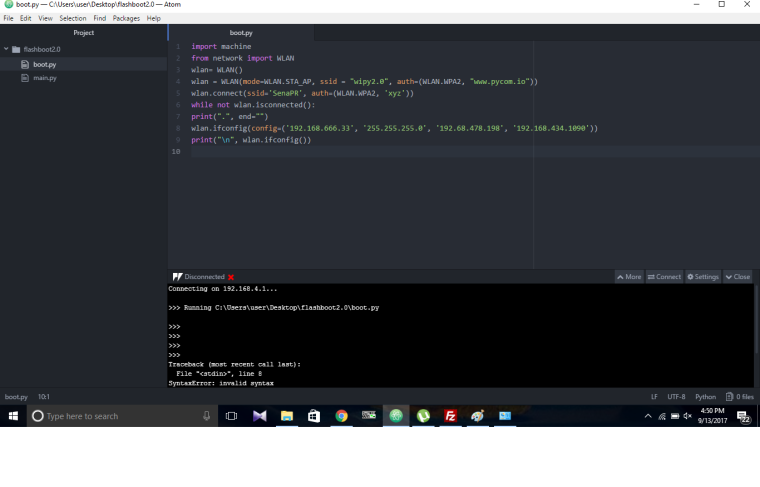
@robert-hh I have followed the same thing, i can connect with my pycom board wifi but i couldnot connect pycom board wifi with the office wifi. i have attached file for your reference. Please go through it and tell me if any changes i need to do to make pycom board wifi to the office wifi. Thank you for your cooperation.
-
@SenaPR Line 7 must be indented by at least one space. It looks as if not. and that is a syntax error.
while not wlan.isconnected():
    print(".", end="")
Also, the IP you give to your WiPy is in a different net than the router. So if 192.168.478.198 is the IP of your gateway, the IP of your WiPy should be 192.168.478.xxx.
But you could remove (or comment out) line 8 which sets the IP parameters and just see what you router assigns to the WiPy. -
@robert-hh are there any libraries which we need to dump on our pycom board after upgrading its firware ??
Thank you. -
@SenaPR No, for the language itself and the standard modules as documented you do not need any special libraries. Especially the Bluetooth and WiFi modules are embedded in the firmware. For you special application, you might need some libraries and scripts, but that's another story.
-
@SenaPR - also, most of these IP addresses are invalid - an IPv4 address can't have an octet above 255 and you have 478 and even 1090. I would expect the libraries to reject these, but in any case you will never get a working network without valid IP addresses.
-
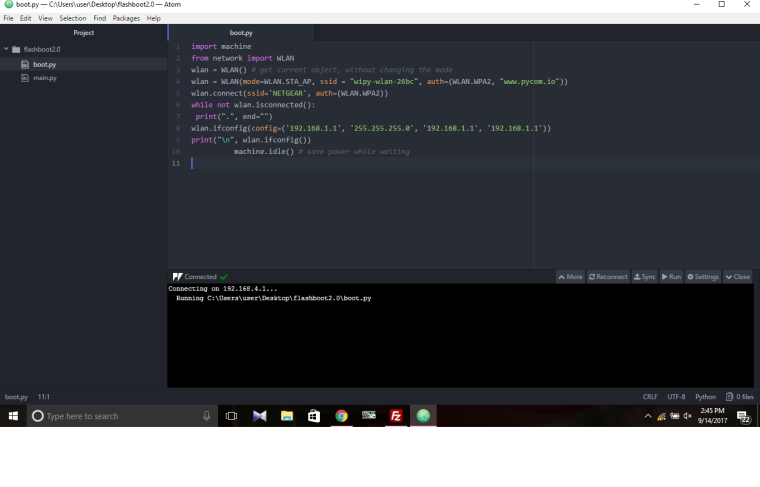
@robert-hh i have attached a file of the WLAN program, using the code i am trying to connect pycom board wifi with the office router. Everything has been developed under your guidance but still i am unable to connect it with the office wifi. Please go through the program and suggest me if i went somewhere wrong. Thank you.
-
@SenaPR Hello SenaPR, What I'm missing is in the auth= parameter of the connect statement the WiFi password of your router. I guess you just dropped that for showing th example..
And you cannot give your own device the IP address of the router, which is 192.168.1.1. So you must use something different, which is not in use at the moment, like 192.168.1.100. You have to ask the network administrator which addresses you may use.
Again, I see a problem with indentation. The last idle() statement is not indented properly and should raise an sytax error.
Are you sure that this boot.py is really loaded to your device? It has to, because is is executed before pymakr steps in. Otherwise, for testing you can give is a different name, like connect.py, and just put a statement like:
import connect
into boot.py.
I do not trust the atom plugin.
Still: if your PC is connected to the office router, open the program cmd.exe, which gives you the good ol' MSDOS command prompt. At the prompt, enter the command:
ipconfig
That will tell you the netmask, the IP address of the router, and the IP-adress of the DNS-Service. -
facing exactly the same issue.Even changed the router and firewall but didn't work.do i have to install any kind of library?
please revert asap as i have to finish my project by the end of this week. -
This post is deleted! -
This post is deleted! -
DO NOT click on the link in the post by Vellin_Boute, it is most certainly an attempt to hack your router...
-
This post is deleted!

Hello! It looks like you're interested in this conversation, but you don't have an account yet.
Getting fed up of having to scroll through the same posts each visit? When you register for an account, you'll always come back to exactly where you were before, and choose to be notified of new replies (either via email, or push notification). You'll also be able to save bookmarks and upvote posts to show your appreciation to other community members.
With your input, this post could be even better 💗
Register Login