SDI-12
-
Has anyone written or know of an SDI-12 library for Micropython or the Pycom board.
Specifically I need to interface to the Decagon 5TM sensor from the LoPy. Any suggestions?
-
@jubbs sorry, I don't have an answer for you, but I've just started looking at the same problem (with a different sensor).
I'd be very interested if anyone can give some guidance on communicating via SDI-12 using a Pycom board.
-
@jubbs You have to use a RS485 driver (e.g. SN65HVD1780 from TI) and connect a pin (e.g. P11 to ~RE and DE) then you can use the code
# function SDI-12
def SDI12(cmd):
    uart.deinit()
    p_tx.value(0)
    p_dir.value(1)                                                      # set output dir
    utime.sleep_us(12500)                                               # send BREAK
    p_tx.value(1)
    utime.sleep_us(8333)                                                # send MARK
    uart.init(1200, bits=7, parity=UART.EVEN, stop=1, timeout_chars=75) # init with given parameters
    uart.write(cmd)                                                     # send command
    utime.sleep_us(8333 * len(cmd))                                     # wait to send command (byte time * command lenght)
    p_dir.value(0)                                                      # output set to read
    line = uart.readline()                                              # read data from UART
    return line;
to Write a SDI-12 command and get a string with the response. For example to read the 5TM data you can use
while True:
    utime.sleep(2)
    line = SDI12('0M!')
    print(line)
    time_samp = int(line[1:4])
    number_values = int(line[4]) - 48
    utime.sleep(time_samp+1)
    data = SDI12('0D0!')
    data = data.split()
    data2 = data[0].decode("utf-8")
    values = data2.split('+')
    dielectric  = float(values[1])
    bulk_ec     = float(values[2])
    temperature = float(values[3])
    vwc =  4.3e-6 * (dielectric * dielectric * dielectric) - 5.5e-4 * (dielectric * dielectric) + 2.92e-2 * dielectric - 5.3e-2
    print('Dielectric: ', values[1])
    print('Bulk EC: ', values[2])
    print('Temperature: ', temperature)
    print('Vol. Water Cont.: ', vwc)
Best regards,
Antonio Valente -
@antoniovalente Can you add ``` on a line before and after each code section? That will format it correctly.
-
@antoniovalente Thank you for the instructions and code. Could you please indicate where in the code the data pin (P11) is specified? Also, can you please provide a wiring diagram of the complete circuit with LoPy and N65HVD1780 driver?
-
@senseit The pin (P11) is for selecting between send and receive. It is connected to ~RE and DE and in the code is p_dir.
p_tx   = Pin('P3' , mode=Pin.OUT)
p_dir   = Pin('P11', mode=Pin.OUT)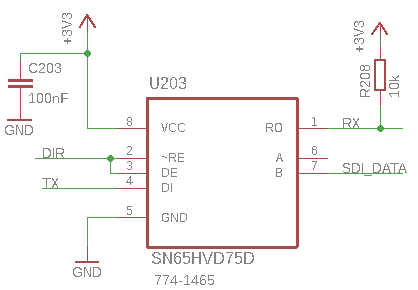
The pinout of SN65HVD75 is the same of SN65HVD1780. -
@antoniovalente I have tried to implement your code with a different SDI-12 probe I am however getting a "none" response .
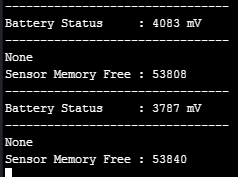
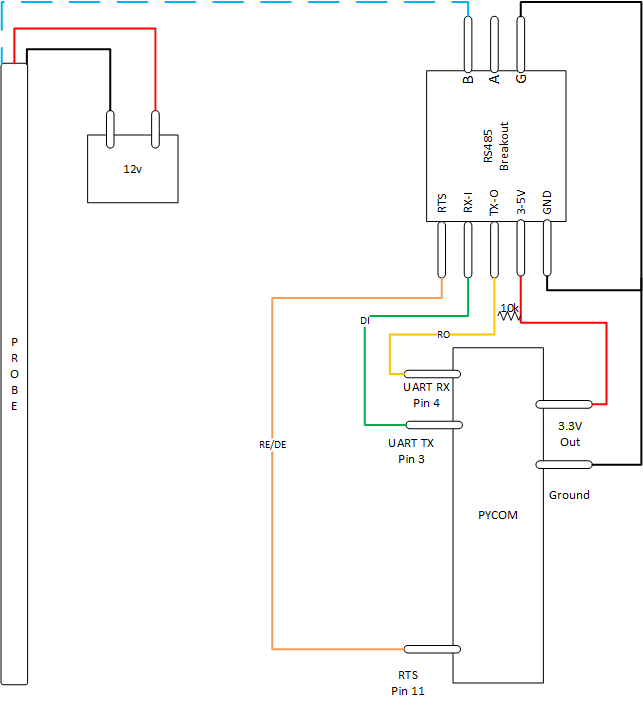
Here is my connections
import network import time import pycom import machine import gc import socket import utime from machine import RTC from machine import ADC from machine import Pin from machine import UART from network import LoRa execfile('/flash/Network/LoRa.py') f_device = open('/flash/Config/Device_Details.txt', 'r') device_setting = f_device.readline() device_strings = [i.strip() for i in device_setting.split(',')] f_device.close() pycom.heartbeat(False) rtc = RTC() adc = ADC() lora = LoRa() uart = UART(1, baudrate=1200) p_tx = Pin('P3', mode=Pin.OUT) p_dir = Pin('P11', mode=Pin.OUT) def SDI12(cmd): uart.deinit() p_tx.value(0) p_dir.value(1) # set output dir utime.sleep_us(25000) # send BREAK p_tx.value(1) utime.sleep_us(8333) # send MARK uart.init(1200, bits=7, parity=UART.EVEN, stop=1, timeout_chars=75) # init with given parameters uart.write(cmd) # send command utime.sleep_us(8333 * len(cmd)) # wait to send command (byte time * command lenght) p_dir.value(0) # output set to read line = uart.readline() # read data from UART return line; time.sleep(2) while True: batt = adc.channel(attn=1, pin='P16') #s = socket.socket(socket.AF_LORA, socket.SOCK_RAW) #s.setsockopt(socket.SOL_LORA, socket.SO_DR, 5) #s.setblocking(True) #s.send("Battery Status : " + str(batt.value()) + " mV") #s.setblocking(False) print('--------------------------------') print("Battery Status : " + str(batt.value()) + " mV") print('--------------------------------') ########################################################## # Measure Temperature # ########################################################## #line = ('000312') utime.sleep(2) line = SDI12('?!') print(line) #temp_time_samp = int(line[1:4]) #temp_sens_samp = int(line[4:6]) #print("Temp Read Time : " + str(temp_time_samp) + " Secs") #print("Temp Sensor Read : " + str(temp_sens_samp) + " Sensors") ########################################################## # Garbage Collect # ########################################################## gc.enable() gc.collect() print("Sensor Memory Free : " + str(gc.mem_free())) time.sleep(10)``` -
@jimpower I think you have to connect the 12V ground to the Pycom ground.
Can you send me the RS485 Breakout reference? -
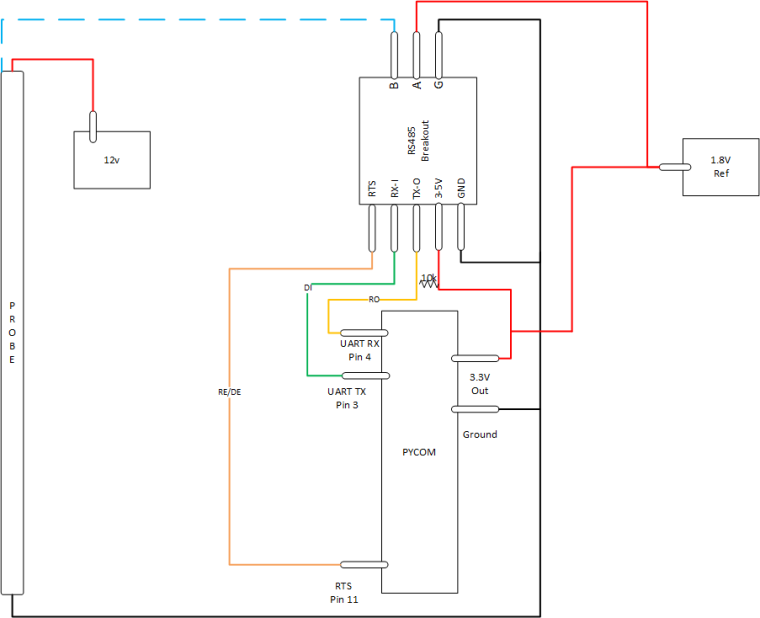
@jimpower You need alsol to connect A of the breakout board to a reference potential, like 1.8 V, as shown in the initial drawing. You must not leave it open, otherwise there will be not signal current.
-
-
ok changed cct to replicate below and am starting to get response from sensor, however thinking their is something wrong with the timings in the "SDI12(cmd)".
The following code gets me the below responses the first 3 are as expected, the last one I'm expecting 12 temperature readings separated by "+0".
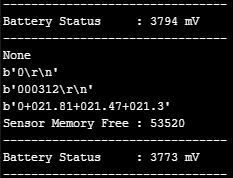
import network import time import pycom import machine import gc import socket import utime from machine import RTC from machine import ADC from machine import Pin from machine import UART from network import LoRa execfile('/flash/Network/LoRa.py') f_device = open('/flash/Config/Device_Details.txt', 'r') device_setting = f_device.readline() device_strings = [i.strip() for i in device_setting.split(',')] f_device.close() pycom.heartbeat(False) rtc = RTC() adc = ADC() lora = LoRa() uart = UART(1, baudrate=1200) p_tx = Pin('P3', mode=Pin.OUT) p_dir = Pin('P11', mode=Pin.OUT) def SDI12(cmd): uart.deinit() p_tx.value(0) p_dir.value(1) # set output dir utime.sleep_us(12500) # send BREAK p_tx.value(1) utime.sleep_us(8333) # send MARK uart.init(1200, bits=7, parity=UART.EVEN, stop=1, timeout_chars=75) # init with given parameters uart.write(cmd) # send command utime.sleep_us(8333 * len(cmd)) # wait to send command (byte time * command lenght) p_dir.value(0) # output set to read line = uart.readline() # read data from UART return line; time.sleep(2) while True: batt = adc.channel(attn=1, pin='P16') #s = socket.socket(socket.AF_LORA, socket.SOCK_RAW) #s.setsockopt(socket.SOL_LORA, socket.SO_DR, 5) #s.setblocking(True) #s.send("Battery Status : " + str(batt.value()) + " mV") #s.setblocking(False) print('--------------------------------') print("Battery Status : " + str(batt.value()) + " mV") print('--------------------------------') ########################################################## # Measure Temperature # ########################################################## utime.sleep(2) wake_up = SDI12('?!') #Wake Up Sensor print(wake_up) #Print Sensor Response utime.sleep(2) #Wait before Next Cmd add_prt = SDI12('?!') #Probe Address Request print(add_prt) #Print Probe Address utime.sleep(2) #Wait before Next Cmd temp_read = SDI12('0C2!') #Probe Temp Measure print(temp_read) #Print Time/Sensors utime.sleep(2) #Wait before Next Cmd temp_data = SDI12('0D0!') #Probe Temp Readings print(temp_data) #Print Temp Readings ########################################################## # Garbage Collect # ########################################################## gc.enable() gc.collect() print("Sensor Memory Free : " + str(gc.mem_free())) time.sleep(15)``` -
Sorry to grave dig, but had I known this earlier it would have been helpful. This post is about the Decagon 5TM, which has two protocols, SDI-12 and DDI. The DDI is typical UART at 1200 baud, which you can read from any UART reader. I've tested it with an FTDI cable and know it works with a LoPy. You do however have to power cycle the sensor to get a new reading.
Note: This may not work on new Decagon 5TM sensors if you have changed the SDI-12 address to anything other than 0. Factory default is 0. If you have not used SDI-12 to communicate with the sensor then it should work as expected.
We used a mosfet to turn the power on and off for the sensor, controlled by GPIO. Reading the UART within 10s of milliseconds from turning the power on will give you your readings. Its all explained in the integration guide.
http://publications.metergroup.com/Integration Guides/18237 5TM Integrators Guide.pdf
I know this doesn't help with SDI-12, but jubbs is using the 5TM specifically, which has this dual protocol stack.
The sensor was also just powered from 5 volts (same supply source as for the LoPy), the 5TM supports 3.6V-15V, check datasheet for more information including current draw.

Hello! It looks like you're interested in this conversation, but you don't have an account yet.
Getting fed up of having to scroll through the same posts each visit? When you register for an account, you'll always come back to exactly where you were before, and choose to be notified of new replies (either via email, or push notification). You'll also be able to save bookmarks and upvote posts to show your appreciation to other community members.
With your input, this post could be even better 💗
Register Login