Function similar to Pulse In in C
-
@soren That's OK. Since the timeout you've chose is pretty short, the sequence of statement is critical. The method using pulses_get() is not optimal, as you said, since you need just a few pulses, and not many. At least, there seems not to be an overflow risk, since the underlying call uses a ringbuffer, and the length of the returned list is limited to 128 values. Please consider, that the timeout is to be given in µs. So
pulses_get(sout, 1)of your example below uses a timeout of 1 µs. -
@soren Testing with a frequency generator, square wave, I found a bug in pulses_get. If you go down below 25 Hz (= 20000us pulse duration), the pulse counter locks. Even raising the frequency again does not help, only hard reset. 26Hz is the slowest you can take. looking at the light sensor, this is bad, because the dark frequency is at about 10 Hz.
That behavior can be cured by changing the source code, mods/modpycom.c, line 107, into:
rmt_rx.rx_config.idle_threshold = 0xffff;
Then, the maximum timeout value is about 65000, the lowest frequency with reasonable values is 16 Hz (or 32 ms pulse duration). Going below that gives you bad values, but once you're above that threshold, the device works again as expected without the need for a reset. -
Very good to know! I doubt this sensor will go down into frequencies that low though. And actually, getting many samples from pulses_get is pretty neat since I need to get an average value anyway. So, so far I'm very optimistic. Still some way to completely getting correct results and understanding them.
And thanks for the microseconds tip, obviously pulses_get timeout should be 1000 then.Here's a snippet of my data output. This is with red filter activated (s2 and s3 held low). Bold values are before I put a completely red book over the sensor (very close):
305.0
345.0
305.875
308.625
311.25
296.1667
291.1666
208.2
201.9
206.7
206.2
209.6
196.1
179.0Strange thing is how the values go down after putting the red book over. Maybe it's inverse. I'll probably have to read more up on the concepts of it to get it. Currently trying to grasp this: https://arduinoplusplus.wordpress.com/2015/07/15/tcs230tcs3200-sensor-calibration/ not
EDIT: aaah, just realised that the data looks fine. As a period gets shorter, obviously frequency gets higher. Shoot me.
Code:
while True:
    oe.value(0)
    oeTimer = OETIMER()
    data = pulses_get(sout, 1000)
    del data[-1] # delete last element
    del data[0] # delete first element
    sum = 0
    for trans in data:
        sum += trans[1]
    avr = sum / len(data)
    print(avr)
    time.sleep(1)
EDIT II:
Hmm, after converting from period to frequency, I still get some strange results. Eg, when holding up a (very) red book - the sensor will read RGB frequencies like this one: [3086.42, 6038.647, 3100.775] This is in hertz, and I found it weird that the red channel isn't relatively higher than the other ones. I'm doing calculation and conversion like this:s2Array = [0, 0, 1] # arrays for setting color filters on sensor s3Array = [0, 1, 1] while True: rgbArray = [0, 0, 0] for num in range(0, 3): s2.value(s2Array[num]) # set colour filters s3.value(s3Array[num]) time.sleep_ms(1) oe.value(0) oeTimer = OETIMER() # set timer to turn off sensor data = pulses_get(sout, 1000) # get period values if len(data) == 0: print('no data collected. breaking.') break del data[-1] # delete last element del data[0] # delete first element sum = 0 for trans in data: sum += trans[1] avrPeriodUs = sum / len(data) # average period in micro seconds avrPeriodSec = avrPeriodUs / 1000000 # convert to seconds avrFreq = 1 / avrPeriodSec # get frequency #print(num, ' ', avrFreq) rgbArray[num] = avrFreq time.sleep(1) print(rgbArray) -
@robert-hh As you mentioned about the changes made in
modpycom.c, does it mean thatpulses_get()can be used for PWM of more than 32ms??Thanks,
Devang -
@devang-sharma No. pulses_get() uses 16 bit counters of a 1 MHz clock. The high bit is ignored, so you get effectively results only for pulses shorter than 32ms. The change only prevents, that the counter stalls if by chance longer pulses arrive. I did not dig further yet to see, if the counter can be set to lower input frequencies. But since pulses_get uses the remote control circuit, intended for signal frequencies of 20-50 kHz, the chances may be odd.
-
@robert-hh,
I've been trying to write a code which can function aspulses_get()but can detect higher pulse width. I used Nova SDS011 Dust sensor.This is my
main.pyfile:from trig import * import time from machine import Pin from machine import Timer trig = TRIG() chrono = Timer.Chrono() chrono.start() while True: if pin1() == 1: trig.high1() if pin2() == 1: trig.high2()This is my library file
trig.py:import time from machine import Pin from machine import PWM pin1 = Pin("G9", mode = Pin.IN, pull = Pin.PULL_UP) # PM2.5 pin2 = Pin("G8", mode = Pin.IN, pull = Pin.PULL_UP) # PM10 class TRIG: def __init__(self, prev1=0, prev2=0, pulse1=0, pulse2=0, dust25=0.0, dust10=0.0): self.prev1 = prev1 self.prev2 = prev2 self.pulse1 = pulse1 self.pulse2 = pulse2 self.dust25 = dust25 self.dust10 = dust10 def low1(self): if pin1.value() == 1: self.high1() self.pulse1 = time.ticks_diff(self.prev1, time.ticks_us()) print("Pulse1: ", self.pulse1) def low2(self): if pin2.value() == 1: self.high2() self.pulse2 = time.ticks_diff(self.prev2, time.ticks_us()) print("Pulse2: ", self.pulse2) def high1(self): if pin1.value() == 0: self.low1() self.prev1 = time.ticks_us() def high2(self): if pin2.value() == 0: self.low2() self.prev2 = time.ticks_us() def getdata(self): if self.pulse1 >= 2000: self.dust25 = float((self.pulse1 - 2000)/1000) if self.pulse2 >= 2000: self.dust10 = float((self.pulse2 - 2000)/1000) print("DUST PM2.5: ", self.dust25) time.sleep_us(500) print("DUST PM10 : ", self.dust10) time.sleep_us(500)Right now, I'm not calling
getdata()function. I'm only trying to measure pulse width. While doing that, I get the output as below: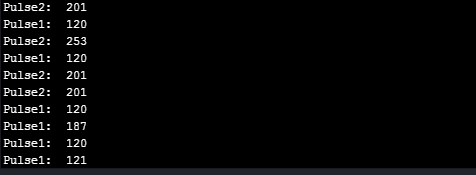
This received output is in Microseconds. That means that the frequencies are around 4-5kHz. Received data is either wrong or again this is some of the limitations of LoPy! I'm confused! What is the issue here? Is there any solution?
Also, I've read about
time.ticks_diff()in docs, which says:Measure period between consecutive calls to ticksms(), ticks_us(), or ticks_cpu(). The value returned by these functions may wrap around at any time, so directly subtracting them is not supported. ticks_diff() should be used instead. “old” value should actually precede “new” value in time, or result is undefined. This function should not be used to measure arbitrarily long periods of time (because ticks() functions wrap around and usually would have short period).
Does this also say about the limitations?
Thanks,
Devang -
@devang-sharma Ticks_us uses a 32 bit counter, which starts after reset and wraps around after 2**32 microseconds or about 71 minutes. But there is a bug in ticks_diff(), such that about 36 minutes after reset numbers received from tick_us() will raise an exception when fed into tick_diff(). But since you do not get an exception, this should not be your problem. I glanced at your code, but I'm wondring why you do not use the edge triggered interrupts of the PIN handler by pin.callback(trigger, handler=None, arg=None). Use that to
a) register a pair of handlers for rising and falling events,
b) memorize the time at a rising edge, set a busy flag and
c) get the difference at a falling edge, put it into a place for results, e.g. a list, and clear the busy flag.
or the like. Synchronization may be a little bit tricky.
Pitfalls:
a) There is a latency of a few 100 µs for all kind of interrupts. That will have an impact at low readings.
b) The esp32 might create false triggers if the slope of the input signal is too slow. The datasheet is silent about that. So you might have to double check in your code in the handler, is the state is as expected, e.g. if after a falling slope the level is indeed low. -
@robert-hh said in Function similar to Pulse In in C:
But there is a bug in ticks_diff(), such that about 36 minutes after reset numbers received from tick_us() will raise an exception when fed into tick_diff()
because it cast to small int and i do not understand the comment that this is "as designed cast"
STATIC mp_obj_t time_ticks_diff(mp_obj_t t0, mp_obj_t t1) {
    // We want to "cast" the 32 bit unsigned into a 30-bit small-int
    uint32_t start = mp_obj_get_int(t0);
    uint32_t end = mp_obj_get_int(t1);
    return MP_OBJ_NEW_SMALL_INT((end - start) & MP_SMALL_INT_POSITIVE_MASK);
}
think about people first, then computers
-
@robert-hh Thanks for the help. I tried using pin.callback().
main.py:from trig import * import time from machine import Pin from machine import Timer trig = TRIG() chrono = Timer.Chrono() chrono.start() while True: # if pin1() == 1: # trig.high1() # if pin2() == 1: # trig.high2() # if int(chrono.read()) >= 60: # trig.getdata() time.sleep_ms(500) pin1.callback(Pin.IRQ_RISING, trig.high1()) time.sleep_ms(500) pin2.callback(Pin.IRQ_RISING, trig.high2())trig.py:import time from machine import Pin from machine import PWM pin1 = Pin("G9", mode = Pin.IN, pull = Pin.PULL_UP) # PM2.5 pin2 = Pin("G8", mode = Pin.IN, pull = Pin.PULL_UP) # PM10 class TRIG: def __init__(self,flag1=0, flag2=0, prev1=0, prev2=0, pulse1=0, pulse2=0, dust25=0.0, dust10=0.0): self.flag1 = flag1 self.flag2 = flag2 self.prev1 = prev1 self.prev2 = prev2 self.pulse1 = pulse1 self.pulse2 = pulse2 self.dust25 = dust25 self.dust10 = dust10 def low1(self): # pin1.callback(Pin.IRQ_RISING, self.high1()) # if pin1.value() == 1: # self.high1() if self.flag1 == 1: self.pulse1 = time.ticks_diff(self.prev1, time.ticks_us()) print("Pulse1: ", self.pulse1) self.flag1 = 0 # self.getdata() def low2(self): # pin2.callbck(Pin.IRQ_RISING, self.high2()) # if pin2.value() == 1: # self.high2() if self.flag2 == 1: self.pulse2 = time.ticks_diff(self.prev2, time.ticks_us()) print("Pulse2: ", self.pulse2) self.flag2 = 0 # self.getdata() def high1(self): self.prev1 = time.ticks_us() self.flag1 = 1 pin1.callback(Pin.IRQ_FALLING, self.low1()) # if pin1.value() == 0: # self.low1() def high2(self): self.prev2 = time.ticks_us() self.flag2 = 1 pin2.callback(Pin.IRQ_FALLING, self.low2()) # if pin2.value() == 0: # self.low2() def getdata(self): if self.pulse1 >= 2000: self.dust25 = float((self.pulse1 - 2000)/1000) if self.pulse2 >= 2000: self.dust10 = float((self.pulse2 - 2000)/1000) print("DUST PM2.5: ", self.dust25) time.sleep_us(500) print("DUST PM10 : ", self.dust10) time.sleep_us(500)Output:
Pulse1: 120
Pulse2: 106
Pulse1: 107
Pulse2: 106
Pulse1: 93
Pulse2: 93
Pulse1: 107
Pulse2: 120
Pulse1: 106
Pulse2: 93
Pulse1: 94
Pulse2: 107
Pulse1: 107
Pulse2: 106
Pulse1: 107
Pulse2: 106Why I get so short pulses?
-
@livius The snippet you show is not used by utime.ticks_diff(). The one used is in esp32/mods/modutime.c
STATIC mp_obj_t time_ticks_diff(mp_obj_t start_in, mp_obj_t end_in) {
   uint32_t start = mp_obj_get_int(start_in);
   uint32_t end = mp_obj_get_int(end_in);
   return mp_obj_new_int_from_uint((end - start));
}
STATIC MP_DEFINE_CONST_FUN_OBJ_2(time_ticks_diff_obj, time_ticks_diff);
The problem is, that tick_us() returns unsigned 32 bit values, which do not fit into a short int and fail in ticks_diff() when they should be converted to an int. There are implementations of the functions in extmod/mphal_utime.c, which work. Alternatively, I use the following patch for ticks_diff()
STATIC mp_obj_t time_ticks_diff(mp_obj_t start_in, mp_obj_t end_in) {
    int32_t start = mp_obj_get_int_truncated(start_in);
    int32_t end = mp_obj_get_int_truncated(end_in);
    return mp_obj_new_int((end - start));
}
STATIC MP_DEFINE_CONST_FUN_OBJ_2(time_ticks_diff_obj, time_ticks_diff);
Which takes just the lower bits of the int. That would even allow ticks_us and tick_ms to return 64 bit values, reducing the chance of an overflow substantially (overflow of tick_us() after about 584542 years).
-
@devang-sharma I'll look into that tonight. I need a test set-up for that.
-
@robert-hh
Yes, i digged in wrong place.. -
@devang-sharma I got a little bit lost by your code, so I made one by myself, which works at least with the function generator. The times shown ar a little bit shorter than what I set-up at the function generator, like 899 instead of 900, but mostly right.
# import machine import utime class Pulses: def __init__(self, p10_name, p25_name): self.result_p10 = None self.result_p25 = None self.start_p10 = None self.start_p25 = None if p10_name is not None: self.pin_p10 = machine.Pin(p10_name, machine.Pin.IN, pull = machine.Pin.PULL_UP) self.pin_p10.callback(machine.Pin.IRQ_RISING | machine.Pin.IRQ_FALLING, self.trig_p10) if p25_name is not None: self.pin_p25 = machine.Pin(p25_name, machine.Pin.IN, pull = machine.Pin.PULL_UP) self.pin_p25.callback(machine.Pin.IRQ_RISING | machine.Pin.IRQ_FALLING, self.trig_p25) def trig_p10(self, pin): if self.pin_p10.value() == 1: self.start_p10 = utime.ticks_us() elif self.start_p10 is not None: self.result_p10 = utime.ticks_diff(self.start_p10, utime.ticks_us()) self.start_p10 = None def trig_p25(self, pin): if self.pin_p25.value() == 1: self.start_p25 = utime.ticks_us() elif self.start_p25 is not None: self.result_p25 = utime.ticks_diff(self.start_p25, utime.ticks_us()) self.start_p25 = None def get_p10(self): if self.result_p10 is None: return None else: result = self.result_p10 self.result_p10 = None return result def get_p25(self): if self.result_p25 is None: return None else: result = self.result_p25 self.result_p25 = None return result def stop(self): self.pin_p10.callback(machine.Pin.IRQ_RISING | machine.Pin.IRQ_FALLING, None) self.pin_p25.callback(machine.Pin.IRQ_RISING | machine.Pin.IRQ_FALLING, None) # # pulses = Pulses("G9", "G8") try: while True: res = pulses.get_p10() if res is not None: print ("DUST PM10: {:<6.1f}".format(res/1000)) res = pulses.get_p25() if res is not None: print ("DUST PM2.5: {:<6.1f}".format(res/1000)) utime.sleep_ms(10) except KeyboardInterrupt: pulses.stop() print ("Test stopped") -
@robert-hh Thanks a lot, Man! Works like a charm. :) Now I get where I was wrong! I was measuring pulses the wrong way. Moreover, I wasn't resetting the
self.startvariable..!! :'DThank You,
Devang.


Hello! It looks like you're interested in this conversation, but you don't have an account yet.
Getting fed up of having to scroll through the same posts each visit? When you register for an account, you'll always come back to exactly where you were before, and choose to be notified of new replies (either via email, or push notification). You'll also be able to save bookmarks and upvote posts to show your appreciation to other community members.
With your input, this post could be even better 💗
Register Login