Sending data from LoPy to a webserver
-
Hello!
I have a sensor connected to a LoPy and I want to send the sensor data to a webserver (a raspberry pi 3) via WiFi. Is that possible if I connect the webserver to the WiFi of the LoPy? If so, how can I send the data? I've heard about "rest" API for the raspberry but I don't know if it can help.Thank you for your answers,
Jérôme Maquoi
-
@jeromemaquoi
Think in another direction. As you say you have webserver on rasp pi. Then connect your lopy to it throught wifi.
https://docs.pycom.io/chapter/tutorials/all/wlan.html
and
then create socket
https://docs.pycom.io/chapter/firmwareapi/micropython/usocket.html
and send data in format you need -
I'd do it the other way round: Connect the lopy to your local wlan.
you might use the urequests lib from here https://github.com/micropython/micropython-lib/tree/master/urequests
Then use e.g. http post requests to send the data:
import urequests
sensorreading = 'whatever'
res = urequests.post('http://yourserver/endpoint', json={'my_sensor': sensorreading})
res.close()
if (res.status_code - 200) < 100: # check that response code is in the 200 range
    print('done')
else:
    print('there was some error')
This will send a post http request to the given url and the sensor reading as json.
If your are doing this over wan or on an untrusted wlan you have to consider security!
A completely different approach would be to use mqtt. Example here: https://docs.pycom.io/chapter/tutorials/all/mqtt.html
(needs an mqtt broker) -
@this-wiederkehr @livius Ok I understood I could connect my LoPy to the webserver via WiFi. But can I do it without stopping to transmit Wifi with the LoPy?
-
I thought it is not possible to use the lopy as both, station(connecting to an existing wlan) and ap (access point providing a wlan) simultaneously... but in fact it "seems" to be possible, tough I have not tested. And some restrictions apply (same channel of ap and sta)
https://www.esp32.com/viewtopic.php?t=1192#p5285
https://docs.pycom.io/chapter/firmwareapi/pycom/network/wlan.htmlsetting the mode as to WLAN.STA_AP seems to make this possible ...
-
@this-wiederkehr Hello again,
I used the urequests lib that you gave me a month ago. Unfortunately I have this error. Can you help me?
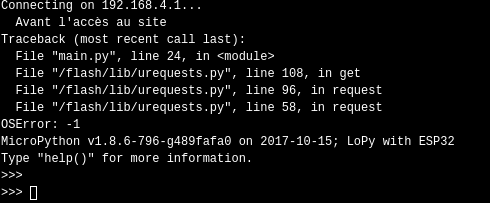
Here is the 24 line:

Also, I have another question. How can I catch those data from my web server?
Best regards,
Jérôme Maquoi
-
127.0.0.1refers tolocalhost. you have to use the real ip of the server.See the example on how to get the response. https://github.com/micropython/micropython-lib/blob/master/urequests/example_xively.py
-
@this-wiederkehr Hello,
I tested the code with the real ip address and it works! But I don't understand how it works. When I make "urequests.post", where is the data sent? And how can I catch it from the server side? I did'nt understand your response about that.Jérôme Maquoi
-
Someone can help me?
-
@jeromemaquoi
real sample tell more
this is the same as when you open your browser and put address in the bar
when you writehttp://www.pycom.io(if you write onlywww.pycom.iobrowser assumehttp://at start and also try https)
when you press enter browser send request to the server on default port which is80for http and443for https
namewww.pycom.iois translated to ip18.220.239.183
now "same" is for
urequests.post
if you writeurequests.post("http://123.123.123.123/", data = data)request is send to destination server
123.123.123.123to port80
and waiting for response from that server.
If on that server there is nothing listening on port 80 then you got timeoutthen to recive something you must have on destination server socket which listen on port
80 -
Your question is very broad ....
The above code sends a post request with the sensor data as a json payload. Each server framework provides a way to access that data however the way to do it depends on the framework.
I see that you have used php, as I have no idea about php I'm quoting stackoverflow for a way to access json in the payload with php:
$data = json_decode(file_get_contents('php://input'), true); -
@livius Hi, thanks for the answer. It's clearer for me now.
So if I understood, when I run this code and I have the word "done" printed in the console, does that mean that the server is listening on port 80? Or does that mean that the data is just correctly sent?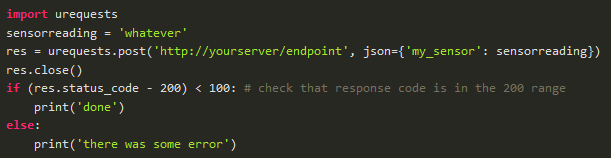
-
@jeromemaquoi
yes, you got 'done' if on the destination side port is open and something is listen
Hello! It looks like you're interested in this conversation, but you don't have an account yet.
Getting fed up of having to scroll through the same posts each visit? When you register for an account, you'll always come back to exactly where you were before, and choose to be notified of new replies (either via email, or push notification). You'll also be able to save bookmarks and upvote posts to show your appreciation to other community members.
With your input, this post could be even better 💗
Register Login