Welcome to the Pycom forum Forum
    • \[\[global:header.categories\]\]
    • \[\[global:header.recent\]\]
    • \[\[global:header.tags\]\]
    • \[\[global:header.popular\]\]
    • Login

    Explore Pybytes | Official Documentation | Report a Firmware Bug/Issue | GitHub

    New firmware release for Pytrack and Pysense version 0.0.8

    Scheduled Pinned Locked Moved Announcements & News
    pytrackpysensefirmwarerelease
    12 Posts 4 Posters 5.0k Views 4 Watching
    Loading More Posts
    • Oldest to Newest
    • Newest to Oldest
    • Most Votes
    Reply
    • Reply as topic
    Log in to reply
    This topic has been deleted. Only users with topic management privileges can see it.
    • catalinC Offline
      catalin @han
      last edited by

      Hi @han,

      I've just done the update on Pytrack, on a Win7 machine.

      Just to make sure the instructions are correct:

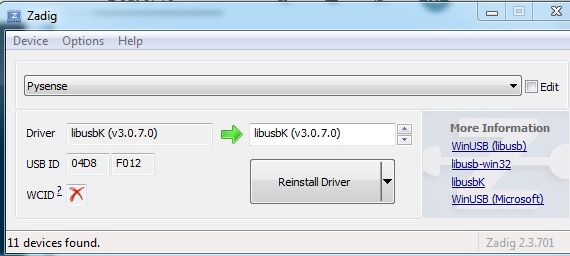
      1. power on the pytrack keeping Reset button pressed, and install Zadig libusbk driver (within 7 secs)
      2. power on again the Pytrack board keeping Reset button pressed and execute dfu-util-static.exe command (within 7 secs)
      3. for another update, the Zadig libusbk doesn't need to be re-installed, so just the 2nd step has to be done

      I hope it will work for you!
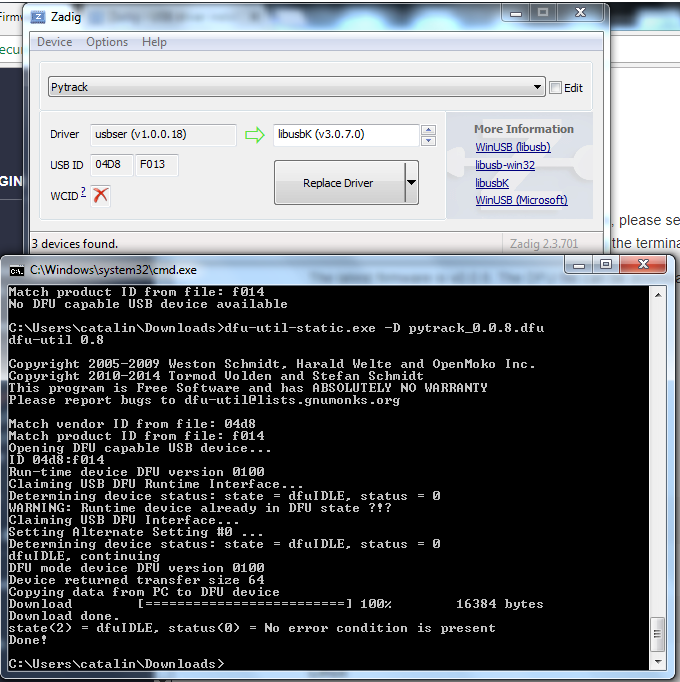
      0_1513066665924_screen_pytrack_dfu.png

      Catalin,

      Have you checked out our docs for the answer? (Now with an easy search function) https://docs.pycom.io
      Check out our newly revamped device management platform, Pybytes! https://pybytes.pycom.io/

      1 Reply Last reply Reply Quote 0
      • catalinC Offline
        catalin @han
        last edited by

        Aaah, @han, there is the error on the last line, you don't have the pytrack_0.0.8.dfu file in the same directory as dfu-util-static.exe.
        No such file or directory: Could not open file pytrack_0.0.8.dfu for reading

        Catalin,

        Have you checked out our docs for the answer? (Now with an easy search function) https://docs.pycom.io
        Check out our newly revamped device management platform, Pybytes! https://pybytes.pycom.io/

        H 1 Reply Last reply Reply Quote 1
        • H Offline
          han @catalin
          last edited by

          @catalin Thanks for your help!
          It`s done and works fine again!
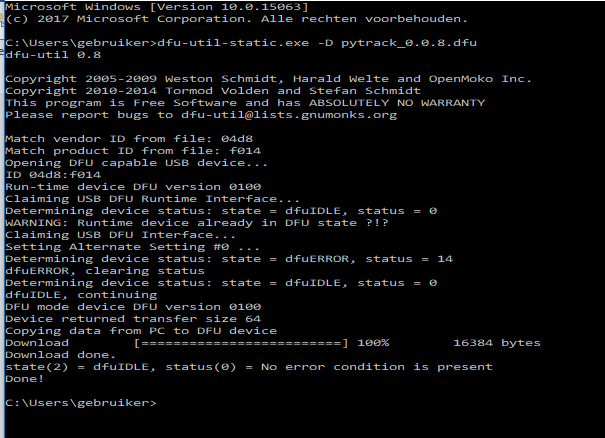
          0_1513104158980_7eaa799f-b4c9-45db-9e8c-935f6eb61424-image.png

          1 Reply Last reply Reply Quote 0
          • T Offline
            tanmoy_dutta @catalin
            last edited by livius

            @catalin
            Firmware successfully upgraded for LoPy, Pytrack and Pysense.
            After loading the factorized pytrack.py and pycoproc.py, cannot load/initialize the Pytrack module -

            >>> from pytrack import Pytrack
            Traceback (most recent call last):
            File "", line 1, in 
            File "/flash/lib/pytrack.py", line 5, in 
            TypeError: cannot create 'module' instances
            
            catalinC 1 Reply Last reply Reply Quote 0
            • catalinC Offline
              catalin @tanmoy_dutta
              last edited by

              Hi @tanmoy_dutta

              Are you sure pycoproc.py is also in /flash/lib directory (next to pytrack.py)?

              rst:0x10 (RTCWDT_RTC_RESET),boot:0x17 (SPI_FAST_FLASH_BOOT)
              configsip: 0, SPIWP:0xee
              clk_drv:0x00,q_drv:0x00,d_drv:0x00,cs0_drv:0x00,hd_drv:0x00,wp_drv:0x00
              mode:DIO, clock div:1
              load:0x3fff9028,len:8
              load:0x3fff9030,len:1076
              load:0x4009fa00,len:0
              ho 12 tail 0 room 4
              load:0x4009fa00,len:15380
              entry 0x400a0720
              MicroPython v1.8.6-849-g0af003a4 on 2017-11-24; LoPy with ESP32
              Type "help()" for more information.
              >>> from pytrack import Pytrack
              >>>
              >>> import uos
              >>>
              >>> uos.getcwd()
              '/flash'
              >>> uos.listdir('lib')
              ['pycoproc.py', 'pytrack.py']
              >>> py = Pytrack()
              

              Catalin,

              Have you checked out our docs for the answer? (Now with an easy search function) https://docs.pycom.io
              Check out our newly revamped device management platform, Pybytes! https://pybytes.pycom.io/

              T 1 Reply Last reply Reply Quote 0
              • T Offline
                tanmoy_dutta @catalin
                last edited by

                @catalin
                Hi Catalin,
                I put the required libs in this fashion -

                /flash/lib/L76GNSS.py
                /flash/lib/LIS2HH12.py
                /flash/lib/pytrack.py
                /flash/lib/mqtt.py
                /flash/lib/pycoproc/pycoproc.py

                Do the pycoproc.py and pytrack.py files need to reside on the same path level ?

                catalinC 1 Reply Last reply Reply Quote 0
                • catalinC Offline
                  catalin @tanmoy_dutta
                  last edited by

                  @tanmoy_dutta
                  Afik, pycoproc.py have to reside in a directory where python is searching. These are: directory of pytrack.py, /flash and /flash/lib.

                  Because in pytrack.py there is the next line, and pycoproc has to be searched for:
                  from pycoproc import Pycoproc

                  Catalin,

                  Have you checked out our docs for the answer? (Now with an easy search function) https://docs.pycom.io
                  Check out our newly revamped device management platform, Pybytes! https://pybytes.pycom.io/

                  T 1 Reply Last reply Reply Quote 0
                  • T Offline
                    tanmoy_dutta @catalin
                    last edited by

                    Hi @catalin ,
                    Thanks for the help. It works now !

                    1 Reply Last reply Reply Quote 0
                    • M Offline
                      Mongkol
                      last edited by

                      I got this message below . I don't sure my pysense or pysense_0.0.8.dfu or something error

                      Pls suggest me.

                      Thank in advance.
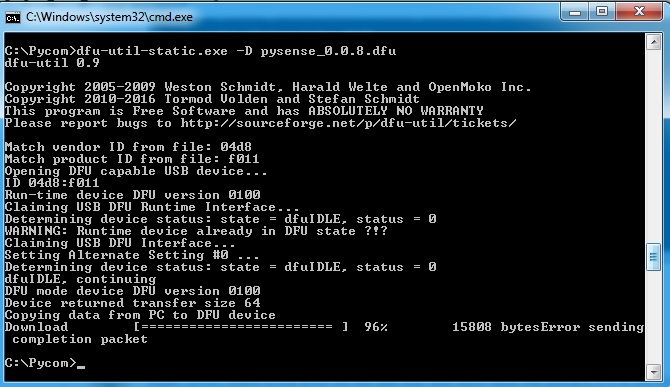
                      0_1514601687231_pycom1.jpg 0_1514601692257_pycom2.jpg

                      catalinC 1 Reply Last reply Reply Quote 0
                      • catalinC Offline
                        catalin @Mongkol
                        last edited by

                        Hi @mongkol, so you have this error every time you try to update? Or just once in a while? I would suspect the PC USB port to be the problem, you could:

                        1. change the USB-microUSB cable
                        2. use the PC direct USB port, not thru a USB hub;
                        3. remove other USB peripherals from PC
                          The firmware update packages are sent over DFU protocol, which runs over USB bulk transfer channel, it might happen that the CRC of a package was wrong (or delayed).

                        Catalin,

                        Have you checked out our docs for the answer? (Now with an easy search function) https://docs.pycom.io
                        Check out our newly revamped device management platform, Pybytes! https://pybytes.pycom.io/

                        1 Reply Last reply Reply Quote 0

                        Hello! It looks like you're interested in this conversation, but you don't have an account yet.

                        Getting fed up of having to scroll through the same posts each visit? When you register for an account, you'll always come back to exactly where you were before, and choose to be notified of new replies (either via email, or push notification). You'll also be able to save bookmarks and upvote posts to show your appreciation to other community members.

                        With your input, this post could be even better 💗

                        Register Login
                        • 1 / 1
                        • First post
                          Last post

                        Pycom on Twitter

                        Pycom