Welcome to the Pycom forum Forum
    • \[\[global:header.categories\]\]
    • \[\[global:header.recent\]\]
    • \[\[global:header.tags\]\]
    • \[\[global:header.popular\]\]
    • Login

    Explore Pybytes | Official Documentation | Report a Firmware Bug/Issue | GitHub

    New firmware release for Pytrack and Pysense version 0.0.8

    Scheduled Pinned Locked Moved Announcements & News
    pytrackpysensefirmwarerelease
    12 Posts 4 Posters 4.9k Views 4 Watching
    Loading More Posts
    • Oldest to Newest
    • Newest to Oldest
    • Most Votes
    Reply
    • Reply as topic
    Log in to reply
    This topic has been deleted. Only users with topic management privileges can see it.
    • catalinC Offline
      catalin
      last edited by

      Hello everyone,

      We have released a new firmware for Pytrack and Pysense that can:

      • wakeup the PIC on the INT pin (RC1 - P9 - G16), the setup is done using the method setup_int_pin_wake_up()
      • when *py board was awaken the approximate remaining time of the sleep can be found out using the method get_sleep_remaining().

      As usual, you can get the firmware from here: https://docs.pycom.io/chapter/pytrackpysense/installation/firmware.html

      For an example of the newest features, please take a look at the example python script from here: https://github.com/pycom/pycom-libraries/blob/master/examples/accelerometer_wake/main.py
      Please note that the python libraries pytrack.py and pysense.py were factorized with pycoproc.py.

      Also the pinouts were modified to show PIC RC0 and RC1 pins: https://docs.pycom.io/chapter/datasheets/downloads/pysense-pinout.pdf and https://docs.pycom.io/chapter/datasheets/downloads/pytrack-pinout.pdf.

      Have a nice day,
      Catalin

      Catalin,

      Have you checked out our docs for the answer? (Now with an easy search function) https://docs.pycom.io
      Check out our newly revamped device management platform, Pybytes! https://pybytes.pycom.io/

      T 1 Reply Last reply Reply Quote 1
      • H Offline
        han
        last edited by

        Hi Catalin,

        I am trying to upgrade the firmware of my Pytrack, but that does not going well.
        The Libusbk driver is installed well with the Zadig tool. USB ID is 04D8 F014.
        Now i have some struggles with the command prompt action.

        I bring the Pytrack in dfu mode en run the command. What then appears is this.

        0_1513021405822_1f1bc9ad-602b-4084-a9dd-3b28656da29c-image.png

        Do you know what i am doing wrongt in these steps?

        catalinC 2 Replies Last reply Reply Quote 0
        • catalinC Offline
          catalin @han
          last edited by

          Hi @han,

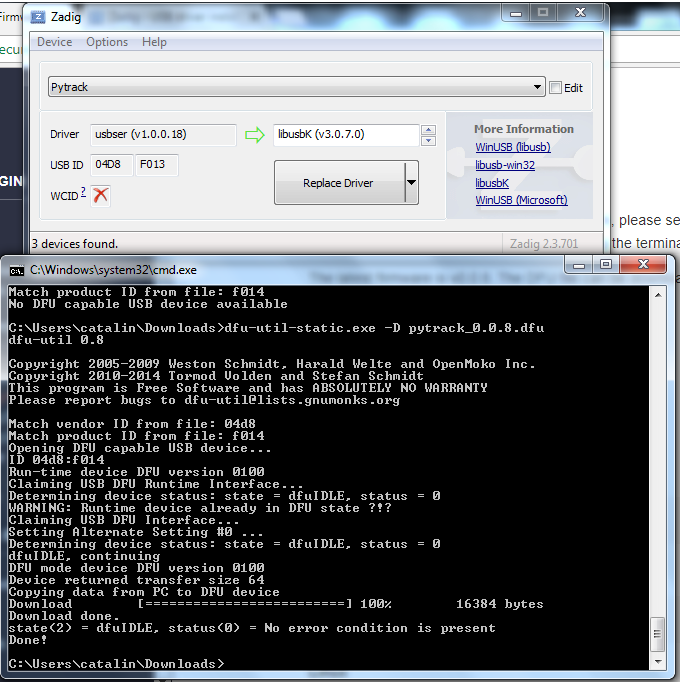
          I've just done the update on Pytrack, on a Win7 machine.

          Just to make sure the instructions are correct:

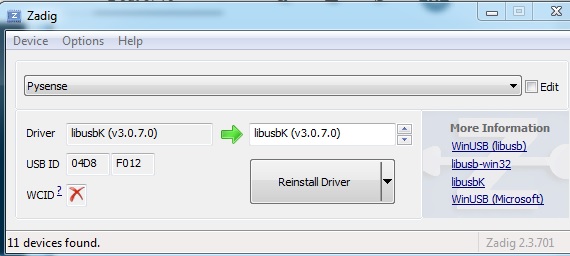
          1. power on the pytrack keeping Reset button pressed, and install Zadig libusbk driver (within 7 secs)
          2. power on again the Pytrack board keeping Reset button pressed and execute dfu-util-static.exe command (within 7 secs)
          3. for another update, the Zadig libusbk doesn't need to be re-installed, so just the 2nd step has to be done

          I hope it will work for you!
          0_1513066665924_screen_pytrack_dfu.png

          Catalin,

          Have you checked out our docs for the answer? (Now with an easy search function) https://docs.pycom.io
          Check out our newly revamped device management platform, Pybytes! https://pybytes.pycom.io/

          1 Reply Last reply Reply Quote 0
          • catalinC Offline
            catalin @han
            last edited by

            Aaah, @han, there is the error on the last line, you don't have the pytrack_0.0.8.dfu file in the same directory as dfu-util-static.exe.
            No such file or directory: Could not open file pytrack_0.0.8.dfu for reading

            Catalin,

            Have you checked out our docs for the answer? (Now with an easy search function) https://docs.pycom.io
            Check out our newly revamped device management platform, Pybytes! https://pybytes.pycom.io/

            H 1 Reply Last reply Reply Quote 1
            • H Offline
              han @catalin
              last edited by

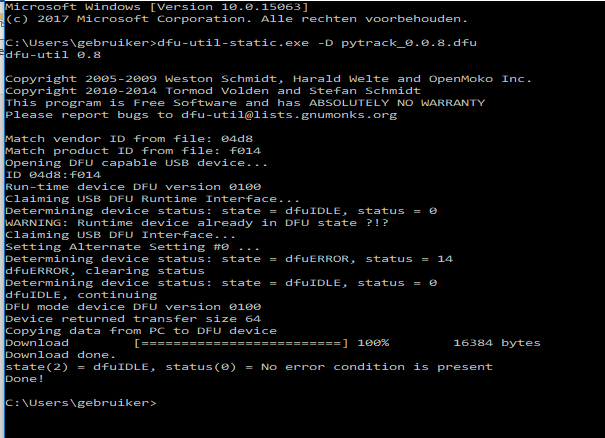
              @catalin Thanks for your help!
              It`s done and works fine again!
              0_1513104158980_7eaa799f-b4c9-45db-9e8c-935f6eb61424-image.png

              1 Reply Last reply Reply Quote 0
              • T Offline
                tanmoy_dutta @catalin
                last edited by livius

                @catalin
                Firmware successfully upgraded for LoPy, Pytrack and Pysense.
                After loading the factorized pytrack.py and pycoproc.py, cannot load/initialize the Pytrack module -

                >>> from pytrack import Pytrack
                Traceback (most recent call last):
                File "", line 1, in 
                File "/flash/lib/pytrack.py", line 5, in 
                TypeError: cannot create 'module' instances
                
                catalinC 1 Reply Last reply Reply Quote 0
                • catalinC Offline
                  catalin @tanmoy_dutta
                  last edited by

                  Hi @tanmoy_dutta

                  Are you sure pycoproc.py is also in /flash/lib directory (next to pytrack.py)?

                  rst:0x10 (RTCWDT_RTC_RESET),boot:0x17 (SPI_FAST_FLASH_BOOT)
                  configsip: 0, SPIWP:0xee
                  clk_drv:0x00,q_drv:0x00,d_drv:0x00,cs0_drv:0x00,hd_drv:0x00,wp_drv:0x00
                  mode:DIO, clock div:1
                  load:0x3fff9028,len:8
                  load:0x3fff9030,len:1076
                  load:0x4009fa00,len:0
                  ho 12 tail 0 room 4
                  load:0x4009fa00,len:15380
                  entry 0x400a0720
                  MicroPython v1.8.6-849-g0af003a4 on 2017-11-24; LoPy with ESP32
                  Type "help()" for more information.
                  >>> from pytrack import Pytrack
                  >>>
                  >>> import uos
                  >>>
                  >>> uos.getcwd()
                  '/flash'
                  >>> uos.listdir('lib')
                  ['pycoproc.py', 'pytrack.py']
                  >>> py = Pytrack()
                  

                  Catalin,

                  Have you checked out our docs for the answer? (Now with an easy search function) https://docs.pycom.io
                  Check out our newly revamped device management platform, Pybytes! https://pybytes.pycom.io/

                  T 1 Reply Last reply Reply Quote 0
                  • T Offline
                    tanmoy_dutta @catalin
                    last edited by

                    @catalin
                    Hi Catalin,
                    I put the required libs in this fashion -

                    /flash/lib/L76GNSS.py
                    /flash/lib/LIS2HH12.py
                    /flash/lib/pytrack.py
                    /flash/lib/mqtt.py
                    /flash/lib/pycoproc/pycoproc.py

                    Do the pycoproc.py and pytrack.py files need to reside on the same path level ?

                    catalinC 1 Reply Last reply Reply Quote 0
                    • catalinC Offline
                      catalin @tanmoy_dutta
                      last edited by

                      @tanmoy_dutta
                      Afik, pycoproc.py have to reside in a directory where python is searching. These are: directory of pytrack.py, /flash and /flash/lib.

                      Because in pytrack.py there is the next line, and pycoproc has to be searched for:
                      from pycoproc import Pycoproc

                      Catalin,

                      Have you checked out our docs for the answer? (Now with an easy search function) https://docs.pycom.io
                      Check out our newly revamped device management platform, Pybytes! https://pybytes.pycom.io/

                      T 1 Reply Last reply Reply Quote 0
                      • T Offline
                        tanmoy_dutta @catalin
                        last edited by

                        Hi @catalin ,
                        Thanks for the help. It works now !

                        1 Reply Last reply Reply Quote 0
                        • M Offline
                          Mongkol
                          last edited by

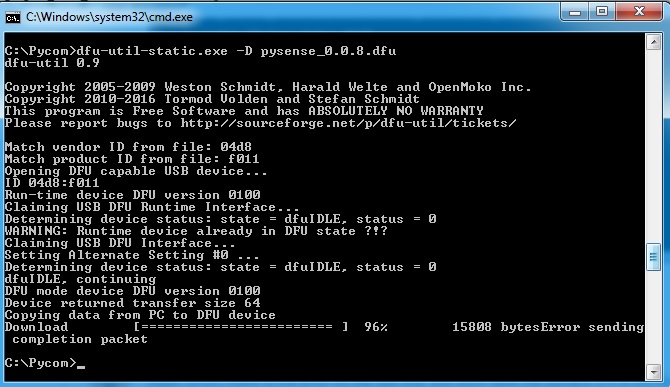
                          I got this message below . I don't sure my pysense or pysense_0.0.8.dfu or something error

                          Pls suggest me.

                          Thank in advance.
                          0_1514601687231_pycom1.jpg 0_1514601692257_pycom2.jpg

                          catalinC 1 Reply Last reply Reply Quote 0
                          • catalinC Offline
                            catalin @Mongkol
                            last edited by

                            Hi @mongkol, so you have this error every time you try to update? Or just once in a while? I would suspect the PC USB port to be the problem, you could:

                            1. change the USB-microUSB cable
                            2. use the PC direct USB port, not thru a USB hub;
                            3. remove other USB peripherals from PC
                              The firmware update packages are sent over DFU protocol, which runs over USB bulk transfer channel, it might happen that the CRC of a package was wrong (or delayed).

                            Catalin,

                            Have you checked out our docs for the answer? (Now with an easy search function) https://docs.pycom.io
                            Check out our newly revamped device management platform, Pybytes! https://pybytes.pycom.io/

                            1 Reply Last reply Reply Quote 0

                            Hello! It looks like you're interested in this conversation, but you don't have an account yet.

                            Getting fed up of having to scroll through the same posts each visit? When you register for an account, you'll always come back to exactly where you were before, and choose to be notified of new replies (either via email, or push notification). You'll also be able to save bookmarks and upvote posts to show your appreciation to other community members.

                            With your input, this post could be even better 💗

                            Register Login
                            • 1 / 1
                            • First post
                              Last post

                            Pycom on Twitter

                            Pycom