Welcome to the Pycom forum Forum
    • \[\[global:header.categories\]\]
    • \[\[global:header.recent\]\]
    • \[\[global:header.tags\]\]
    • \[\[global:header.popular\]\]
    • Login

    Explore Pybytes | Official Documentation | Report a Firmware Bug/Issue | GitHub

    I2C at expansion board
    Scheduled Pinned Locked Moved Expansion Board
    i2cexpansion boardlopy
    8 Posts 3 Posters 2.1k Views 3 Watching
    Loading More Posts
    • Oldest to Newest
    • Newest to Oldest
    • Most Votes
    Reply
    • Reply as topic
    Log in to reply
    This topic has been deleted. Only users with topic management privileges can see it.
    • L Offline
      Lopyusr
      last edited by Lopyusr

      Hello there,

      im a bit confused about setting up the I2C Bus.
      I can use my sensor at Pin9 and Pin10 without any problems, but i cant manage to set up any other Pins for I2C. I read that this should be working but i couldnt get it done by now. I use FW 1.8.6

      The Sensor seems not to exist when i connect it to any other Pins. (i.e. Pins 11 and 12)

      Actually i use a class to control my sensor

      import time
      import pycom
      from machine import I2C

      class DHT12():

      def __init__(self,pinSDA='P9',pinSCL='P10',bd=100000):
          self.i2c = I2C(2, pins=(pinSDA,pinSCL)) 
          self.i2c.init(I2C.MASTER, baudrate=bd)
          self.addr = self.i2c.scan()  
      

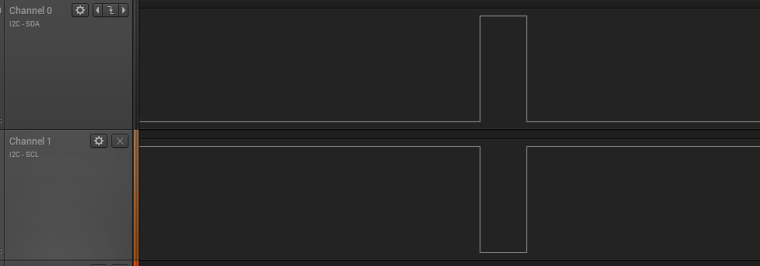
      When i change pinSDA to P19 and pinSCL to P20
      i get I2C bus error and a strange behaviour
      0_1513622901890_Unbenannt.PNG Bild Link)

      Thanks in advance for any help on this topic.

      ledbelly2142L X 2 Replies Last reply Reply Quote 0
      • ledbelly2142L Offline
        ledbelly2142 @Lopyusr
        last edited by

        @lopyusr Try this before you class or def

        i2c = I2C(0, I2C.MASTER, baudrate=100000, pins=('P8','P9'))
        

        What are you init -ing?

        Or maybe try this

        def __init__(self, i2c, address=0x29): # where0x29 is your device I2C address
                self.i2c = i2c
                self._address = address
        
        
        L 1 Reply Last reply Reply Quote 0
        • X Offline
          Xykon administrators @Lopyusr
          last edited by

          @lopyusr said in I2C at expansion board:

          self.i2c = I2C(2, pins=(pinSDA,pinSCL))
          self.i2c.init(I2C.MASTER, baudrate=bd)

          Please try the following instread:

          self.i2c = I2C(2, mode=I2C.MASTER, pins=(pinSDA,pinSCL),baudrate=bd)
          self.i2c.init(I2C.MASTER, baudrate=bd)

          Please also remember that I2C bus nr. 2 is emulated in software while I2C bus 0 and 1 are hardware I2C ports, so you might not get reliable communication at this speed when using bus nr. 2

          Christian Ehlers

          1 Reply Last reply Reply Quote 2
          • L Offline
            Lopyusr
            last edited by Lopyusr

            Im building a driver file. So im initing the sensor at given ports.

            When i try
            i2c = I2C(0,mode=I2C.MASTER,pins=('P9','P10'),baudrate=1000000)

            i get the following result

            0_1513778393318_Unbenannt2.PNG

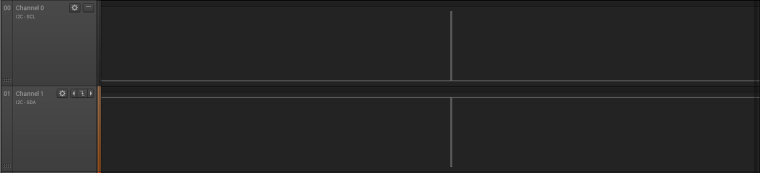
            i2c = I2C(0,mode=I2C.MASTER,pins=('P20','P19'),baudrate=1000000)

            results in
            0_1513778832805_Unbenannt.PNG

            when i try i2c.scan() at this config i dont get a result.

            1 Reply Last reply Reply Quote 0
            • L Offline
              Lopyusr @ledbelly2142
              last edited by

              @ledbelly2142 It all works fine until i try changing the Pins i cant figure out what im doing wrong at this point :/

              ledbelly2142L 1 Reply Last reply Reply Quote 0
              • ledbelly2142L Offline
                ledbelly2142 @Lopyusr
                last edited by ledbelly2142

                This post is deleted!
                L 1 Reply Last reply Reply Quote 0
                • L Offline
                  Lopyusr @ledbelly2142
                  last edited by

                  @ledbelly2142 Im using a DHT12 temperature and humidity sensor. I dont get the point with that battery reading code. I just wonder why it is working on the Pins 9 and 10 but not at any onthers :/ Yfyi i use the Expansion board also. Best regards for your help.

                  ledbelly2142L 1 Reply Last reply Reply Quote 0
                  • ledbelly2142L Offline
                    ledbelly2142 @Lopyusr
                    last edited by

                    @lopyusr I apologize, I misunderstood. I provided too much info on something not your issue.

                    I'm assuming you are using this driver and example: HERE

                    And documentation HERE

                    1 Reply Last reply Reply Quote 0

                    Hello! It looks like you're interested in this conversation, but you don't have an account yet.

                    Getting fed up of having to scroll through the same posts each visit? When you register for an account, you'll always come back to exactly where you were before, and choose to be notified of new replies (either via email, or push notification). You'll also be able to save bookmarks and upvote posts to show your appreciation to other community members.

                    With your input, this post could be even better 💗

                    Register Login
                    • 1 / 1
                    • First post
                      Last post

                    Pycom on Twitter

                    Pycom