[SOLVED] Trouble with LoPy OTAA example
-
Hello everybody,
I've recently adquired a LoPy module with the expansion board and an antenna in order to test its LoRa functionality.
I've followed the documentation steps and successfully upgraded the firmware (to 1.11.0.b1 version), configured both Atom and VS Code (on Windows 7 x64 OS) and run some basic scripts (blink leds, turn on/off GPIO, etc.).
Then, I tried to run the LoRa examples, in particular 5.3.2 (LoRaWAN OTAA). I have an Multitech Conduit gateway configured as follows:
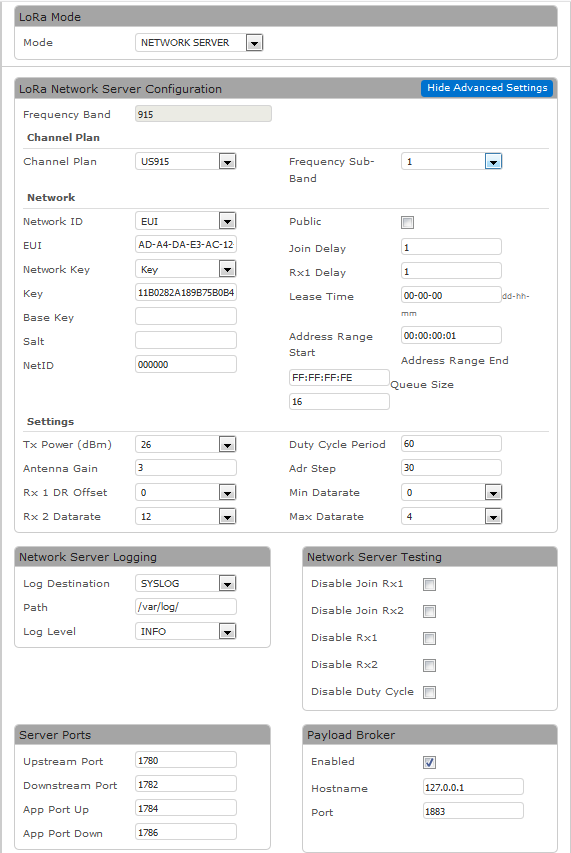
Both Network ID and Key are the same as the sample.
My problem is that when I click "Run" the script seems to be "stucked". If I type the commands one by one, I don't have problem until I run:
lora.join(activation=LoRa.OTAA, auth=(app_eui, app_key), timeout=0)
When I hit Enter the board restarts:
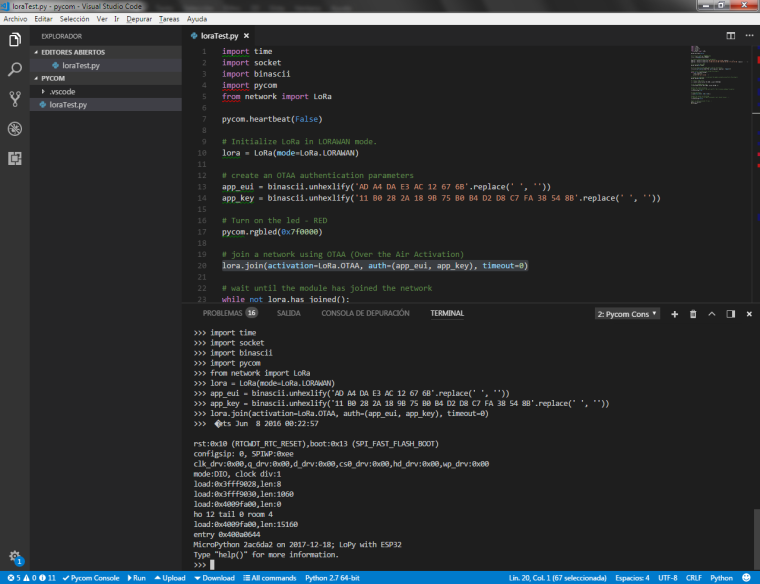
I don't know the reason, and I haven't found any similar topic on this forum. Any suggestion on how to solve this problem will be well received.
Thank you in advance!
-
Hi @lsoria,
It's unusual that you're getting a RTCWDT_RTC_RESET when trying to join over LoRa.
Could you please try flashing the firmware again?
-
Hi @jmarcelino, thank you for your reply.
I have tried re-installing the firmware twice (with the option "High Speed Transfer" enabled and disabled), both times without luck.
If I press "Run" the terminal just keeps busy like this:
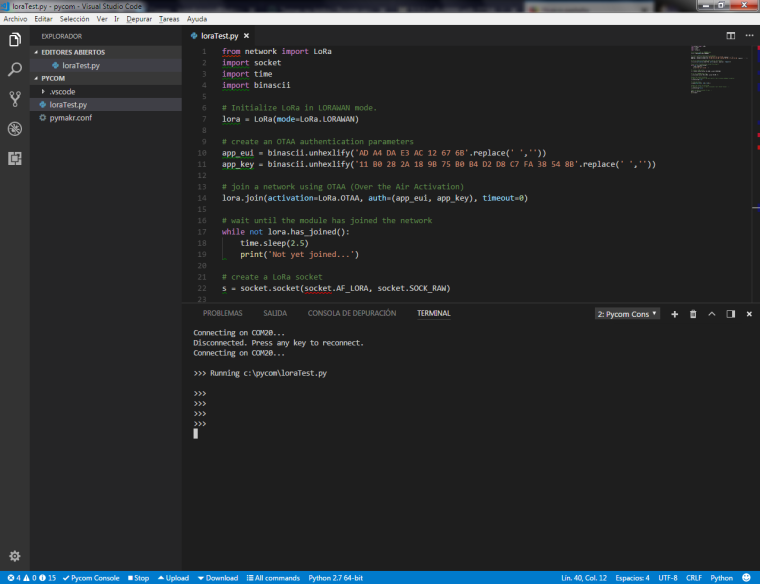
Also I've noticed that my board resets if I paste a considerable chunk of code into the terminal. I don't know if this behaviour is normal.
Maybe resetting the device to factory options would help?
-
A little update:
I've downgraded the LoPy firmware to the versions specified in https://forum.pycom.io/topic/517/downgrading-firmware-advanced-users
(1.7.9.b3 to 1.9.2.b2), and then tried the sample code (with comments and extra lines deleted) in both Atom and VS Code.
In one instance I was successfull to join the gateway, but couldn't replicate this situation. The boards still resets when I type lora.join().I don't know what else to do at the moment. If I have any news I'll communicate them.
-
@lsoria It might be that your module is drawing more current when activating the LoRa radio than your USB port is able to provide. You could try a different USB cable and/or a different USB port or possibly a USB hub with external power supply.
You could also try as a test to deactivate the WiFi radio before using LoRa with:
from network import WLAN
wlan = WLAN()
wlan.deinit()
This would at least point us in the right direction.
Christian Ehlers
-
Hi @xykon, thanks for your reply.
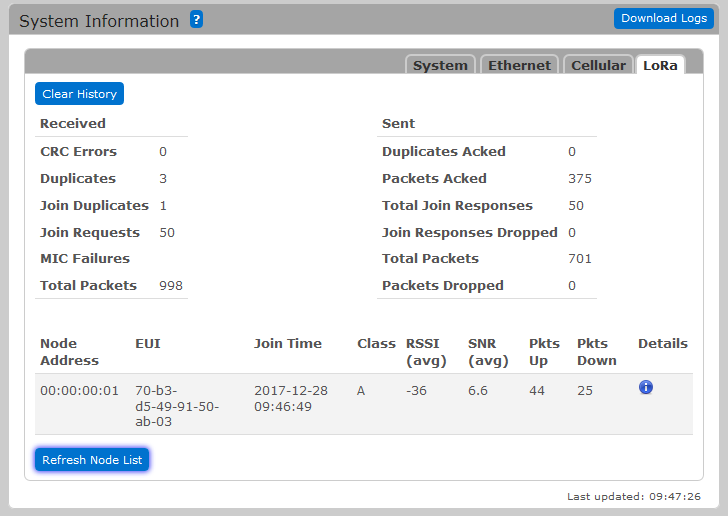
Indeed, my USB cable was the problem! I have changed it for a newer one and the scripts runs without problem. Now my LoPy can join the gateway network. Here is the gateway log:
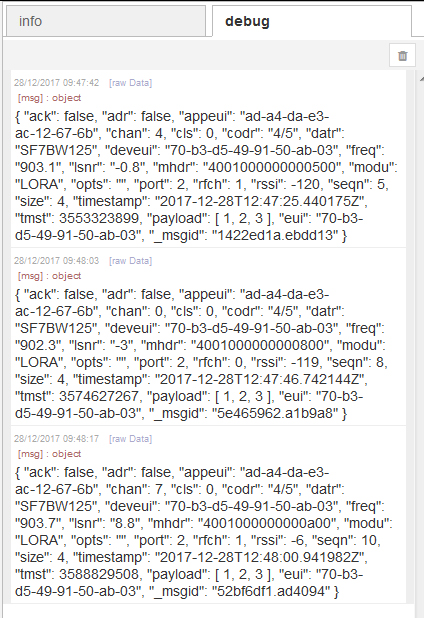
And the debug output in a simple node-Red application showing the byte array sended by the LoPy:
The strange thing I notice is the time it takes the module to join the gateway. I've run ten instances of the script and registered the number of "attemps" until the module joins.
- First Run: 80 attempts (200 seconds)
- Second Run: 15 attempts (37.5 seconds)
- Third Run: 3 attempts (7.5 seconds)
- Fourth Run: 51 attempts (127.5 seconds)
- Fifth Run: 44 attempts (110 seconds)
- Sixth Run: 21 attempts (52.5 seconds)
- Seventh Run: 15 attempts (37.5 seconds)
- Eighth Run: 38 attepts (98 seconds)
- Ninth Run: 3 attempts (7.5 seconds)
- Tenth Run: 99 attempts (247.5 seconds)
This (really poor) experiment leads to a mean time of 92.55 seconds to join, with 81.13 seconds of standard deviation.
I still have to read the LoRa API documentation, but is there any way of improving this join time? Just in case, both LoPy and gateway are in my desk, so distance is not the problem here.
Thank you again!
-
@lsoria I do not own a Multitech Conduit gateway. However, could it be that your gateway is listening on only one of the eight available subbands, whereas your LoPy tries to connect on one of the subbands at random?
-
Glad you found the problem with the crashes! Some USB cables are really poor quality these days, hard to tell.
You must also select which sub-band you want to use: the LoPy follows the standard which is to send on 64 channels but due to hardware limitations almost all US915 gateways only listen on 8 of those.
Add the following code:
def select_subband(lora, subband):
    if (type(subband) is int):
        if ((subband<1) or (subband>8)):
            raise ValueError("subband out of range (1-8)")
    else:
        raise TypeError("subband must be 1-8")

    for channel in range(0, 72):
        lora.remove_channel(channel)

    for channel in range((subband-1)*8, ((subband-1)*8)+8):
        lora.add_channel(channel, frequency=902300000+channel*200000, dr_min=0, dr_max=3)
and do
select_subband(lora, 1)(1 here is to match what you set on the Multitech) before the LoRa.join.Check this original thread for more info: https://forum.pycom.io/post/2930
This way the LoPy will only send on the 8 channels the Multitech expects and should make joins much quicker
-
@xykon Excellent suggestion! This is worth mentioning in the documentation.
I also learnt the hard way that there is a plenitude of USB cables on sale that are not shielded and/or have an extremely thin wire gauge. USB cables with real ferrite cores are even harder to come by these days.
To be sure not to buy a cat in a bag, it is wise to buy only those shielded USB cables with a transparent plastic sheath.
-
Hi again @jmarcelino, thank you for your suggestion! I've added the code as you said and now only takes 3 attempts to join the network.
I think I don't have any others issues at the moment. My next step is try to configure the LoPy as a LoRaWAN gateway, but that's another thing unrelated with this discussion... Should I add the title of this thread the word [SOLVED]?
-
Excellent @lsoria , so happy you got it working! I'll gladly add the [SOLVED] if you're satisfied :)
By the way - just a bit of LoRa trivia - the code really just sends one join attempt, you see the "Not yet joined..." message several times because OTAA joins by the LoRaWAN standard take at least 5 seconds from sending the join request to receiving a join accept reply (+ a bit extra extra processing time), this is called JOIN_ACCEPT_DELAY1 and JOIN_ACCEPT_DELAY2 in the spec.
But this is really not that important so feel free to ignore it :-)

Hello! It looks like you're interested in this conversation, but you don't have an account yet.
Getting fed up of having to scroll through the same posts each visit? When you register for an account, you'll always come back to exactly where you were before, and choose to be notified of new replies (either via email, or push notification). You'll also be able to save bookmarks and upvote posts to show your appreciation to other community members.
With your input, this post could be even better 💗
Register Login