Pytrack shows up with alternative USB ID so dfu-util fails
-
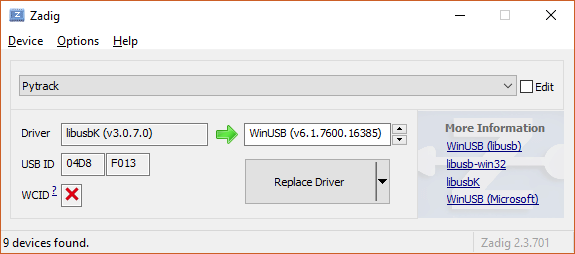
Note that USB ID shows as 04D8:F013 and the firmware image update is for 04D8:F014So, even if I supply the detected USB ID, dfu-util fails
dfu-util-static.exe -device 04D8:F013 -D pytrack_0.0.8.dfu
dfu-util 0.9Match product ID from file: f014
No DFU capable USB device availableWindows 10 Pro, build 1709 on a Toshiba Portege laptop...
-
If it's says F013 it's not in DFU mode. Make sure you are pressing the button on the Pytrak as you plug into USB. Then you only have 6 seconds while the board is in DFU mode.
-
@jmarcelino - thanks for the quick reply. Using Zadig, I have managed to see the Pytrack as an unknown device with USB ID 04D8:F014. However, when I follow the inistructions and press button, connect USB, wait 1 second, release button wait one second, run dfu-util, I see this:
dfu-util-0.9-win64>dfu-util-static.exe -D pytrack_0.0.8.dfu
dfu-util 0.9Copyright 2005-2009 Weston Schmidt, Harald Welte and OpenMoko Inc.
Copyright 2010-2016 Tormod Volden and Stefan Schmidt
This program is Free Software and has ABSOLUTELY NO WARRANTY
Please report bugs to http://sourceforge.net/p/dfu-util/tickets/Match vendor ID from file: 04d8
Match product ID from file: f014
Cannot open DFU device 04d8:f014
No DFU capable USB device availableIf I wait until I hear the USB disconnect as the Pytrack leaves dfu mode then I see
dfu-util-0.9-win64>dfu-util-static.exe -D pytrack_0.0.8.dfu
dfu-util 0.9Copyright 2005-2009 Weston Schmidt, Harald Welte and OpenMoko Inc.
Copyright 2010-2016 Tormod Volden and Stefan Schmidt
This program is Free Software and has ABSOLUTELY NO WARRANTY
Please report bugs to http://sourceforge.net/p/dfu-util/tickets/Match vendor ID from file: 04d8
Match product ID from file: f014
No DFU capable USB device availableSo, what might be causing dfu-util to report "...Cannot open DFU device 04d8:f014..."? - thanks!
-
@nicbkw
You need to use Zadig to set the 04D8:F014 device as libusbK driver, if it's unknown it won't work. You need to follow the steps from https://docs.pycom.io/chapter/pytrackpysense/installation/firmware.htmAlternatively an easier solution might be to install the Pytrack DFU Windows driver I made a while ago for the PyTrack: http://metavurt.net/software/drivers/PyTrack_DFU.zip
Most people have had success with this.
Once the driver issue is solved dfu-util should work.
-
I could not get this to work on Windows whatever I tried. Switched to Mac and dfu-util worked first time...
Thanks - for anyone else reading this trail, forget Windows, try Mac :-)
Hello! It looks like you're interested in this conversation, but you don't have an account yet.
Getting fed up of having to scroll through the same posts each visit? When you register for an account, you'll always come back to exactly where you were before, and choose to be notified of new replies (either via email, or push notification). You'll also be able to save bookmarks and upvote posts to show your appreciation to other community members.
With your input, this post could be even better 💗
Register Login