Welcome to the Pycom forum Forum
    • \[\[global:header.categories\]\]
    • \[\[global:header.recent\]\]
    • \[\[global:header.tags\]\]
    • \[\[global:header.popular\]\]
    • Login

    Explore Pybytes | Official Documentation | Report a Firmware Bug/Issue | GitHub

    lopy to raspberry pi 3 serial connection

    Scheduled Pinned Locked Moved LoPy
    raspberry pilopyserialurgent
    28 Posts 7 Posters 8.2k Views 7 Watching
    Loading More Posts
    • Oldest to Newest
    • Newest to Oldest
    • Most Votes
    Reply
    • Reply as topic
    Log in to reply
    This topic has been deleted. Only users with topic management privileges can see it.
    • L Offline
      livius @thomand1000
      last edited by livius

      @thomand1000
      Yes, in code it is but did you connected cables to P3/P4?
      Sometimes simplest thing is right.
      If all is connected right (GND have priority)
      then try @robert-hh advice and look if you got something on PC from and also to lopy

      Also try code without LORA between RPi and Lopy

      think about people first, then computers

      1 Reply Last reply Reply Quote 0
      • robert-hhR Offline
        robert-hh @thomand1000
        last edited by

        @thomand1000 remove the lopy, so you just use the USB/Serial adapter of the expansion board.

        1 Reply Last reply Reply Quote 0
        • Z Offline
          zappfinger @thomand1000
          last edited by

          @thomand1000 Another approach is to not use the GPIO at all. Just connect the Pi3 and LoPy via USB. That way the LoPy also gets it's power form the Pi, while you can use serial comms over the USB. Works very well with <-Pi->Arduino. I see no reason why it should not work with the LoPy. Another advantage is that you do not expose the vulnerable GPIO pins...

          robert-hhR 1 Reply Last reply Reply Quote 0
          • robert-hhR Offline
            robert-hh @zappfinger
            last edited by

            @zappfinger That#s what @thomand1000 tried first. And it still could be used. The only thing that does not work is UART methods. Instead you have to use input() and print(), or sys.stdin.readxxx() and sys.stdout.writexxx(). Both input() and sys.stdin.readxxx() calls however are blocking, and there is no safe way to tell whether data is waiting.

            1 Reply Last reply Reply Quote 0
            • C Offline
              crumble @thomand1000
              last edited by

              @thomand1000 I struggle right now with the Pi3 and a PC via serial. The Bluetooth of the Pi3 interferes with the UART. You have to disable the bluetooth on the Pi3 to get predictable results. Sadly I can't help you, 'cause it is not running at the moment so I may have to do the frequency settings of the GPU as well. Simply google for pi3 serial and bluetooth.

              Please tell us the settings which works on your machine ;)

              C 1 Reply Last reply Reply Quote 0
              • C Offline
                crumble @crumble
                last edited by

                @crumble said in lopy to raspberry pi 3 serial connection:

                Please tell us the settings which works on your machine ;)

                It's running now. I had to do the following settings on the Pi3:
                in /boot/config.txt

                enable_uart=1
                dtoverlay=pi3-miniuart-bt
                

                I don't know if it necessary but i called as well

                sudo systemctl disable hciuart
                

                After these changes and reboot I had a stable serial device without noise on
                /dev/ttyAMA0

                Without these settings I got a lot of noise on /dev/ttyS0. Noise was gone after I had send a few lines from the Pi3.

                T 1 Reply Last reply Reply Quote 0
                • T Offline
                  thomand1000 @crumble
                  last edited by thomand1000

                  @crumble Thank you very much. And all you other guys also. That did the trick. I'm trying to send the string b'send', but b'dsen' is received at the lopy. But this is probably an easy fix right?

                  And b'sending this string' gets received as b'tringsending this s'

                  Has this something to do with uarts readall or readline methods?

                  Z 1 Reply Last reply Reply Quote 0
                  • Z Offline
                    zappfinger @thomand1000
                    last edited by

                    @thomand1000 That does not look good. Can you share your code on both sides?

                    T 1 Reply Last reply Reply Quote 0
                    • T Offline
                      thomand1000 @zappfinger
                      last edited by

                      @zappfinger

                      lopy code:

                      from machine import UART
                      import pycom, time
                      
                      pycom.heartbeat(False) # turn off heartbeat
                      
                      uart1 = UART(1, 115200, bits=8, parity=None, stop=1)
                      uart1.init(baudrate=115200, bits=8, parity=None, stop=1)
                      
                      while True:
                          uart1.write('test')
                          if uart1.any():
                              data = uart1.readall()
                              pycom.rgbled(0xFF0000) # set LED to RED on if data received
                              if data == b'send':
                                  uart1.write("SendToPi")
                                  pycom.rgbled(0x00FF00) # set LED to GREEN if data is b'send'
                              time.sleep(1)
                              pycom.rgbled(0x000000)
                          time.sleep(0.25)
                      

                      RPi code:

                      import serial
                      
                      with serial.Serial('/dev/serial0', 115200, timeout=10) as ser:
                          ser.write(b'send')
                          print(ser.read(4)) #prints b'test'. So link from lopy seems ok. 
                      
                      print("Data Sent")
                      

                      Now the messages from the lopy to the Rpi go through, but not the other way. It doesn't look like uart1.any() returns True at any point.

                      Any suggestions or help would be awesome!

                      Thanks :)

                      robert-hhR Z 2 Replies Last reply Reply Quote 0
                      • robert-hhR Offline
                        robert-hh @thomand1000
                        last edited by robert-hh

                        @thomand1000 It seems that in both code samples you first send something, and then wait for a response. I would have expected that you interlock that, so whwn you send something form one side, you would wait for data on the other side.
                        The fact that you see somthing on the rpi side might be caused by buffering in the serial driver for any data that might arrive, even when no instance is waiting for it.

                        T 1 Reply Last reply Reply Quote 0
                        • Z Offline
                          zappfinger @thomand1000
                          last edited by

                          @thomand1000 Yes, like Robert said, you should be reading on one machine and writing on the other initially. Also, for clarity, specify bits, parity and stop also on the RPi side..

                          1 Reply Last reply Reply Quote 0
                          • T Offline
                            thomand1000 @robert-hh
                            last edited by

                            @robert-hh Thank you very much! It didn't work right away, but I decided to try to eliminate faulty cables etc. So I made one script for each direction and tested them individually. I now have communication both ways, so then I just need to get the logic for when to read and write right and I'm good. For anyone struggling with this in the future the following worked for me (the initialization of both sides are like before):

                            Lopy->Rpi

                            code on the lopy:

                            uart1.write('some string')
                            

                            code on the Rpi:

                            print(ser.read(ser.in_waiting))
                            

                            Rpi -> lopy

                            code on the Rpi:

                            ser.write('some string')
                            

                            code on the lopy:

                            print(uart1.read())
                            

                            Thanks for everyone helping me! :)

                            H 1 Reply Last reply Reply Quote 0
                            • H Offline
                              hsn548 @thomand1000
                              last edited by

                              @thomand1000 Hi Thomas, Can you please share your working code? as i am also having the same problem... I shall be really thankful.. :D

                              T 1 Reply Last reply Reply Quote 0
                              • T Offline
                                thomand1000 @hsn548
                                last edited by

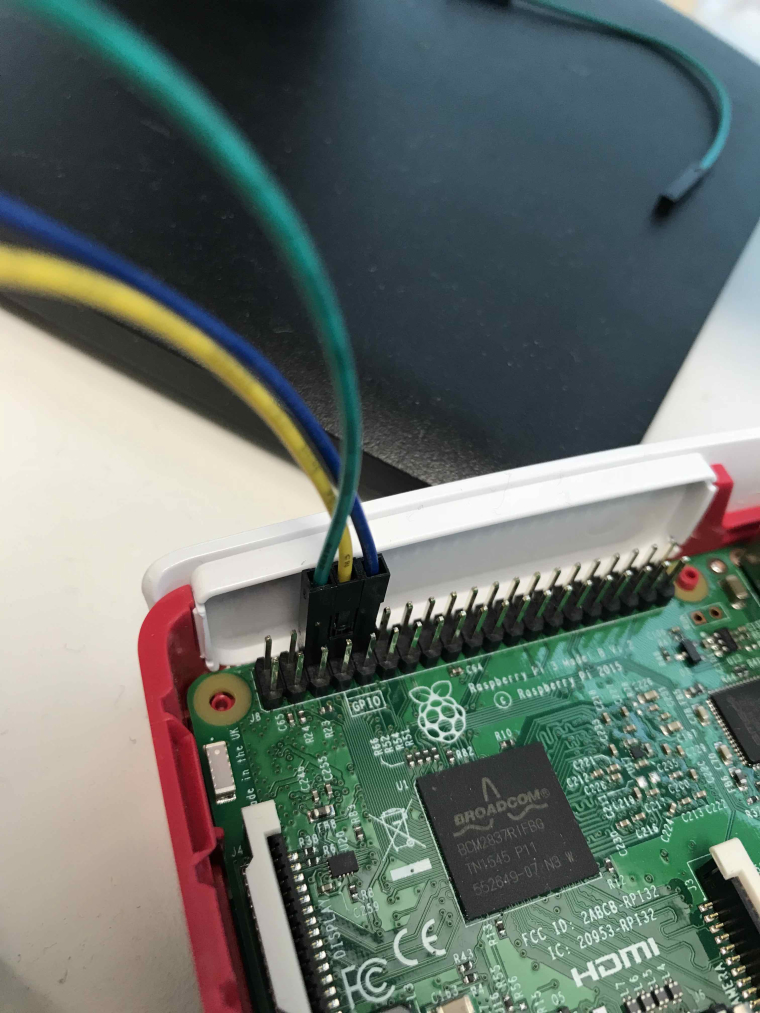
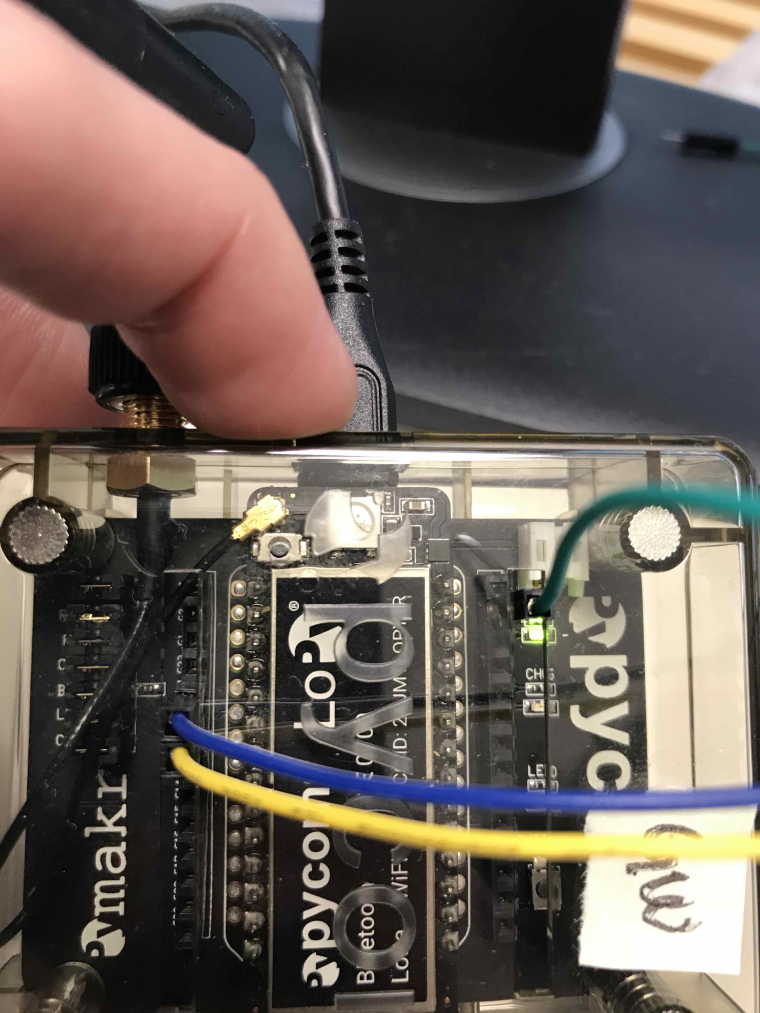
                                @hsn548 Here is the code I used to get it working. Be sure to place the jumper cables in the right place. I had the cables in the wrong place at first. 1_1519046569556_IMG_3501.jpg 0_1519046569555_IMG_3500.jpg
                                The following code works for me (i made a class for all the code on the RPI. Just import it and make a new PiGateway() and call its methods).

                                RPi code:

                                #run script as super user (e.g. $ sudo python3 sendlora.py)
                                import serial, time

                                class PiGateway:
                                
                                    def __init__(self):
                                        self.ser = serial.Serial('/dev/serial0', 115200, timeout=10)
                                
                                    def readFile(self, filename):
                                        f = open(filename,'r')
                                        content = f.read()
                                        f.close()
                                        return content
                                
                                    def sendToLopy(self, device_id, data):
                                        n = 254
                                        id = "id=" + str(device_id)
                                        sendingDone = "sending done"
                                        #split data into 255 byte chunks for sending
                                        splitData = [data[i:i+n] for i in range(0, len(data), n)]
                                        #send device_id first. Wait one second between each packet to prevent collisions.
                                        self.ser.write(bytes(id, 'utf-8'))
                                        time.sleep(1)
                                        for dataChunk in splitData:
                                            #send each chunjk of data
                                            self.ser.write(bytes(dataChunk,'utf-8'))
                                            time.sleep(1)
                                        #send a string notifying that the transmission is done
                                        self.ser.write(bytes(sendingDone, 'utf-8'))   
                                
                                    def getFromLopy(self):
                                        while True:
                                            if (self.ser.in_waiting > 0):
                                                received = self.ser.read(self.ser.in_waiting).decode('utf-8')
                                                return received
                                            time.sleep(1)
                                

                                on the Lopy the code was the following:

                                import machine, time, pycom
                                pycom.heartbeat(False)
                                pycom.rgbled(0x000000)
                                uart1 = UART(1, 115300, bits=8, parity=None, stop=1)
                                uart1.init(baudrate=115200, bits=8, parity=None, stop=1)
                                
                                while True:
                                    if uart1.any():
                                        receiving = uart1.read().decode('utf-8')
                                        #Do something with what you receive here
                                        #I used exec(receiving) -> entire code sent from Rpi to be executed on Lopy. It works
                                        time.sleep(5)
                                        #remember to break here sometime
                                    time.sleep(1)
                                

                                Good luck

                                1 Reply Last reply Reply Quote 0
                                • T Offline
                                  testos
                                  last edited by testos

                                  Hello,

                                  Sorry to ask, I'm novice in that field, coding is not an issue, but the electronic part is still a bit tricky for me....

                                  Is it required to have the expansion board to connect the lopy to the rpi ?

                                  In my case I have a pytrack + fipy and I was wondering if I can also send the gps and accelerometer data to a rapsberry Zero in a similar way ?

                                  Looking at the rpi-zero io pins I can see that there are RX/TX and GND pins : http://raspberry-projects.com/pi/pi-hardware/raspberry-pi-zero/rpi-zero-io-pins

                                  Similar as the fipy : https://docs.pycom.io/datasheets/development/fipy.html ( RX1 / TX1 / GND ), can I use those ?

                                  Thanks by advance.

                                  robert-hhR 1 Reply Last reply Reply Quote 0
                                  • robert-hhR Offline
                                    robert-hh @testos
                                    last edited by

                                    @testos If you look at the code and pictures below by @thomand1000, it is actually using UART1 with TX1, RX1 and GND connected to the rPi.

                                    T 1 Reply Last reply Reply Quote 0
                                    • T Offline
                                      testos @robert-hh
                                      last edited by

                                      @robert-hh THanks for your quick answerr, yes I agree, but on the first picture, it's not the expansion board that he use ?

                                      Br, Testos

                                      robert-hhR 1 Reply Last reply Reply Quote 0
                                      • robert-hhR Offline
                                        robert-hh @testos
                                        last edited by

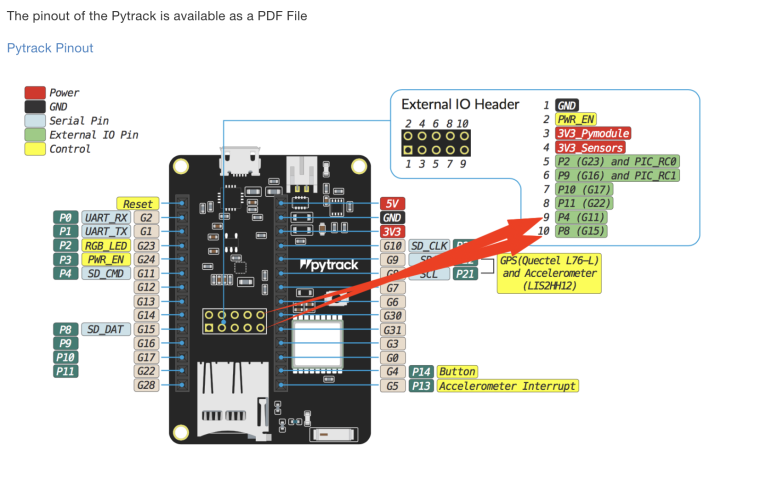
                                        @testos Yes, that's right. The picture shown an expansion board. On the pytrack, P3 and P4 are not that easily accessible. The connector below the Lopy has P4, P8, P10 and P11 available. So you have to re-assign the UART pin when you init the UART with the pins parameter, like:

                                        from machine import UART
                                        uart1 = UART(1, 115200, pins=("P8", "P4")) # P8=Tx, P4=Rx
                                        
                                        T 1 Reply Last reply Reply Quote 0
                                        • T Offline
                                          testos @robert-hh
                                          last edited by

                                          @robert-hh Thanks for the guidance, I will give a try during my holiday next week.

                                          Just for clarification, the P3/P4 that you talk about are from the fipy ? and by doing the following ...

                                          from machine import UART
                                          uart1 = UART(1, 115200, pins=("P8", "P4")) # P8=Tx, P4=Rx
                                          

                                          ... it will re-assign them on the pytrack on the 2 pin P4/P8 on the External IO Header shown on the picture ?
                                          0_1546105950113_a1d4ef34-34e0-404c-8aab-7af1927ba2e1-image.png

                                          Thanks again for your time.

                                          C 1 Reply Last reply Reply Quote 0
                                          • C Offline
                                            crumble @testos
                                            last edited by

                                            Please note that P8 (G15) is used by the SD-Card interface. So you can't use them at the same time.

                                            robert-hhR T 2 Replies Last reply Reply Quote 0

                                            Hello! It looks like you're interested in this conversation, but you don't have an account yet.

                                            Getting fed up of having to scroll through the same posts each visit? When you register for an account, you'll always come back to exactly where you were before, and choose to be notified of new replies (either via email, or push notification). You'll also be able to save bookmarks and upvote posts to show your appreciation to other community members.

                                            With your input, this post could be even better 💗

                                            Register Login
                                            • 1
                                            • 2
                                            • 2 / 2
                                            • First post
                                              Last post

                                            Pycom on Twitter

                                            Pycom