Class-C sample
-
Dear all,
we've got our RG1xx Gateway up and running - pretty awesome and easy experience
We can already do the basic Class-A communication where the node creates an uplink msg to received a possible downlink msg.
For our use case we want to be in "always listen mode", and I guess this is Class-C. Therefore I changed the example source accordingly to Class-C initialization:lora = LoRa(mode=LoRa.LORAWAN, public=True, tx_retries=3, device_class=LoRa.CLASS_C) s = socket.socket(socket.AF_LORA, socket.SOCK_RAW) s.setsockopt(socket.SOL_LORA, socket.SO_DR, 5) s.setsockopt(socket.SOL_LORA, socket.SO_CONFIRMED, False) s.setblocking(False)But... how do I proceed with receiving the messages? Eg for receiving only one test byte my infinite loop simply looks like this:
while True:
    rx, port = s.recvfrom(1)
But nothing is received
Is there any sample for the Class-C mode?
-
Hi @derchris
You still need to join the network with lora.join(activation=... , auth=(...)) as you do in Class A even for Class C.
Perhaps that's the problem?
If not please tell me more about your setup, which network server are you using etc.
Thanks.
-
@jmarcelino yes, that was the problem :) thx
-
Hello all,
Forget it, it's working fine here. Received downlink data in 869,525 and with any DR. Bad server configuration was the problem.
I have the same problem here. I'm running locally a Lorawan Server and i can send up or downlink messages in Class-A mode without any problem. When trying to use Class-C i never receive nothing. I know that the server send the message, because i use a SDR to confirm it.
My test code is:#Class C test code lora = LoRa(mode=LoRa.LORAWAN, region=LoRa.EU868, public=True, device_class=LoRa.CLASS_C) lora_channel_init() lora.join(activation=LoRa.OTAA, auth=(app_eui, app_key), timeout=config.JOIN_TIMEOUT, dr=config.JOIN_DR) print('Not joined yet...') while not lora.has_joined(): blink(red, 0.5, 1) print(' --- Joined Sucessfully --- ') s = socket.socket(socket.AF_LORA, socket.SOCK_RAW) s.setsockopt(socket.SOL_LORA, socket.SO_DR, config.LORA_NODE_DR) s.setsockopt(socket.SOL_LORA, socket.SO_CONFIRMED, config.LORA_NODE_CONFIRMED) s.setblocking(False) while True: rx, port = s.recvfrom(12) if rx: print('Received: {}, on port: {}'.format(rx, port)) #blink(yellow, 0.1, 2)The code configure three channels in 868,1 and then join the network. When inside the loop, it never receive nothing.
Channel 0 in frequency 868100000
Channel 1 in frequency 868100000
Channel 2 in frequency 868100000
Not joined yet...
  ---  Joined Sucessfully  ---
If i change the code and insert a send inside the loop, when trying to downlink a message to Lopy, it receives it inside the RX1 window normally but never outside of it.
pkt_send = 0
while True:
    s.setblocking(True)
    s.send(bytes([0x00,0x01]))
    s.setblocking(False)
    rx, port = s.recvfrom(12)
    if rx:
        print('Received: {}, on port: {}'.format(rx, port))
        #blink(yellow, 0.1, 2)
    time.sleep(5)
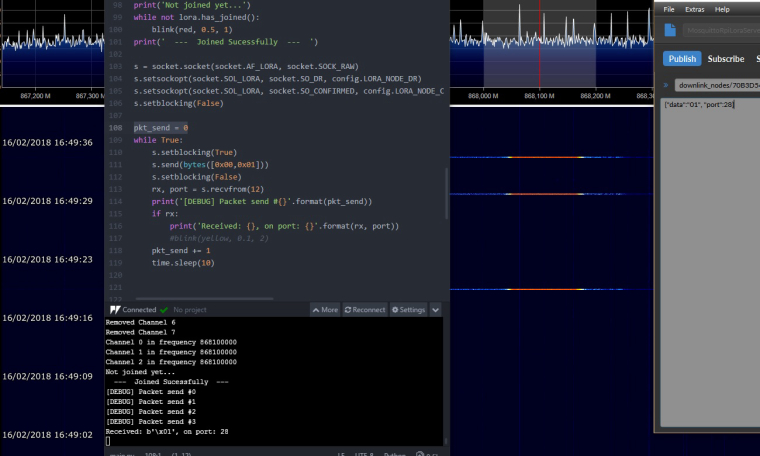
Next image shows a downlink message sended in normal class A style, using RX1 windows.
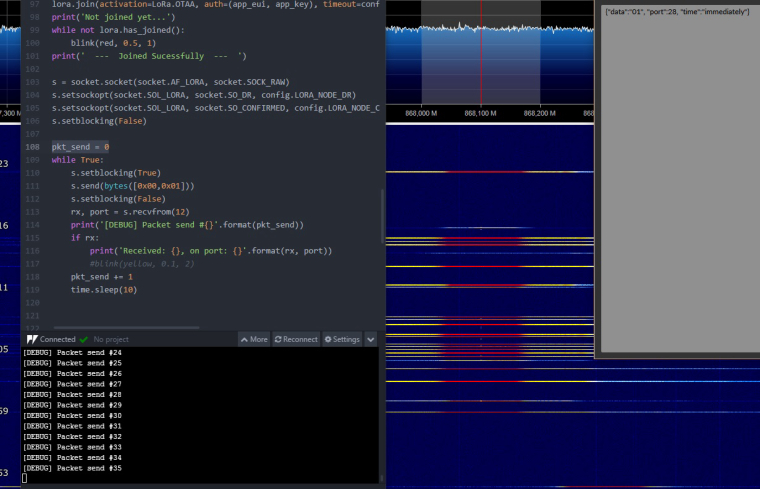
Here i tried to send multiple downlinks outside RX window time but Lopy never received none.
Any idea how to solve it or what could be wrong? Did Lopy use the default LoraWAN RX2 frequency and DR??
-
Hi guys
have you got an example of class C device working?
I've done several tests and got only downlink when I send an uplink.Is class C is working (I got last firmware at this day)
Thanks -
Hi @charly86
It should be. What's your network server? Is it sending the downlink on RX2 correctly, do you know which frequency/sf it is using?
-
@jmarcelino
Thanks, I'm using this one https://github.com/gotthardp/lorawan-server with this configuration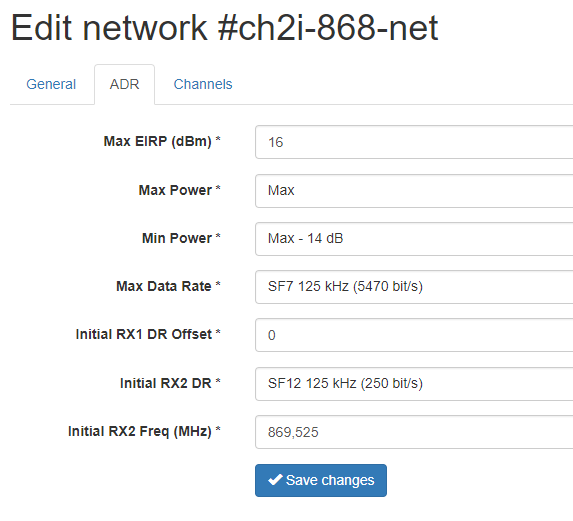
-
@charly86
Thanks, for the Gotthard server how are you triggering the Class C downlink? Are you specifying the correct port and time? -
@jmarcelino I'm using websocket for that, and with json, for class A I'm sending this and got downlink just after uplink (it works also with class C)
24/05/2018 16:16:11 Downlink: {"devaddr":"03128BC8","data":"0100"}but for class C, when I send this nothing happens, even sending uplink just after to try to get downlink
24/05/2018 16:15:32 Downlink: {"devaddr":"03128BC8","data":"0100","time":"immediately"}Anyway I'll try A timed one, may be I'm not doing things correctly
-
@charly86 You'll need to specify also a port number for class C to work:
{"devaddr":"03128BC8","data":"0100", "port":2, "time":"immediately"} -
yeah I tried @jmarcelino port option while you were writing @Neuromystix , setting port and works ;-)
24/05/2018 16:59:16 Downlink: {"devaddr":"03128BC8","data":"0164","port":2, "time":"immediately"}Lopy Side
Downlink received
Cmd=0x01
Value=100% Dac1=0.8
thanks all :-)
-
Can any of those who have now successfully got class C downlinks working please share some example code? I've been at this all week and like many others here: I can get downlinks in class A or C in the RX window after sending but never outside of it.
I'm also interested in some comments on how best to handle downlink messages, I can see some info on defining event driven callbacks but the docs don't make it clear whether this is supposed to be used for both LoRa and LoRaWAN. Otherwise I guess you'd just stop the socket from blocking and try to receive on that socket as part of a main loop, this seems a little messy but I'd just be happy to have it working.
-
What about class B devices? Is it necessary to make some code for Lopy (end node)?
Thank you. -
Class B is currently not supported in the pycom firmware for the Lopy.
You might be able to write some addition to the firmware to build it yourself, though I suspect it will be some work
Hello! It looks like you're interested in this conversation, but you don't have an account yet.
Getting fed up of having to scroll through the same posts each visit? When you register for an account, you'll always come back to exactly where you were before, and choose to be notified of new replies (either via email, or push notification). You'll also be able to save bookmarks and upvote posts to show your appreciation to other community members.
With your input, this post could be even better 💗
Register Login