Can not upload file to lopy
-
Hi,
From the screenshot you posted I cannot see a
>>>prompt which would normally show up for the REPL. Can you confirm that you are you able to access the serial REPL via pymakr? -
@seb Hello, thank for your reply. I am new and I do not know some term :o). What do you meen about Serial REPL? It true, I am using Lopy since this week-end. I could upload the file, but I do not remember seeing the >>> excpeted after pressing "Get Serial Ports" from Pymakr from Atom. But I do not rember seeing the >>> after pressing "connect" or " reconnect". I also can be connect to my devise but does it really connected as the >>> is not printed? Did I answer to your question? Thank
-
Hi,
The serial REPL (read-evaluate-print loop) is the interactive python mode available over the serial port. This allows you to type lines of python code in and when you press enter they run without having to upload any times. It is very useful for testing.
Firstly, I can see you are using a Pysense/Pytrack board to connect the lopy to your computer. These boards have their own firmware (not to be confused with the lopy firmware) which needs updating. Instructions on how to do this are available here: https://docs.pycom.io/chapter/pytrackpysense/installation/firmware.html
Secondly, have you updated the firmware on your lopy since receiving it? If not then please follow the instructions here: https://docs.pycom.io/chapter/gettingstarted/installation/firmwaretool.html
After this you should set the path to your serial port in the pymakr configuration (which it looks like you already have), then when you click connect you should see something like this:

You can then type into this prompt to run code, for example:
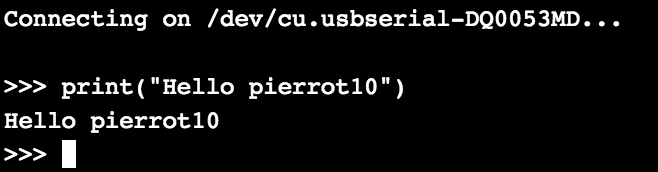
If you cannot get access to this serial terminal and type into it, it means there is an issue connecting to the serial port. If you can then the issue lies elsewhere. -
@seb Dar Seb, Thank for your reply. I di upgrade my fireware (link text). However, I have not performed this step: link text. While I investigate on my issue, I found this information, but I was not sure about how to do it. May be, because, I have not dot, it cause un instability. I never used brew and mac port, from my mac and I supposed I should install it Macport
Correct me if I am wrong.
- list itemmy Lopy4 in my Pysense (sorry, I ahve a Lopy4, and not a lopy)
- Connect my USB cable from my pysense to my mac and make sure, I select the right port
- Open a terminal windows
- run the command : port install libusb dfu-util
- Download Pysense DFU
- Remove the USB cable,
- hold nad keep held the pysense button
- plug the USB cable and keep the button hold for 1 sec before releasing it
- Run the command : dfu-util -D pytrack_0.0.8.dfu within 7 second
Does my step are correct or did I miss something?
Thank for your help!!!
-
Make sure your LoPy4 is not inserted into the Pysense while you try to update the Pysense firmware. Otherwise, your steps seem correct (I have not used macports before, I use homebrew). It may take a few attempts for the update to succeed. If
dfu-utilgives you an error, try again a few more times. -
@pierrot10 If you have already uploaded a script which includes a never-ending loop, the REPL is not waiting for input (and the pymakr extension requires REPL to do so).
Try typing Ctrl-C to break the loop, you should get a
>>>prompt. You should then be able to upload your script. -
-
You can use either macports or homebrew they should both achieve the same results. I cannot comment on if one is better than the other.
-
@seb Unfortunately, none of this works. I first tried with ctrl+c (Mac) and I could not see the >>>. I also installed dfu-util without error and then I installed oysense_0.8.8.dfu wihtout error as well
dfu-util -D pysense_0.0.8.dfu
dfu-util 0.9Copyright 2005-2009 Weston Schmidt, Harald Welte and OpenMoko Inc.
Copyright 2010-2016 Tormod Volden and Stefan Schmidt
This program is Free Software and has ABSOLUTELY NO WARRANTY
Please report bugs to http://sourceforge.net/p/dfu-util/tickets/Match vendor ID from file: 04d8
Match product ID from file: f011
Deducing device DFU version from functional descriptor length
Opening DFU capable USB device...
ID 04d8:f011
Run-time device DFU version 0100
Claiming USB DFU Runtime Interface...
Determining device status: state = dfuIDLE, status = 0
dfu-util: WARNING: Runtime device already in DFU state ?!?
Claiming USB DFU Interface...
Setting Alternate Setting #0 ...
Determining device status: state = dfuIDLE, status = 0
dfuIDLE, continuing
DFU mode device DFU version 0100
Device returned transfer size 64
Copying data from PC to DFU device
Download [=========================] 100% 16384 bytes
Download done.
state(2) = dfuIDLE, status(0) = No error condition is present
Done!Now I tred to upload my file, and it did not completed as it state in my first picture :o(
-
@seb What it look strange, when I press the bottum "run", I got the >>> but I can not type a text after the >>> and ctrl+c do not do anything. As I have a fresh install of Atom and Pymakr, did I have to install an additional package? Is possible to format my poly4 as it would just delivered?
-
@seb Hello, I finally solve my problem. I edit the global and project setting and for both I changed to
"ctrl_c_on_connect": trueNow I can upload. Thnak a lot
-
Hi,
Its odd that this fixed it but pressing ctrl + c yourself did not. I will mention this to the pymakr team. -
@seb Same reaction here...
I think however there are cases when Ctrl-C will not interrupt the currently running code right away, but have an effect only once the current call is finished or something, maybe that's related? We don't quite know what code was running...
Or maybe... @pierrot10, had you actually deleted the console in Atom (clicked on the bottom part of the window) before hitting Ctrl-C?


Hello! It looks like you're interested in this conversation, but you don't have an account yet.
Getting fed up of having to scroll through the same posts each visit? When you register for an account, you'll always come back to exactly where you were before, and choose to be notified of new replies (either via email, or push notification). You'll also be able to save bookmarks and upvote posts to show your appreciation to other community members.
With your input, this post could be even better 💗
Register Login